THORMANG3 ROS Packages
MPC Packages

CAUTION : There are two versions of thormang3 manager depending on the version of THORMANG3.
- DXL PRO version : thormang3_manager in ROBOTIS-THORMANG-MPC
- DXL PRO+ version : thormang3_p_manager in ROBOTIS-THORMANG-P-MPC
NOTE: DYNAMIXEL PRO+ is renamed as DYNAMIXEL-P.
-
Revised Date: Jan 2th, 2020.
-
Revised Model Name: See the following table.
Previous New H54P-200-S500-R PH54-200-S500-R H54P-100-S500-R PH54-100-S500-R H42P-020-S300-R PH42-020-S300-R M54P-060-S250-R PM54-060-S250-R M54P-040-S250-R PM54-040-S250-R M42P-010-S260-R PM42-010-S260-R
thormang3_manager
thormang3_manager is a package to apply ROBOTIS Framework to THORMANG3. Refer to the below link to create a new robot manager.
Download & Build
Reference : MPC Installation
Run
Execute the program with a .launch file in order to load ROS parameters. The command should be executed from the root account to configure the attribute of Thread.
$ sudo bash
[sudo] password for robotis:
# roslaunch thormang3_manager thormang3_manager.launch
ROS API
-
Launch Parameters
- gazebo (bool, default: false) : Configure whether to the program run in gazebo mode.
- gazebo_robot_name (string, default: "") : Configure the robot name for joint_state topic name when running in gazebo mode.
ex) If thormang3 is the gazebo_robot_name, /thormang3/joint_states will be subscribed. - offset_file_path (string, default: "") : This path indicates the location of the file that contains offset data of each joint and initial posture data for offset adjustment.
- robot_file_path (string, default: "") : This path indicates the location of .robot file that contains robot data.
- init_file_path (string, default: "") : This path indicates the location of the file that contains initialization information of each joint.
- ft_data_path (string, default: "") : This path indicates the location of the file that contains calibration matrix and unloaded voltage information of the FT sensor.
- ft_calibration_data_path (string, default: "") : This path indicates the location of the file that contains the reference value for FT sensor calibration.
thormang3_p_manager
thormang3_p_manager is a package to apply ROBOTIS Framework to THORMANG3(DXL Pro+ Ver). Refer to the below link to create a new robot manager. It's almost same with thormang3_manager. The difference is the actuator-related settings.
Download & Build
Reference : MPC Installation
Run
Execute the program with a .launch file in order to load ROS parameters. The command should be executed from the root account to configure the attribute of Thread.
$ sudo bash
[sudo] password for robotis:
# roslaunch thormang3_p_manager thormang3_p_manager.launch
ROS API
-
Launch Parameters
- gazebo (bool, default: false) : Configure whether to the program run in gazebo mode.
- gazebo_robot_name (string, default: "") : Configure the robot name for joint_state topic name when running in gazebo mode.
ex) If thormang3 is the gazebo_robot_name, /thormang3/joint_states will be subscribed. - offset_file_path (string, default: "") : This path indicates the location of the file that contains offset data of each joint and initial posture data for offset adjustment.
- robot_file_path (string, default: "") : This path indicates the location of .robot file that contains robot data.
- init_file_path (string, default: "") : This path indicates the location of the file that contains initialization information of each joint.
- ft_data_path (string, default: "") : This path indicates the location of the file that contains calibration matrix and unloaded voltage information of the FT sensor.
- ft_calibration_data_path (string, default: "") : This path indicates the location of the file that contains the reference value for FT sensor calibration.
thormang3_kinematics_dynamics
thormang3_kinematics_dynamics is a kinematics and dynamics library that provides joint & link information and basic robotics function. To use this library, it is necessary to set the CMakeList.txt and package.xml of each module
In CMakeList.txt,
find_package( thormang3_kinematics_dynamics )
target_link_libraries( thormang3_kinematics_dynamics )
In package.xml,
<build_depend>thormang3_kinematics_dynamics</build_depend>
Functions
-
LinkData.cpp
- name : Joint name
- parent : Parent joint ID
- sibling : Sibling joint ID
- child : Child joint ID
- mass : Mass
- relative_position : Joint relative position (relative to parent)
- joint_axis : Joint axis vector (relative to parent)
- center_of_mass : Center of mass (Link Local)
- inertia : Moment of Inertia (Link Local)
- joint_limit_max : Joint upper limit
- joint_limit_min : Joint lower limit
- joint_angle : Joint angle
- joint_velocity : Joint velocity
- joint_acceleration : Joint acceleration
- position: Link position
- orientation : Link orientation
- transformation : Link transformation matrix
-
ThorMang3KinematicsDynamics.cpp
-
THORMANG3 joint & link information
ThorMang3KinematicsDynamics(TREE_SELECT tree) -
Find kinematics tree
- arguments : start joint id
- return value : vector ( n x 1 )
std::vector<int> findRoute( int to ) -
Find kinematics tree
- arguments : start joint id and end joint id
- return value : vector ( n x 1 )
std::vector<int> findRoute( int from , int to ) -
Calculate total mass
- arguments : start joint id
- return value : total mass
double TotalMass( int joint_ID ) -
Calculate center of mass
- arguments : start joint id
- return value : 3 x 1 matrix
Eigen::MatrixXd CalcMC( int joint_ID )Eigen::MatrixXd CalcCOM( Eigen::MatrixXd MC ) -
Calculate forward kinematics
- arguments : start joint id
void ForwardKinematics( int joint_ID ) -
Calculate forward kinematics
- arguments : vector ( n x 1 )
- return value : 6 x n matrix
Eigen::MatrixXd CalcJacobian( std::vector<int> idx ) -
Calculate inverse kinematics
- arguments : end joint id, target position, target orientation, max iteration, calculation error
- return value : true or false
bool InverseKinematics( int to,Eigen::MatrixXd tar_position, Eigen::MatrixXd tar_orientation,int max_iter, double ik_err ) -
Calculate inverse kinematics
- arguments : start joint id, end joint id, target position, target orientation, max iteration, calculation error
- return value : true or false
bool InverseKinematics( int from, int to,Eigen::MatrixXd tar_position, Eigen::MatrixXd tar_orientation,int max_iter, double ik_err ) -
Calculate inverse kinematics for leg
- arguments : output, target position (x y z), target orientation (roll pitch yaw)
- return value : true or false
bool InverseKinematicsforLeg( double *out,double x, double y, double z,double roll, double pitch, double yaw ) -
Calculate inverse kinematics for right leg
- arguments : output, target position (x y z), target orientation (roll pitch yaw)
- return value : true or false
bool InverseKinematicsforRightLeg( double *out,double x, double y, double z,double roll, double pitch, double yaw); -
Calculate inverse kinematics for left leg
- arguments : output, target position (x y z), target orientation (roll pitch yaw)
- return value : true or false
bool InverseKinematicsforLeftLeg( double *out,double x, double y, double z,double roll, double pitch, double yaw);
thormang3_action_module
thormang3_action_module is one of the Motion Module. This module can load and play a motion file.
The motion file is edited with thormang3_action_editor
Download & Build
Reference : MPC Installation
ROS API
Subscribed Topics
-
/robotis/action/page_num(std_msgs/Int32)
The page number will be played.
If user send a page number between 1 ~ 255, the page will be played.
If user send -1, the action will be stopped.
If user send -2, the action will be broken(stop immediately). -
/robotis/action/start_action(thormang3_action_module_msgs/StartAction)
The page number and joint names will be played.
Published Topics
/robotis/status(robotis_controller_msgs/StatusMsg)
The message indicates status of the action_module.
Services
/robotis/action/is_running(thormang3_action_module_msgs/IsRunning)
The service that checks whether THORMANG3's action is being played or not.
thormang3_base_module
thormang3_base_module is a module for initial posture. This module is included in thormang3_manager as a library.
Download & Build
Reference : MPC Installation
The motion module is used in the manager as a form of library.
ROS API
Subscribed Topics
/robotis/base/ini_pose(std_msgs/String)
A command to take the initial posture(This command is effective even when the base module is inactive).
Published Topics
-
/robotis/enable_ctrl_module(std_msgs/String)
A base_module activation topic to take the initial posture. -
/robotis/status(robotis_controller_msgs/StatusMsg)
A message that contains the status of base_module.
thormang3_manipulation_module
THORMANG3 manipulation module for the upper body.
Download & Build
Reference : MPC Installation
ROS API
Subscribed Topics
-
/robotis/manipulation/ini_pose_msg(std_msgs/String)
A message to take the initial posture. -
/robotis/manipulation/joint_pose_msg(thormang3_manipulation_module_msgs/JointPose)
A message to move to the target point in the Joint Space. -
/robotis/manipulation/kinematics_pose_msg(thormang3_manipulation_module_msgs/KinematicsPose)
A message to move to the target pose in the Task Space.
Published Topics
/robotis/status(robotis_controller_msgs/StatusMsg)
A status message of THORMANG3
Services
-
/robotis/manipulation/get_joint_pose(thormang3_manipulation_module_msgs/GetJointPose)
A service that reads the pose of specific joint. -
/robotis/manipulation/get_kinematics_pose(thormang3_manipulation_module_msgs/GetKinematicsPose)
A service that reads the pose of end effector from a specific kinematics group.
thormang3_walking_module
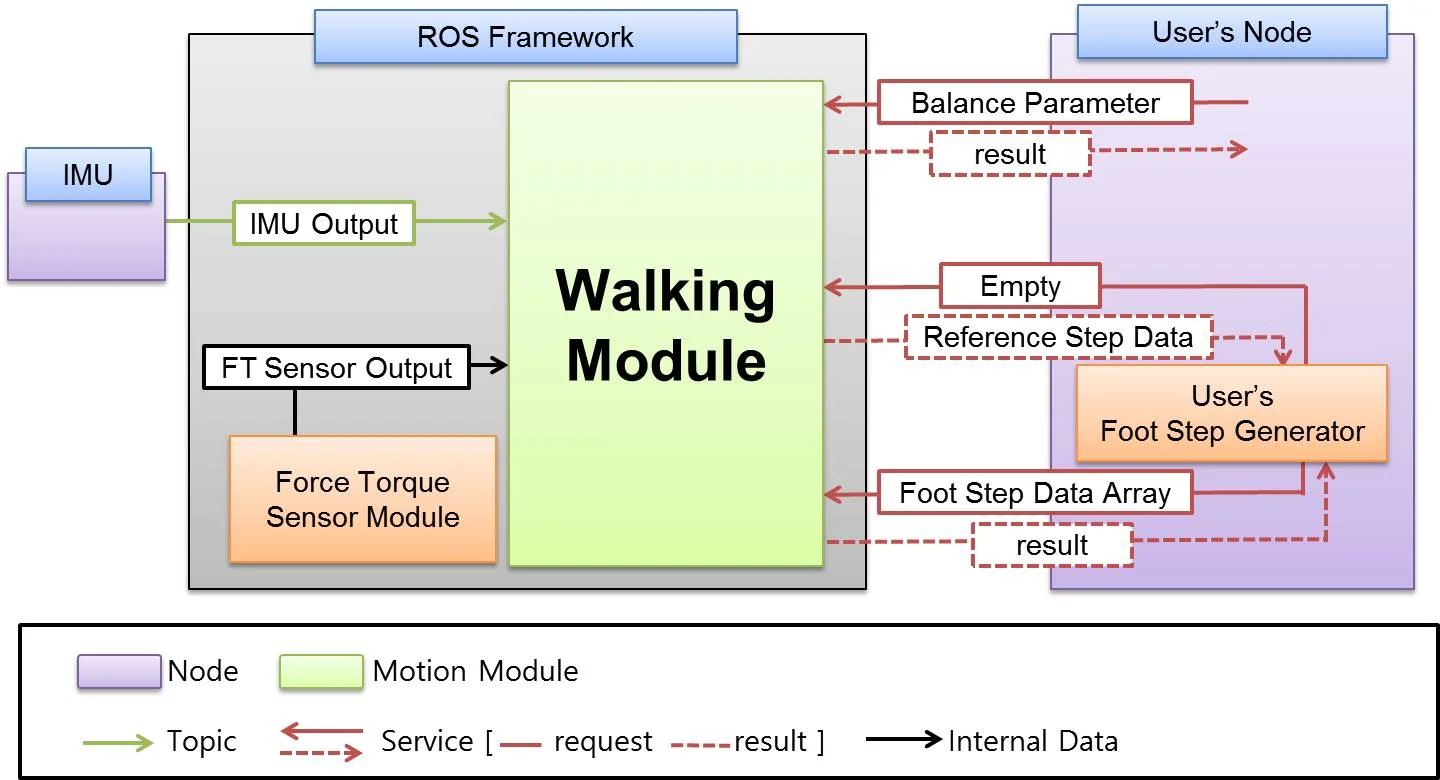
As seen from the above figure, thormang3_walking_module is one of the MotionModules from ROS Framework. THROMANG3 can be controlled with Topics and Services. Users can designate almost all Step Parameters.(thormang3_walking_module_msgs/StepData)
-
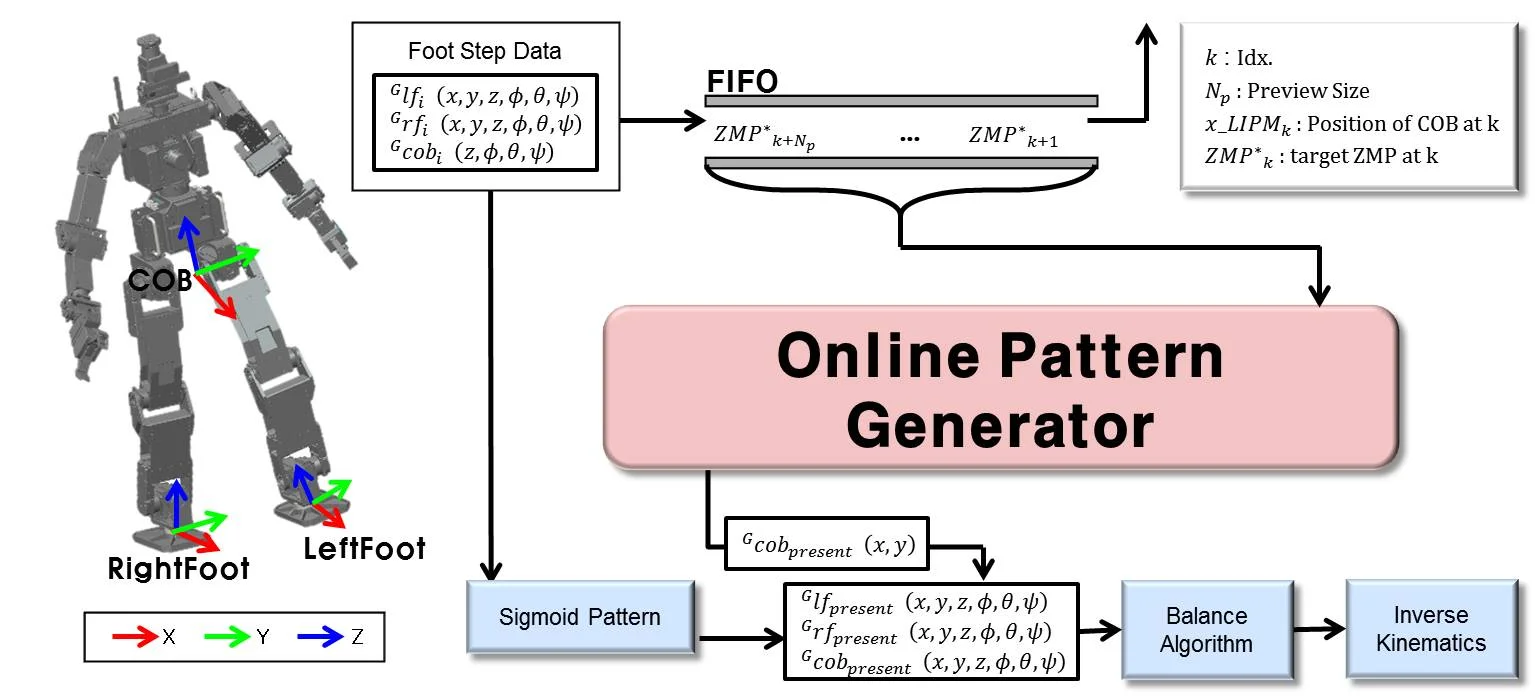
Pattern Generation
thormang3_walking_module includes online walking pattern generator. The pattern is generated from Foot Step Data input.
-
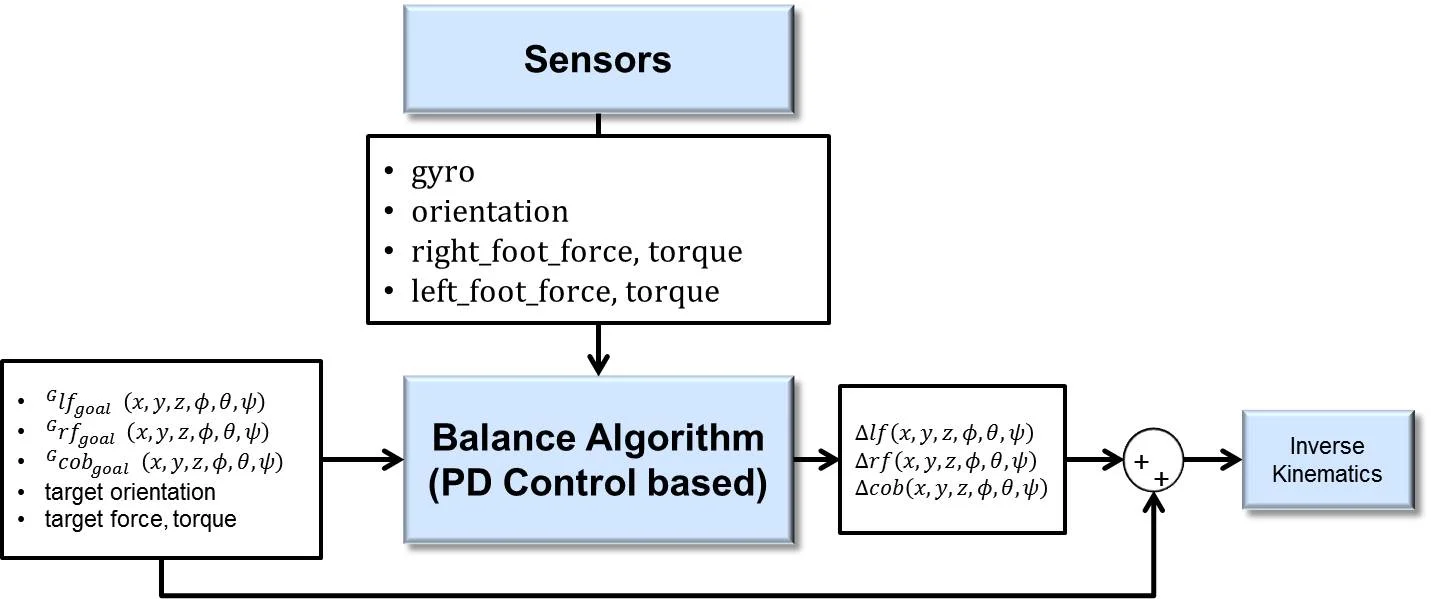
Balance Algorithm
The balance algorithm is included as shown below.(thormang3_walking_module_msgs/BalanceParam)
Download & Build
Reference : MPC Installation
ROS API
Subscribed Topics
/robotis/sensor/imu/imu(sensor_msgs/Imu)
Current data of the IMU Sensor
Published Topics
/robotis/status(robotis_controller_msgs/StatusMsg)
Status message of THORMANG3
Services
-
/robotis/walking/get_reference_step_data(thormang3_walking_module_msgs/GetReferenceStrpData)
A service that collects current location of THORMANG3 in the Global from the Walking Module. -
/robotis/walking/add_step_data(thormang3_walking_module_msgs/AddStepDataArray)
A service that adds StepData created by the user. -
/robotis/walking/walking_start(thormang3_walking_module_msgs/WalkingStart)
A service that commands to start walking. -
/robotis/walking/is_running(thormang3_walking_module_msgs/IsRunning)
A service that checks whether THORMANG3 is walking or not. -
/robotis/walking/set_balance_param(thormang3_walking_module_msgs/SetBalanceParam)
A service that can set Balance Algorithm parameters. -
/robotis/walking/remove_existing_step_data(thormang3_walking_module_msgs/RemoveExistingStepData)
A service that deletes existing StepData.
thormang3_head_control_module
This module is to control the head. This module is included in the Thormang3 Manager as a library.
Download & Build
Reference : MPC Installation
ROS API
Subscribed Topics
-
/robotis/head_control/move_lidar(std_msgs/String)
The command moves the head in order to obtain Lidar data. -
/robotis/head_control/move_lidar_with_range(std_msgs/Float64)
This command scans up and down a given range at the current head position to generate 3D lidar data. -
/robotis/head_control/set_joint_states(sensor_msgs/JointState)
The message controls joints that are connected to the head. -
/robotis/head_control/set_joint_states_time(thormang3_head_control_module_msgs/HeadJointPose)
The message moves head joints for given time.
Published Topics
-
/robotis/sensor/move_lidar(std_msgs/String)
This message reports the head movement to the Node which assembles LiDAR data. -
/robotis/status(robotis_controller_msgs/StatusMsg)
The message indicates status of the head_control_module.
thormang3_tuning_module
This module is for tuning gain and offset of THORMANG3. Users can tune gain and offset under thormang3_p_manager.(Users no longer have to run the offset tuner server separately.)
Download & Build
Reference : MPC Installation
ROS API
Subscribed Topics
-
/robotis/tuning_module/tuning_pose(std_msgs/String)
The topic transfers pose for tuning gain or offset -
/robotis/tuning_module/joint_offset_data(thormang3_tuning_module_msgs/JointOffsetData)
The topic transfers Joint offset -
/robotis/tuning_module/joint_gain_data(thormang3_tuning_module_msgs/JointOffsetData)
The topic transfers Joint gain -
/robotis/tuning_module/torque_enable(thormang3_tuning_module_msgs/JointTorqueOnOffArray)
The topic executes Torque on/off command -
/robotis/tuning_module/command(std_msgs/String)
The topic transfers other commands(save, initial posture, etc).
Published Topics
-
/robotis/enable_ctrl_module(std_msgs/String)
A tuning_module activation topic to take the initial posture. -
/robotis/sync_write_item(robotis_controller_msgs/SyncWriteItem)
A topic to sync write in order to turn on/off torque. -
/robotis/status(robotis_controller_msgs/StatusMsg)
The message indicates status of the head_control_module. -
/robotis/enable_offset(std_msgs/Bool)
A topic to turn off and off the offset in controller. -
/robotis/tuning_module/present_joints_data(thormang3_tuning_module_msgs/JointsOffsetPositionData)
This message is used by tuning_module to send information about each joint to the client.
Services
-
/robotis/set_present_ctrl_modules(robotis_controller_msgs/SetModule)
The service to set module totuning_module. -
/robotis/load_offset(robotis_controller_msgs/LoadOffset)
The service send the path to load offset.
Services Called
/robotis/tuning_module/get_present_joint_offset_data(thormang3_tuning_module_msgs/GetPresentJointOffsetData)
The service send saved joint offset and gain.
Parameters
- offset_file_path (string, default: "") : This path indicates the location of the file that contains offset data of each joint and initial posture data for offset adjustment.
- init_file_path (string, default: "") : This path indicates the location of the file that contains initialization information of each joint. It has gain for dynamixels.
ati_ft_sensor
This is a library to use ForceTorque Sensor(FT Sensor) of ATI Inc in the ROS.
The library can load saved Calibration Matrix and Unloaded Voltage from the YAML File.
The library does not include functions to communicate with hardwares. It can convert voltage output from the FT sensor to N or Nm.
Functions
- ATIForceTorqueSensorTWE Class
bool Initialize(const std::string& ft_data_path,
                const std::string& ft_data_key,
                const std::string& ft_frame_id,
                const std::string& ft_raw_publish_name,
                const std::string& ft_scaled_publish_name)
- arguments :
- ft_data_path : Location of the YAML file to save Calibration Matrix and Unloaded Voltage
- ft_data_key
- The key to read data from YAML
- Key format used to read YAML looks like : ft_data_key + "_calibration_matrix" 와 _ft_data_key + "_unload"
- For example, if "ft_right_foot_calibration_matrix" and "ft_right_foot_unload" are saved in the YAML, ft_data_key should be "ft_right_foot".
- ft_frame_id : The frame_id to publish sensor outputs
- ft_raw_publish_name : The topic name for raw outputs
- ft_scaled_publish_name : The topic name for scaled outputs
- description : The function that configures variables in the Class according to Arguments
- return value : Indicates Initialization success/failure result
void SetScaleFactor(double ft_scale_factor)
- arguments :
- ft_scale_factor : The gain value for calculating scaled output
- Refer to the "SetScaleParam" function.
- description : Function sets the scale gain of the FT sensor
- return value : void
void SetNullForceTorque(Eigen::MatrixXd ft_null)
- arguments :
- ft_null : Null value for calculating scaled output
- Refer to the "SetScaleParam" function
- description : Function sets null value of the FT sensor
- return value : void
void SetScaleParam(double ft_scale_factor, Eigen::MatrixXd ft_null)
- arguments :
- ft_scale_factor : The gain value for calculating scaled output
- ft_null : Null value when calculating scaled output
- description :
- Function sets Parameter for calculating scaled output
- The scaled output can be calculated as below.
- ft_scaled = ft_scale_factor * (ft_raw - ft_null)
- return value : void
void SetCurrentVoltageOutput(double voltage0, double voltage1, double voltage2, double voltage3, double voltage4, double voltage5)
- arguments :
- voltage0 : The output voltage of the FT sensor #0
- voltage1 : The output voltage of the FT sensor #1
- voltage2 : The output voltage of the FT sensor #2
- voltage3 : The output voltage of the FT sensor #3
- voltage4 : The output voltage of the FT sensor #4
- voltage5 : The output voltage of the FT sensor #5
- description : Function sets internal variables for the output voltage of the FT sensors and converts them to force torque.
- return value : void
void SetCurrentVoltageOutput(Eigen::MatrixXd _voltage)
- arguments :
- voltage : The 6x1 matrix form of output voltage of the FT sensor
- description : Function sets internal variables for the output voltage of the FT sensors and converts them to force torque.
- return value : void
Eigen::MatrixXd GetCurrentForceTorqueRaw()
- arguments : void
- description : Return the most recent Raw Force and Torque of the voltage calculated from the "SetCurrentVoltageOutput" function.
- return value : Raw Force & Raw Torque
- Eigen::MatrixXd ft = GetCurrentForceTorqueRaw()
- force_x = ft.coeff(0,0);
- force_y = ft.coeff(1,0);
- force_z = ft.coeff(2,0);
- torque_x = ft.coeff(3,0);
- torque_y = ft.coeff(4,0);
- torque_z = ft.coeff(5,0);
Eigen::MatrixXd GetCurrentForceTorqueScaled()
- arguments : void
- description : Return the most recent Scaled Force and Torque of the voltage calculated from the "SetCurrentVoltageOutput" function.
- return value : Scaled Force & Scaled Torque
- Eigen::MatrixXd ft = GetCurrentForceTorqueScaled()
- force_x = ft.coeff(0,0);
- force_y = ft.coeff(1,0);
- force_z = ft.coeff(2,0);
- torque_x = ft.coeff(3,0);
- torque_y = ft.coeff(4,0);
- torque_z = ft.coeff(5,0);
void GetCurrentForceTorqueRaw(double* _force_x_N,   double* _force_y_N,   double* _force_z_N,
                              double* _torque_x_Nm, double* _torque_y_Nm, double* _torque_z_Nm)
- arguments : The return pointer of Raw Force and Raw Torque
- description : Return the most recent Raw Force and Torque of the voltage calculated from the "SetCurrentVoltageOutput" function.
- return value : void
void GetCurrentForceTorqueScaled(double* _force_x_N,   double* _force_y_N,   double* _force_z_N,
                                 double* _torque_x_Nm, double* _torque_y_Nm, double* _torque_z_Nm)
- description : Return the most recent Scaled Force and Torque of the voltage calculated from the "SetCurrentVoltageOutput" function.
- return value : void
void SetCurrentVoltageOutputPublishForceTorque(double _voltage0, double _voltage1, double _voltage2,
                                               double _voltage3, double _voltage4, double _voltage5)
- arguments :
- voltage0 : The output voltage of the FT sensor #0
- voltage1 : The output voltage of the FT sensor #1
- voltage2 : The output voltage of the FT sensor #2
- voltage3 : The output voltage of the FT sensor #3
- voltage4 : The output voltage of the FT sensor #4
- voltage5 : The output voltage of the FT sensor #5
- description : Function sets internal variables for the output voltage of the FT sensors and converts them to force torque, then publish the converted force torque.
- return value : void
void SetCurrentVoltageOutputPublish(Eigen::MatrixXd _voltage)
- arguments :
- voltage : The 6x1 matrix form of output voltage of the FT sensor
- description : Function sets internal variables for the output voltage of the FT sensors and converts them to force torque, then publish the converted force torque.
- return value : void
thormang3_feet_ft_module
The sensor module of THORMANG3 that uses ati_ft_sensor library.
Acquired sensor values when the robot is hanging on the lift and standing on the ground can be used for the Calibration feature.
Download & Build
Reference : MPC Installation
ROS API
- Subscribed Topics
/robotis/feet_ft/ft_calib_command(std_msgs/String)
FT Calibration Command
- Published Topics
-
/robotis/status(robotis_controller_msgs/StatusMsg)
The status message of THORMANG3 -
/robotis/feet_ft/both_ft_value(thormang3_feet_ft_module_msgs/BothWrench)
Both Wrench -
/robotis/sensor/ft_right_foot/raw(geometry_msgs/WrenchStamped)
raw output from the force torque sensor on the right foot -
/robotis/sensor/ft_right_foot/scaled(geometry_msgs/WrenchStamped)
scaled output from the force torque sensor on the right foot -
/robotis/sensor/ft_right_foot/raw(geometry_msgs/WrenchStamped)
raw output from the force torque sensor on the left foot -
/robotis/sensor/ft_right_foot/scaled(geometry_msgs/WrenchStamped)
scaled output from the force torque sensor on the left foot
thormang3_alarm_module
The sensor module of THORMANG3 reads the present current of leg joints and checks if the joint is overloaded.
Download & Build
Reference : MPC Installation
ROS API
- Subscribed Topics
/robotis/overload/command(std_msgs/String)
Alarm module Command : reset, load_limit
- Published Topics
-
/robotis/status(robotis_controller_msgs/StatusMsg)
The status message of THORMANG3 -
/robotis/overload/data(thormang3_alarm_module_msgs/JointOverload)
caculated overload and present current of leg joints -
/robotis/overload/status(thormang3_alarm_module_msgs/JointOverloadStatus) overload status and warning/error count
- Config file
thormang3_alarm_module/data/overload.yaml
thormang3_balance_control
Library for using Balance Algorithm of THORMANG3 in ROS. There is two kinds of algorithm.
Download & Build
Reference : MPC Installation
Functions and Variables
BalanceLowPassFilter Class
void initialize(double control_cycle_sec_, double cut_off_frequency)
- arguments :
- control_cycle_sec : control cycle in sec of motion module
- cut_off_frequency : cut off frequency for low pass filter
- description : the function that configures variables in the class according to arguments
- return value : void
void setCutOffFrequency(double cut_off_frequency)
- arguments :
- cut off frequency : desired cut off frequency for filtering. If cut_off_frequency is less than 0, filtering is not performed.
- description : the function for setting cut off frequency
- return value : void
double getCutOffFrequency(void)
- arguments : void
- description : the function for getting set cut off frequency
- return value : current set cut off frequency
double getFilteredOutput(double present_raw_value)
- arguments :
- present_raw_value : raw value
- description : the function for filtering and getting its result
- return value : filtered value
Damping Controller Class
double getFeedBack(double present_sensor_output)
- arguments :
- present_sensor_output : present sensor output
- description : the function for calculating damping control and getting its result
- return value : result calculated by damping controller
double desired_
- description : desired value for damping controller
double gain_
- description : gain for damping controller
double time_constant_sec_
- description : time constant for damping controller
double output_
- description : result of damping controller
double control_cycle_sec_
- description : control cycle in sec of motion module
BalancePDController Class
double getFeedBack(double present_sensor_output)
- arguments :
- present_sensor_output : present sensor output
- description : the function for calculating PD control and getting its result
- return value : result calculated by PD controller
double desired_
- description : desired value for PD controller
double p_gain_
- description : P gain for PD controller
double d_gain_
- description : D gain for PD controller
BalanceControlUsingDampingConroller Class
void initialize(const int control_cycle_msec)
- arguments :
- control_cycle_msec : control cycel of motion module in milliseconds
- description : the function that configures variables in the class according to arguments
- return value : void
void setGyroBalanceEnable(bool enable)
- arguments :
- enable : true or false
- description : The function that turns on or off the balance algorithm with gyro
- return value : void
void setOrientationBalanceEnable(bool enable)
- arguments :
- enable : true or false
- description : The function that turns on or off the balance algorithm with orientation from IMU sensor
- return value : void
void setForceTorqueBalanceEnable(bool enable)
- arguments :
- enable : true or false
- description : The function that turns on or off the balance algorithm with force and torque from ft sensor
- return value : void
void process(int *balance_error, Eigen::MatrixXd *robot_to_cob_modified, Eigen::MatrixXd *robot_to_right_foot_modified, Eigen::MatrixXd *robot_to_left_foot_modified)
- arguments :
- balance_error : the one of below values would be returned
- BalanceControlError::NoError(= 0) : There is no error.
- BalanceControlError::BalanceLimit(= 0) : The modification value by the balance algorithm is greater than the maximum modification.
- robot_to_cob_modified : the center of body modification calculated by balance algorithm
- robot_to_right_foot_modified : the right foot modification calculated by balance algorithm
- robot_to_left_foot_modified : the left_foot of body modification calculated by balance algorithm
- balance_error : the one of below values would be returned
- description : calculating balance algorithm using desired values and sensor outputs
- return value : void
void setDesiredPose(const Eigen::MatrixXd &robot_to_cob, const Eigen::MatrixXd &robot_to_right_foot, const Eigen::MatrixXd &robot_to_left_foot)
- arguments :
- robot_to_cob : desired pose of center of body with respect to robot's local coordinate
- robot_to_right_foot : desired pose of right foot with respect to robot's local coordinate
- robot_to_left_foot : desired pose of left foot with respect to robot's local coordinate
- description : the function for setting desired pose of right foot, left foot and center of body
- return value : void
void setDesiredCOBGyro(double gyro_roll, double gyro_pitch)
- arguments :
- gyro_roll : desired x directional angular velocity with respect robot's local coordinate
- gyro_pitch : desired y directional angular velocity with respect robot's local coordinate
- description : the function for setting desired angular velocity
- return value : void
void setDesiredCOBOrientation(double cob_orientation_roll, double cob_orientation_pitch)
- arguments :
- cob_orientation_roll : desired roll angle in radian of robot's local coordinate
- cob_orientation_pitch : desired pitch angle in radian of robot's local coordinate
- description : the function for setting desired robot's orientation
- return value : void
void setDesiredFootForceTorque(double r_force_x_N,      double r_force_y_N,       double r_force_z_N,
                             double r_torque_roll_Nm, double r_torque_pitch_Nm, double r_torque_yaw_Nm,
                             double l_force_x_N,      double l_force_y_N,       double l_force_z_N,
                             double l_torque_roll_Nm, double l_torque_pitch_Nm, double l_torque_yaw_Nm)
- arguments :
- r_force_x_N : desired x directional force on right foot with respect to robot's local coordinate
- r_force_y_N : desired y directional force on right foot with respect to robot's local coordinate
- r_force_z_N : desired z directional force on right foot with respect to robot's local coordinate
- r_torque_roll_Nm : desired x directional torque on right foot with respect to robot's local coordinate
- r_torque_pitch_Nm : desired y directional torque on right foot with respect to robot's local coordinate
- r_torque_yaw_Nm : desired z directional torque on right foot with respect to robot's local coordinate
- l_force_x_N : desired x directional force on left foot with respect to robot's local coordinate
- l_force_y_N : desired y directional force on left foot with respect to robot's local coordinate
- l_force_z_N : desired z directional force on left foot with respect to robot's local coordinate
- l_torque_roll_Nm : desired x directional torque on left foot with respect to robot's local coordinate
- l_torque_pitch_Nm : desired x directional torque on left foot with respect to robot's local coordinate
- l_torque_yaw_Nm : desired x directional torque on left foot with respect to robot's local coordinate
- description : the function for setting desired force in newton and torque in newton-meter on feet
- return value : void
void setCurrentGyroSensorOutput(double gyro_roll, double gyro_pitch)
- arguments :
- gyro_roll : current x directional angular velocity with respect robot's local coordinate
- gyro_pitch : current y directional angular velocity with respect robot's local coordinate
- description : the function for setting current angular velocity from IMU sensor
- return value :
void setCurrentOrientationSensorOutput(double cob_orientation_roll, double cob_orientation_pitch)
- arguments :
- cob_orientation_roll : current roll angle in radian of robot's local coordinate
- cob_orientation_pitch : current pitch angle in radian of robot's local coordinate
- description : the function for setting current orientation from IMU sensor
- return value : void
void setCurrentFootForceTorqueSensorOutput(
  double r_force_x_N,      double r_force_y_N,       double r_force_z_N,
  double r_torque_roll_Nm, double r_torque_pitch_Nm, double r_torque_yaw_Nm,
  double l_force_x_N,      double l_force_y_N,       double l_force_z_N,
  double l_torque_roll_Nm, double l_torque_pitch_Nm, double l_torque_yaw_Nm)
- arguments :
- r_force_x_N : current x directional force on right foot with respect to robot's local coordinate
- r_force_y_N : current y directional force on right foot with respect to robot's local coordinate
- r_force_z_N : current z directional force on right foot with respect to robot's local coordinate
- r_torque_roll_Nm : current x directional torque on right foot with respect to robot's local coordinate
- r_torque_pitch_Nm : current y directional torque on right foot with respect to robot's local coordinate
- r_torque_yaw_Nm : current z directional torque on right foot with respect to roboti's local coordinate
- l_force_x_N : current x directional force on left foot with respect to robot's local coordinate
- l_force_y_N : current y directional force on left foot with respect to robot's local coordinate
- l_force_z_N : current z directional force on left foot with respect to robot's local coordinate
- l_torque_roll_Nm : current x directional torque on left foot with respect to robot's local coordinate
- l_torque_pitch_Nm : current x directional torque on left foot with respect to robot's local coordinate
- l_torque_yaw_Nm : current x directional torque on left foot with respect to robot's local coordinate
- description : the function for setting current force and torque from force-torque sensor on both feet
- return value : void
void setMaximumAdjustment(
  double cob_x_max_adjustment_m, double cob_y_max_adjustment_m, double cob_z_max_adjustment_m,
  double cob_roll_max_adjustment_rad, double cob_pitch_max_adjustment_rad, double cob_yaw_max_adjustment_rad,
  double foot_x_max_adjustment_m, double foot_y_max_adjustment_m, double foot_z_max_adjustment_m,
  double foot_roll_max_adjustment_rad, double foot_pitch_max_adjustment_rad, double foot_yaw_max_adjustment_rad)
- arguments :
- cob_x_max_adjustment_m : the maximum x directinal linear modification of center of body
- cob_y_max_adjustment_m : the maximum y directinal linear modification of center of body
- cob_z_max_adjustment_m : the maximum z directinal linear modification of center of body
- cob_roll_max_adjustment_rad : the maximum x directinal angular modification of center of body
- cob_pitch_max_adjustment_rad : the maximum y directinal angular modification of center of body
- cob_yaw_max_adjustment_rad : the maximum z directinal angular modification of center of body
- foot_x_max_adjustment_m : the maximum x directinal linear modification of foot
- foot_y_max_adjustment_m : the maximum y directinal linear modification of foot
- foot_z_max_adjustment_m : the maximum z directinal linear modification of foot
- foot_roll_max_adjustment_rad : the maximum x directinal angular modification of foot
- foot_pitch_max_adjustment_rad : the maximum y directinal angular modification of foot
- foot_yaw_max_adjustment_rad : the maximum z directinal angular modification of foot
- description : the function for setting maximum modification
- return value : void
void setCOBManualAdjustment(
  double cob_x_adjustment_m, double cob_y_adjustment_m, double cob_z_adjustment_m)
- arguments :
- cob_x_adjustment_m : the x offset of center of body
- cob_y_adjustment_m : the y offset of center of body
- cob_z_adjustment_m : the z offset of center of body
- description : the function for setting manual modification of center of body
- return value : void
double getCOBManualAdjustmentX()
- arguments : void
- description : the function for getting x directional manual modification of center of body
- return value : x directional manual modification of center of body
double getCOBManualAdjustmentY()
- arguments : void
- description : the function for getting y directional manual modification of center of body
- return value : y directional manual modification of center of body
double getCOBManualAdjustmentZ()
- arguments : void
- description : the function for getting z directional manual modification of center of body
- return value : z directional manual modification of center of body
void setGyroBalanceGainRatio(double gyro_balance_gain_ratio)
- arguments :
- gyro_balance_gain_ratio : gyro balance gain
- description : the function for setting gyro balance gain
- return value : void
double getGyroBalanceGainRatio(void)
- arguments : void
- description : the function for getting set gyro balance gain
- return value : current set gyro balance gain
DampingController foot_roll_angle_ctrl_
- description : damping controller for foot using roll angle
DampingController foot_pitch_angle_ctrl_
- description : damping controller for foot using pitch angle
DampingController right_foot_force_x_ctrl_
- description : damping controller for foot using force x on right foot
DampingController right_foot_force_y_ctrl_
- description : damping controller for foot using force y on right foot
DampingController right_foot_force_z_ctrl_
- description : damping controller for foot using force z on right foot
DampingController right_foot_torque_roll_ctrl_
- description : damping controller for foot using torque x on right foot
DampingController right_foot_torque_pitch_ctrl_
- description : damping controller for foot using torque y on right foot
DampingController left_foot_force_x_ctrl_
- description : damping controller for foot using force x on left foot
DampingController left_foot_force_y_ctrl_
- description : damping controller for foot using force y on left foot
DampingController left_foot_force_z_ctrl_
- description : damping controller for foot using force z on left foot
DampingController left_foot_torque_roll_ctrl_
- description : damping controller for foot using torque x on left foot
DampingController left_foot_torque_pitch_ctrl_
- description : damping controller for foot using torque y on left foot
BalanceControlUsingPDController Class
void initialize(const int control_cycle_msec)
- arguments :
- control_cycle_msec : control cycel of motion module in milliseconds
- description : the function that configures variables in the class according to arguments
- return value : void
void setGyroBalanceEnable(bool enable)
- arguments :
- enable : true or false
- description : The function that turns on or off the balance algorithm with gyro
- return value : void
void setOrientationBalanceEnable(bool enable)
- arguments :
- enable : true or false
- description : The function that turns on or off the balance algorithm with orientation from IMU sensor
- return value : void
void setForceTorqueBalanceEnable(bool enable)
- arguments :
- enable : true or false
- description : The function that turns on or off the balance algorithm with force and torque from ft sensor
- return value : void
void process(
  int *balance_error,
  Eigen::MatrixXd *robot_to_cob_modified,
  Eigen::MatrixXd *robot_to_right_foot_modified,
  Eigen::MatrixXd *robot_to_left_foot_modified)
- arguments :
- balance_error : the one of below values would be returned
- BalanceControlError::NoError(= 0) : There is no error.
- BalanceControlError::BalanceLimit(= 0) : The modification value by the balance algorithm is greater than the maximum modification.
- robot_to_cob_modified : the center of body modification calculated by balance algorithm
- robot_to_right_foot_modified : the right foot modification calculated by balance algorithm
- robot_to_left_foot_modified : the left_foot of body modification calculated by balance algorithm
- description : calculating balance algorithm using desired values and sensor outputs
- return value : void
void setDesiredPose(
  const Eigen::MatrixXd &robot_to_cob,
  const Eigen::MatrixXd &robot_to_right_foot,
  const Eigen::MatrixXd &robot_to_left_foot)
- arguments :
- robot_to_cob : desired pose of center of body with respect to robot's local coordinate
- robot_to_right_foot : desired pose of right foot with respect to robot's local coordinate
- robot_to_left_foot : desired pose of left foot with respect to robot's local coordinate
- description : the function for setting desired pose of right foot, left foot and center of body
- return value : void
void setDesiredCOBGyro(double gyro_roll, double gyro_pitch)
- arguments :
- gyro_roll : desired x directional angular velocity with respect robot's local coordinate
- gyro_pitch : desired y directional angular velocity with respect robot's local coordinate
- description : the function for setting desired angular velocity
- return value : void
void setDesiredCOBOrientation(
  double cob_orientation_roll, double cob_orientation_pitch)
- arguments :
- cob_orientation_roll : desired roll angle in radian of robot's local coordinate
- cob_orientation_pitch : desired pitch angle in radian of robot's local coordinate
- description : the function for setting desired robot's orientation
- return value : void
void setDesiredFootForceTorque(
  double r_force_x_N,      double r_force_y_N,       double r_force_z_N,
  double r_torque_roll_Nm, double r_torque_pitch_Nm, double r_torque_yaw_Nm,
  double l_force_x_N,      double l_force_y_N,       double l_force_z_N,
  double l_torque_roll_Nm, double l_torque_pitch_Nm, double l_torque_yaw_Nm)
- arguments :
- r_force_x_N : desired x directional force on right foot with respect to robot's local coordinate
- r_force_y_N : desired y directional force on right foot with respect to robot's local coordinate
- r_force_z_N : desired z directional force on right foot with respect to robot's local coordinate
- r_torque_roll_Nm : desired x directional torque on right foot with respect to robot's local coordinate
- r_torque_pitch_Nm : desired y directional torque on right foot with respect to robot's local coordinate
- r_torque_yaw_Nm : desired z directional torque on right foot with respect to robot's local coordinate
- l_force_x_N : desired x directional force on left foot with respect to robot's local coordinate
- l_force_y_N : desired y directional force on left foot with respect to robot's local coordinate
- l_force_z_N : desired z directional force on left foot with respect to robot's local coordinate
- l_torque_roll_Nm : desired x directional torque on left foot with respect to robot's local coordinate
- l_torque_pitch_Nm : desired x directional torque on left foot with respect to robot's local coordinate
- l_torque_yaw_Nm : desired x directional torque on left foot with respect to robot's local coordinate
- description : the function for setting desired force in newton and torque in newton-meter on feet
- return value : void
void setCurrentGyroSensorOutput(double gyro_roll, double gyro_pitch)
- arguments :
- gyro_roll : current x directional angular velocity with respect robot's local coordinate
- gyro_pitch : current y directional angular velocity with respect robot's local coordinate
- description : the function for setting current angular velocity from IMU sensor
- return value :
void setCurrentOrientationSensorOutput(double cob_orientation_roll, double cob_orientation_pitch)
- arguments :
- cob_orientation_roll : current roll angle in radian of robot's local coordinate
- cob_orientation_pitch : current pitch angle in radian of robot's local coordinate
- description : the function for setting current orientation from IMU sensor
- return value : void
void setCurrentFootForceTorqueSensorOutput(
  double r_force_x_N,      double r_force_y_N,       double r_force_z_N,
  double r_torque_roll_Nm, double r_torque_pitch_Nm, double r_torque_yaw_Nm,
  double l_force_x_N,      double l_force_y_N,       double l_force_z_N,
  double l_torque_roll_Nm, double l_torque_pitch_Nm, double l_torque_yaw_Nm)
- arguments :
- r_force_x_N : current x directional force on right foot with respect to robot's local coordinate
- r_force_y_N : current y directional force on right foot with respect to robot's local coordinate
- r_force_z_N : current z directional force on right foot with respect to robot's local coordinate
- r_torque_roll_Nm : current x directional torque on right foot with respect to robot's local coordinate
- r_torque_pitch_Nm : current y directional torque on right foot with respect to robot's local coordinate
- r_torque_yaw_Nm : current z directional torque on right foot with respect to robot's local coordinate
- l_force_x_N : current x directional force on left foot with respect to robot's local coordinate
- l_force_y_N : current y directional force on left foot with respect to robot's local coordinate
- l_force_z_N : current z directional force on left foot with respect to robot's local coordinate
- l_torque_roll_Nm : current x directional torque on left foot with respect to robot's local coordinate
- l_torque_pitch_Nm : current x directional torque on left foot with respect to robot's local coordinate
- l_torque_yaw_Nm : current x directional torque on left foot with respect to robot's local coordinate
- description : the function for setting current force and torque from force-torque sensor on both feet
- return value : void
void setMaximumAdjustment(
  double cob_x_max_adjustment_m,  double cob_y_max_adjustment_m,  double cob_z_max_adjustment_m,
  double cob_roll_max_adjustment_rad, double cob_pitch_max_adjustment_rad, double cob_yaw_max_adjustment_rad,
  double foot_x_max_adjustment_m, double foot_y_max_adjustment_m, double foot_z_max_adjustment_m,
  double foot_roll_max_adjustment_rad, double foot_pitch_max_adjustment_rad, double foot_yaw_max_adjustment_rad)
- arguments :
- cob_x_max_adjustment_m : the maximum x directinal linear modification of center of body
- cob_y_max_adjustment_m : the maximum y directinal linear modification of center of body
- cob_z_max_adjustment_m : the maximum z directinal linear modification of center of body
- cob_roll_max_adjustment_rad : the maximum x directinal angular modification of center of body
- cob_pitch_max_adjustment_rad : the maximum y directinal angular modification of center of body
- cob_yaw_max_adjustment_rad : the maximum z directinal angular modification of center of body
- foot_x_max_adjustment_m : the maximum x directinal linear modification of foot
- foot_y_max_adjustment_m : the maximum y directinal linear modification of foot
- foot_z_max_adjustment_m : the maximum z directinal linear modification of foot
- foot_roll_max_adjustment_rad : the maximum x directinal angular modification of foot
- foot_pitch_max_adjustment_rad : the maximum y directinal angular modification of foot
- foot_yaw_max_adjustment_rad : the maximum z directinal angular modification of foot
- description : the function for setting maximum modification
- return value : void
void setCOBManualAdjustment(double cob_x_adjustment_m, double cob_y_adjustment_m, double cob_z_adjustment_m)
- arguments :
- cob_x_adjustment_m : the x offset of center of body
- cob_y_adjustment_m : the y offset of center of body
- cob_z_adjustment_m : the z offset of center of body
- description : the function for setting manual modification of center of body
- return value : void
double getCOBManualAdjustmentX()
- arguments : void
- description : the function for getting current set x directional manual modification of center of body
- return value : x directional manual modification of center of body
double getCOBManualAdjustmentY()
- arguments : void
- description : the function for getting current set y directional manual modification of center of body
- return value : y directional manual modification of center of body
double getCOBManualAdjustmentZ()
- arguments : void
- description : the function for getting current set z directional manual modification of center of body
- return value : z directional manual modification of center of body
BalancePDController foot_roll_gyro_ctrl_
- description : PD controller for foot using x directional gyro
BalancePDController foot_pitch_gyro_ctrl_
- description : PD controller for foot using y directional gyro
BalancePDController foot_roll_angle_ctrl_
- description : PD controller for foot using roll angle
BalancePDController right_foot_force_x_ctrl_
- description : PD controller for foot using x directional force on right foot
BalancePDController right_foot_force_y_ctrl_
- description : PD controller for foot using y directional force on right foot
BalancePDController right_foot_force_z_ctrl_
- description : PD controller for foot using z directional force on right foot
BalancePDController right_foot_torque_roll_ctrl_
- description : PD controller for foot using x directional torque on right foot
BalancePDController right_foot_torque_pitch_ctrl_
- description : PD controller for foot using y directional torque on right foot
BalancePDController left_foot_force_x_ctrl_
- description : PD controller for foot using x directional force on left foot
BalancePDController left_foot_force_y_ctrl_
- description : PD controller for foot using y directional force on left foot
BalancePDController left_foot_force_z_ctrl_
- description : PD controller for foot using z directional force on left foot
BalancePDController left_foot_torque_roll_ctrl_
- description : PD controller for foot using x directional torque on left foot
BalancePDController left_foot_torque_pitch_ctrl_
- description : PD controller for foot using y directional torque on left foot
BalanceLowPassFilter roll_gyro_lpf_
- description : Low Pass Filter for x directional angular velocity from IMU
BalanceLowPassFilter pitch_gyro_lpf_
- description : Low Pass Filter for y directional angular velocity from IMU
BalanceLowPassFilter roll_angle_lpf_;
- description : Low Pass Filter for roll angle from IMU
BalanceLowPassFilter pitch_angle_lpf_;
- description : Low Pass Filter for pitch angle from IMU
BalanceLowPassFilter right_foot_force_x_lpf_;
- description : Low Pass Filter for x directional force from force-torque sensor on right foot
BalanceLowPassFilter right_foot_force_y_lpf_;
- description : Low Pass Filter for y directional force from force-torque sensor on right foot
BalanceLowPassFilter right_foot_force_z_lpf_;
- description : Low Pass Filter for z directional force from force-torque sensor on right foot
BalanceLowPassFilter right_foot_torque_roll_lpf_;
- description : Low Pass Filter for x directional torque from force-torque sensor on right foot
BalanceLowPassFilter right_foot_torque_pitch_lpf_;
- description : Low Pass Filter for y directional torque from force-torque sensor on right foot
BalanceLowPassFilter left_foot_force_x_lpf_;
- description : Low Pass Filter for x directional force from force-torque sensor on left foot
BalanceLowPassFilter left_foot_force_y_lpf_;
- description : Low Pass Filter for y directional force from force-torque sensor on left foot
BalanceLowPassFilter left_foot_force_z_lpf_;
- description : Low Pass Filter for z directional force from force-torque sensor on left foot
BalanceLowPassFilter left_foot_torque_roll_lpf_;
- description : Low Pass Filter for x directional torque from force-torque sensor on left foot
BalanceLowPassFilter left_foot_torque_pitch_lpf_;
- description : Low Pass Filter for y directional torque from force-torque sensor on left foot
imu-3dm-gx4
This module is for the IMU Sensor(MicroStrain 3DM-GX4-25).
This module exists in a separated Node, and this module is launched along with the thormang3_manager when executing .launch file of the thormang3_manager.
This is the modified version of KumarRobotics/imu_3dm_gx4.
Download & Build
Reference : MPC Installation
ROS API
Published Topics
/robotis/sensor/imu/imu (sensor_msgs/Imu)
Present output of the IMU Sensor
microstrain_3dm_gx5_45
This package is for the IMU Sensor(MicroStrain 3DM-GX5-25).
The latest THORMANG3 is equipped with 3DM-GX5-25. Users have to check what version is eqipped and modify manager.launch file to operate THORMANG3.
Download & Build
Reference : MPC Installation
ROS API
Published Topics
/robotis/sensor/imu/imu (sensor_msgs/Imu)
Present output of the IMU Sensor
PPC Packages
thormang3_sensors
Thormang3 sensor related package.
This package contains sensor related launch files.
The package also includes a node for assembling Laserscan(LaserScan to PointCloud)
Download & Build
Reference : PPC Installation
Run
Execute Launch file
$ roslaunch thormang3_sensors thormang3_sensors.launch
- thormang3_sensors.launch
- thormang3_pointcloud.launch
- scan_to_scan_filter_chain (laser_filters) : Filter LaserScan topics
- laser_scan_assembler (laser_assembler) : The service assembles LaserScan
- assemble_laser_node (thormang3_sensors) : Create PointCloud from Assemble Service
- thormang3_realsense.launch : Contains Intel RealSense configuration and launch the program.
- thormang3_web_cam.launch : Contains Web Camera configuration and launch the program.
- thormang3_pointcloud.launch
ROS API : assemble_laser_node
Subscribed Topics
/robotis/sensor/move_lidar (std_msgs/String)
Configures start and end time to assemble LaserScan
Set the start time when receiving start message.
Set the end time and assemble Pointcloud when receiving end message.
Published Topics
/robotis/sensor/assembled_scan (sensor_msgs/PointCloud2)
Assembled PointCloud
Services Called
/robotis/sensor/service/assemble_scan2 (laser_assembler/AssembleScan2)
Get assembled PointCloud from the Service with LaserScan start/end parameters.
thormang3_simple_demo
thormang3_manipulation_demo
Thormang3 manipulation simple demonstration
Download & Build
Reference : PPC Installation
Run
Reference : Manipulation Simple Demo from How to execute Simple Demonstration
ROS API
Subscribed Topics
/robotis/manipulation_demo/command (std_msgs/String)
The topic to run various Manipulation simple demo commands.
Published Topics
/robotis/base/ini_pose (std_msgs/String)
The topic to take initial posture of the Base Module
/robotis/enable_ctrl_module (std_msgs/String)
The topic to set upper body of the robot with the Manipulation Module
/robotis/manipulation/ini_pose_msg (std_msgs/String)
The topic to take initial posture of the Manipulation Module
/robotis/manipulation/kinematics_pose_msg (thormang3_manipulation_module_msgs/KinematicsPose)
The topic to take initial posture of the Manipulation Module
thormang3_walking_demo
Thormang3 Walking simple demonstration
Download & Build
Reference : PPC Installation
Run
Reference : Walking Simple Demo of How to execute Simple Demonstration
ROS API
Subscribed Topics
/robotis/status (robotis_controller_msgs/StatusMsg)
Status message of THORMANG3
robotis/walking_demo/command (std_msgs/String)
Command for walking simple demo
Published Topics
robotis/base/ini_pose (std_msgs/String)
The command delivered to the thormang3_base_module to take the initial posture.
/robotis/enable_ctrl_module (std_msgs/String)
The topic to set lower body of the robot with the Walking Module.
Services Called
/robotis/walking/get_reference_step_data (thormang3_walking_module_msgs/GetReferenceStrpData)
The service obtains current location of THORMANG3 from the Walking Module in the Global space.
/robotis/walking/add_step_data (thormang3_walking_module_msgs/AddStepDataArray)
The service adds StepData created by the user.
/robotis/walking/set_balance_param (thormang3_walking_module_msgs/SetBalanceParam)
The service sets parameters related to the Balance Algorithm.
OPC Packages
humanoid_navigation
-
Reference: http://wiki.ros.org/humanoid_navigation -
Prerequisite Packages: map_server, humanoid_nav_msgs, nav_msgs, sbpl, etc -
Packages Installation
$ sudo apt-get install ros-kinetic-map-server
$ sudo apt-get install ros-kinetic-humanoid-nav-msgs
$ sudo apt-get install ros-kinetic-nav-msgs
$ sudo apt-get install ros-kinetic-octomap
$ sudo apt-get install ros-kinetic-octomap-msgs
$ sudo apt-get install ros-kinetic-octomap-ros
$ sudo apt-get install ros-kinetic-octomap-server
- Building and Installing from source
footstep_planner
The footstep planner for humanoids or bipedal robots.
Reference: http://wiki.ros.org/footstep_planner
RUN
$ roslaunch footstep_planner thormang3_footstep_planner.launch
Configurations
- config/footsteps_thormang3.yaml : Footstep configuration of THORMANG3
- config/planning_params_thormang3.yaml
- config/planning_params.yaml : Configuration of planner parameters
gridmap_2d
Reference: http://wiki.ros.org/gridmap_2d
humanoid_localization
Reference: http://wiki.ros.org/humanoid_localization
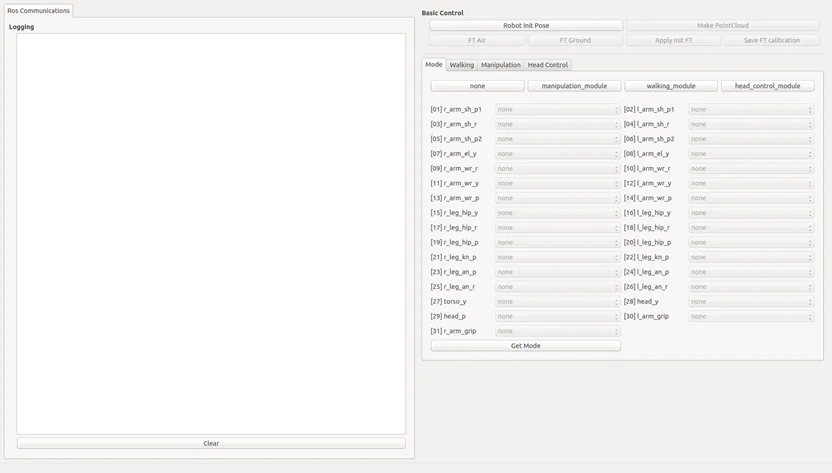
thormang3_demo
The package for THORMANG3 demonstration.
Initial posture, walking, manipulation, head control are available with this package.
Feet ft calibration, Pointcloud conversion are available with this package.
Download & Build
Reference : OPC Installation
Run
Execute the launch file
$ roslaunch thormang3_demo thormang3_demo.launch
- Configuration file used in
thormang3_demo(config/demo_config.yaml)id_joint : id and joint name tables module_list : Module name displayed on each joint in the demo program. module_button : Modules to configure with the manager (index : module name)
ROS API
Subscribed Topics
/robotis/feet_ft/both_ft_value (thormang3_feet_ft_module_msgs/BothWrench)
FT value for calibration
/robotis/status (robotis_controller_msgs/StatusMsg)
Status message of THORMANG3
/robotis/present_joint_ctrl_modules (robotis_controller_msgs/JointCtrlModule)
Joint modules that are currently in use
/robotis/present_joint_states (sensor_msgs/JointState)
Degree of each joint(Unit in Degree)
/robotis/demo/pose (geometry_msgs/Pose)
Pose that are used for Walking and Manipulation
Published Topics
/robotis/set_joint_ctrl_modules (robotis_controller_msgs/JointCtrlModule)
Configuring each joint modules (configure for each joint, Not recommended to use)
/robotis/enable_ctrl_module (std_msgs/String)
Configure modules to control
/robotis/base/ini_pose (std_msgs/String)
Initial posture of Thormang3
/robotis/feet_ft/ft_calib_command (std_msgs/String)
FT Calibration related command
/robotis/head_control/move_lidar (std_msgs/String)
Head movement command for assembling LaserScan.
/robotis/head_control/set_joint_states (sensor_msgs/JointState)
Control for separate head joints
/robotis/demo/foot_step_marker (visualization_msgs/MarkerArray)
Visualized footstep messages created by footstep_planner
/robotis/manipulation/ini_pose_msg (std_msgs/String)
Initial posture command for Manipulation
/robotis/manipulation/joint_pose_msg (thormang3_manipulation_module_msgs/JointPose)
Control the robot in Joint Space
/robotis/manipulation/kinematics_pose_msg (thormang3_manipulation_module_msgs/KinematicsPose)
Control the robot in Task Space
/robotis/thormang3_foot_step_generator/walking_command (thormang3_foot_step_generator/FootStepCommand)
Create footsteps from the foot_step_generator with the walking parameter and direction.
/robotis/thormang3_foot_step_generator/footsteps_2d (thormang3_foot_step_generator/Step2DArray)
2D step array to create footsteps for THORMANG3
/robotis/thormang3_foot_step_generator/balance_command (std_msgs/Bool)
Balance On/Off of THORMANG3
Services Called
/robotis/get_present_joint_ctrl_modules (robotis_controller_msgs/GetJointModule)
Obtains module that is currently in use for each joint.
/plan_footsteps (humanoid_nav_msgs/PlanFootsteps)
Creates footsteps from map and footstep_planner
/robotis/manipulation/get_joint_pose (thormang3_manipulation_module_msgs/GetJointPose)
Obtains joint pose of selected manipulation group.
/robotis/manipulation/get_kinematics_pose (thormang3_manipulation_module_msgs/GetKinematicsPose)
Obtains end effector pose of selected manipulation group.
Parameters
~demo_config(string, default: /config/demo_config.yaml)
Configuration file path of the demo program.
thormang3_action_script_player
The Node that can play a action script.
The default action script is in the "thormang3_action_script_player/script/action_script.yaml".
The user can specify the path of the action script file via rosparameter.
The thormang3_action_script_player is used with thormang3_action_module and ros_mpg321_player.
Download & Build
Reference : OPC Installation
Run
thormang3_action_script_player runs with thormang3_demo.
Reference : Remote Control(GUI Demo)
If user wants to run thormang3_action_script_player separately, user can run it from OPC with the following command.
$ rosrun thormang3_action_script_player thormang3_action_script_player
How to write action script
The default action script file is in the "thormang3_action_script_player/script/action_script.yaml".
The action script has the following structure.
script2:
     cmd1: {cmd_name: play,  cmd_arg: 2}
     cmd2: {cmd_name: sleep, cmd_arg: 1800}
     cmd3: {cmd_name: mp3,   cmd_arg: "/home/robotis/Music/thormang_mp3/hello_kor.mp3"}
     cmd4: {cmd_name: sleep, cmd_arg: 1100}
     cmd5: {cmd_name: mp3,   cmd_arg: "/home/robotis/Music/thormang_mp3/i_am_thormang_kor.mp3"}
The action script is a list of cmd#, and scripts are executed in order of cmd#.
cmd# has two parameters. one is cmd_name, and the othrer is cmd_arg.
There are below four cmd_name in the action script.
- play : "Play" cmd_name means to execute action. User can specify the page number to execute as cmd_arg.
- mp3 : "mp3" cmd_name means to play sound file. User can specify the sound file path to play as cmd_arg.
Because ros_mpg321_player is excuted in PPC, the sound file has to be in PPC. - wait : "wait" cmd_name means to wait until finish of action playing. There is no cmd_arg for "wait" cmd_name.
- sleep : "sleep" cmd_name means to wait for a certain amount of time. User can specify the wait time as cmd_arg.
ROS API
Subscribed Topics
/robotis/demo/action_index (std_msgs/Int32)
The action script number to play.
Parameters
/action_script_file_path(string, default : "thormang3_action_script_player/script/action_script.yaml")
The location of action script file.
thormang3_foot_step_generator
The Node that can create a basic Step Data.
Based on the simple Parameter from Topic, the package creates StepData and transmit it to thormang3_walking_module.
Download & Build
Reference : OPC Installation
Run
Reference : How to operate walking module
ROS API
Subscribed Topics
/robotis/status (robotis_controller_msgs/Status)
Status message of THORMANG3
/robotis/thormang3_foot_step_generator/walking_command (thormang3_foot_step_generator/FootStepCommand)
The topic includes walking type and step length.
/robotis/thormang3_foot_step_generator/footsteps_2d (thormang3_foot_step_generator/Step2DArray)
Planar walking step data contains x, y, theta and moving_foot_flag
Services Called
/robotis/walking/get_reference_step_data (thormang3_walking_module_msgs/GetReferenceStepData)
The service obtains current location of THORMANG3 in the Global space from the Walking Module.
/robotis/walking/add_step_data (thormang3_walking_module_msgs/AddStepDataArray)
The service adds StepData created by the User.
/robotis/walking/set_balance_param (thormang3_walking_module_msgs/SetBalanceParam)
The service initiates walking.
/robotis/walking/is_running (thormang3_walking_module_msgs/IsRunning)
The service checks whether the robot is walking or not.
ROS Message Type
thormang3_offset_tuner_client
The GUI Node that can adjust offset of THORMANG3. It is used with the thormang3_offset_tuner_server.
Download & Build
Reference : OPC Installation
Run
$ rosrun thormang3_offset_tuner_client thormang3_offset_tuner_client
ROS API
Published Topics
/robotis/offset_tuner/joint_offset_data (thormang3_offset_tuner_msgs/JointOffsetData)
The topic transfers Joint offset
/robotis/offset_tuner/torque_enable (thormang3_offset_tuner_msgs/JointTorqueOnOffArray)
The topic executes Torque on/off command
/robotis/offset_tuner/command (std_msgs/String)
The topic transfers other commands(save, initial posture, etc).
Services
/robotis/offset_tuner/get_present_joint_offset_data (thormang3_offset_tuner_msgs/GetPresentJointOffsetData)
The service obtains saved joint offset
Parameters
~/ROBOTIS-THORMANG-MPC/thormang3_manager/config/offset.yaml
Saved offset value
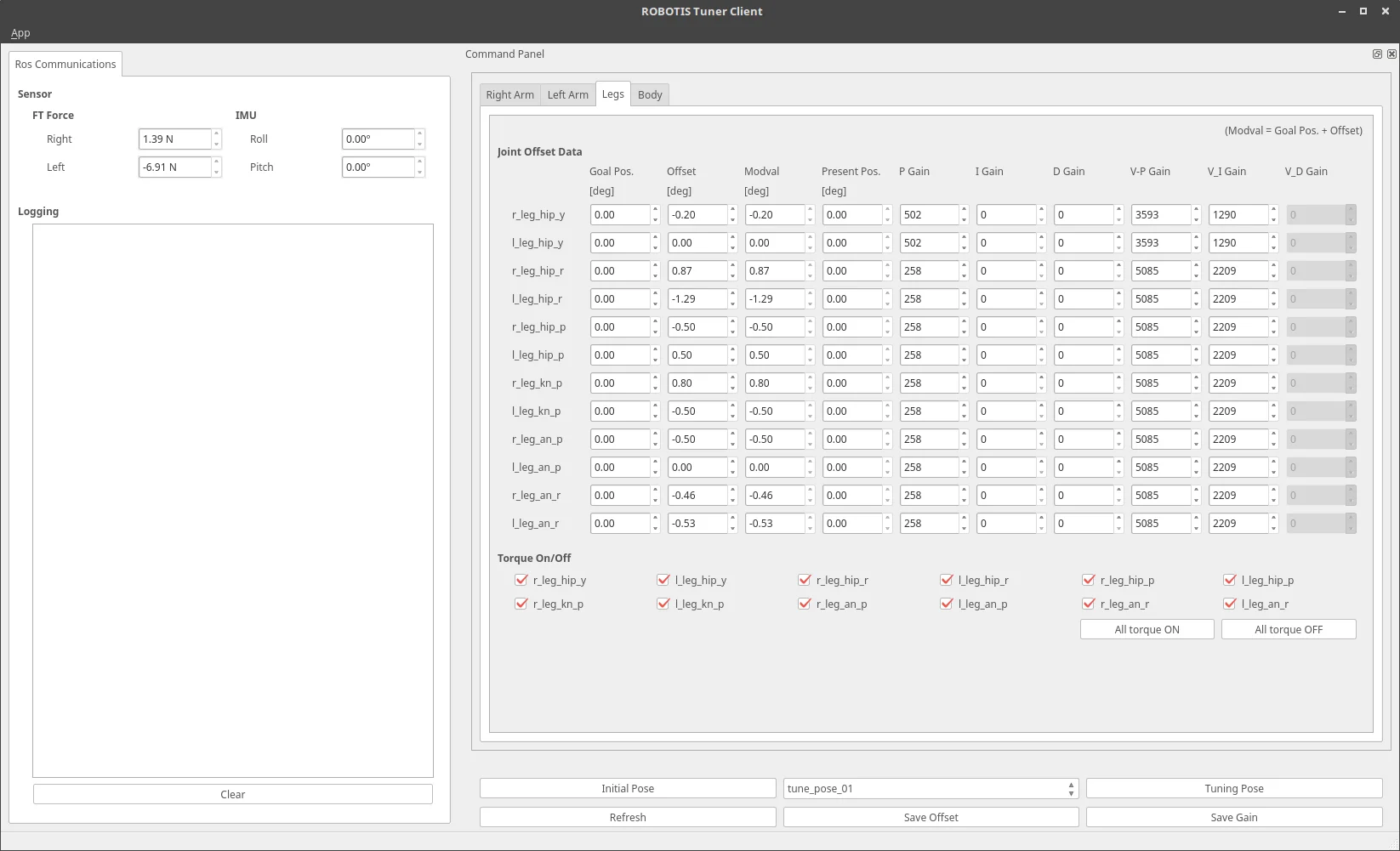
thormang3_tuner_client
The GUI Node that can adjust gain and offset of THORMANG3.
It does not need to the server, it works with thormang3_tuning_module under the thormang3 manager.
Download & Build
Reference : OPC Installation
Run
$ rosrun thormang3_tuner_client thormang3_tuner_client
ROS API
Published Topics
/robotis/tuning_module/joint_offset_data (thormang3_tuning_module_msgs/JointOffsetData)
The topic transfers Joint offset
/robotis/tuning_module/joint_gain_data (thormang3_tuning_module_msgs/JointOffsetData)
The topic transfers Joint gain
/robotis/tuning_module/torque_enable (thormang3_tuning_module_msgs/JointTorqueOnOffArray)
The topic executes Torque on/off command
/robotis/tuning_module/command (std_msgs/String)
The topic transfers other commands(save, initial posture, etc).
/robotis/tuning_module/tuning_pose (std_msgs/String)
The topic transfers pose name to tune gain.
Subscribed Topics
/robotis/tuning_module/present_joints_data (thormang3_tuning_module_msgs/JointsOffsetPositionData)
...
/robotis/sensor/imu/imu (sensor_msgs/Imu)
It shows the orientation(roll, pitch) of the robot to the client.
/robotis/sensor/ft_right_foot/scaled (geometry_msgs/WrenchStamped)
The scaled force fo direction z is used to tune the offset considering the center of weight.
/robotis/sensor/ft_left_foot/scaled (geometry_msgs/WrenchStamped)
The scaled force fo direction z is used to tune the offset considering the center of weight.
Services
/robotis/tuning_module/get_present_joint_offset_data (thormang3_tuning_module_msgs/GetPresentJointOffsetData)
The service obtains saved joint offset
Parameters
/thormang3_tuner_client/config/tm3_joint_data.yaml
joint list for making UI
Common Packages
thormang3_description
Thormang3 URDF Model
-
Make a URDF Model : URDF-ROS Wiki:http://wiki.ros.org/urdf
-
Package
- doc : document for Thormang3 joint & link information
- launch : launch file to execute Rviz
- meshes : STL files of Thormang3's each parts
- src : ROS node for Rviz to publish imaginary gripper joint
- urdf : urdf & xacro files for Thormang3 model
thormang3_gazebo
Thormang3 Gazebo Simulation
-
Gazebo with ROS : Connect to ROS:http://gazebosim.org/tutorials?cat=connect_ros
-
Package
- config : ros controller for gazebo
- launch : launch files to execute gazebo simulation
- worlds : simulation environments
Tools Packages
thormang3_offset_tuner_server
THORMANG3 Offset Tuner Node
Data related to the Offset can be Tuned, Loaded and Saved.
It is used with the thormang3_offset_tuner_client.
Download & Build
Reference : MPC Installation
Run
Execute the launch file.
$ roslaunch thormang3_offset_tuner_server thormang3_offset_tuner_server.launch
ROS API
Subscribed Topics
/robotis/base/send_tra (std_msgs/String)
The topic informs the start and end of trajectory following.
/robotis/offset_tuner/joint_offset_data (thormang3_offset_tuner_msgs/JointOffsetData)
The topic updates joint offset related parameters.
/robotis/offset_tuner/torque_enable (thormang3_offset_tuner_msgs/JointTorqueOnOffArray)
The topic transfers Torque enable/disable command for joints.
/robotis/offset_tuner/command (std_msgs/String)
The topic transfers command to the thormang3_offset_tuner_client.
- "save" : Saves current offset to yaml
- "ini_pose" : Take the initial posture for offset tuning
Services
robotis/offset_tuner/get_present_joint_offset_data (thormang3_offset_tuner_msgs/GetPresentJointOffsetData)
The service obtains current offset data from the thormang3_offset_tuner_client.
thormang3_action_editor
THORMANG3 Action Editor Node
The action file can be edited by this action editor.
The action file will be used with thormang3_action_module.
Action File
The action file is in the "thormang3_action_module/data" folder. The action file is a file that contains THORMANG3’s poses and time data.
The data is written that the positions of dynamixels which converted from original resolution to 4,095 resolution.
And the action file is binaries file you cannot view its contents directly. User can view its contents with thormang3_action_editor.
ROBOTIS currently supplies a default action file with the source code. They are located in "thormang3_action_module/data" directory.
The action file contains 256 pages. Each page can store up to 7 stages (or steps) of action data. In the default action file provided not all pages are used. User can add user's own action by using of the empty pages.
Download & Build
Reference : MPC Installation
Run
Execute the launch file on the MPC.
$ roslaunch thormang3_action_editor thormang3_action_editor.launch
UI
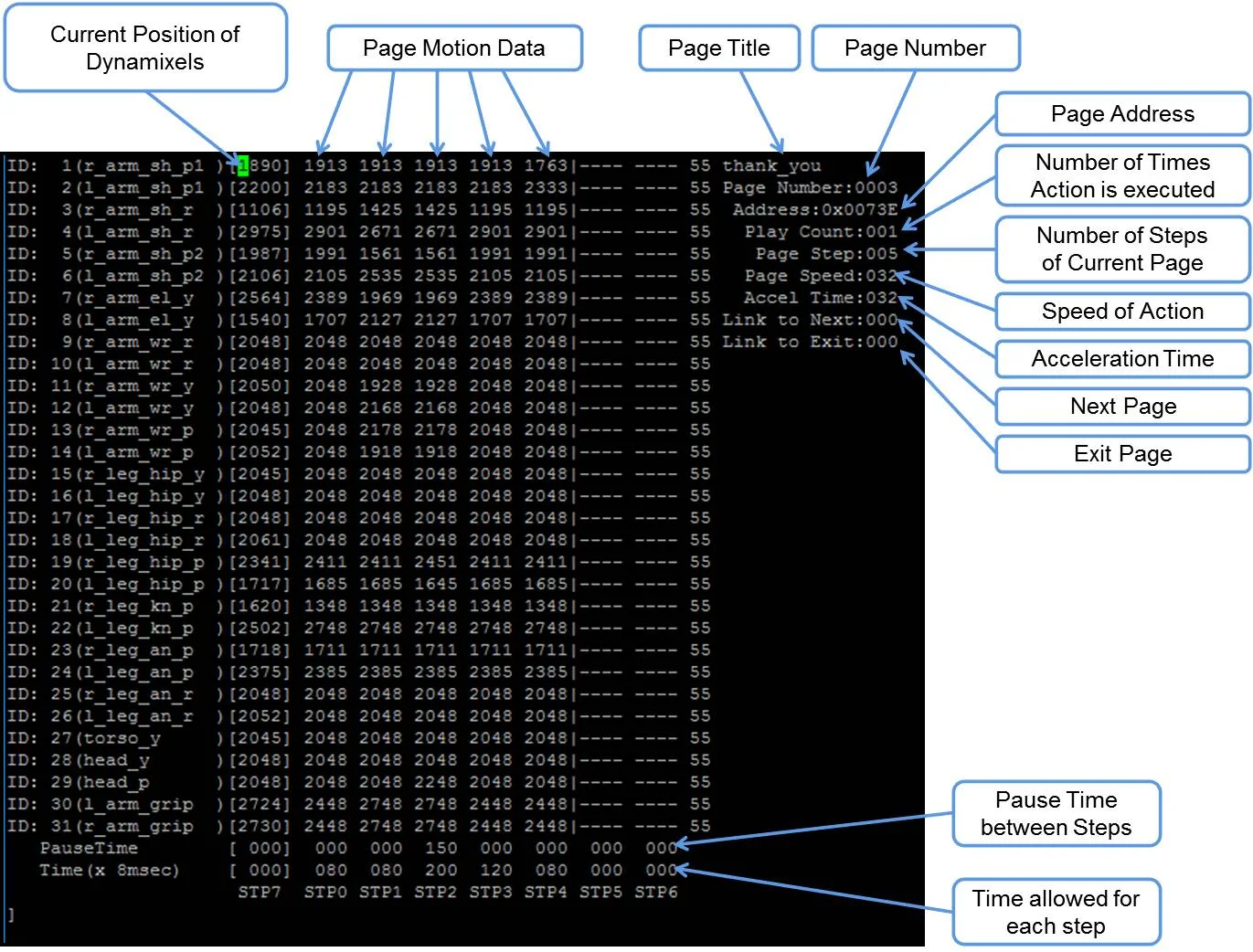
- Page number: Page number is the listed page number. If user wants to create a new action poses, user can use any empty page.
- Page title: We'd like to recommend to user that they use a page title, if they will make a new action on an empty page.
- Current position: This is the current position of dynamixels which converted from original resolution to 4,095 resolution. This data is represented by STP7 in thormang3_action_editor. Sometimes the position may read as ---- in thormang3_action_editor. This means position of the dynamixel is not being read (or its torque is off).
If user turn a dynamixel off, user cannot get current position reading until user turn it back on.
User can turn off any or all dynamixels. This is very convenient to make robot poses rather than entering position values.
For example, if user wants to make a new robot pose, user simply turns any dynamixels off, makes the robot pose, and turn the dynamixels back on at that robot pose. Once turning on, user will get the pose values. - Steps or stages: Each page can be stored up to 7 steps, from STP0 to STP6. However, some actions may be required more than 7 stages to perform completely. It can be resolved by simply using multiple pages and link them with “Next”.
- Next: “Next” indicates whether or not action continues at a different page. To continue actions, just list the page number where action is to be continued. Number 0 indicates that action does not continue onto another page (default value). Linking page does not have to the in numerical order allowing you to link from one page to any other page.
- Play Count: “Play Count” is the number of times the action of the page is to be played.
- Exit: There may be times when an action is stopped. In this case, the robot may be in an unstable position. “Exit” is much like "Next", so "Exit" should be linked to a page where THORMANG3 can return to a stable pose.if "Exit" is 0, it means that there is no link to exit page linked (default value).
TipWhen calling an action requires multiple pages, we strongly suggest that user call that action from the starting page. For example “clap” starts at page 7 and ends at page 8. This means you should call page 7 when calling “clap.” Calling the page 8 may cause the robot to perform abnormally. - STP7: "STP7" column is the current position of the dynamixels which converted to 4,095 resolution from its original resolution. "----" means that torque has been released.
- PauseTime: "PauseTime" is the pause for motion playback for step STP[x].
- Time(x 8msec) : "Time" is the time period for THORMANG3 to complete step STP[x]. Each time unit account for 8ms of time.
It is strongly advised that when user tests user’s own newly-created or edited actions, there should be small incremental changes in position, speed/time, and pause values for the sake of THORMANG3's stability.
The Contents of The Default Action File
The below table shows the contents of the default action file.
| page number | page title | brief description of page | number of pages |
|---|---|---|---|
| 1 | walki_init | initial standing pose | 1 |
| 2 | hello | greeting | 1 |
| 3 | thank_you | Thank you | 1 |
| 4 | yes | yes | 1 |
| 5 | no | no | 1 |
| 6 | fighting | fighting | 1 |
| 7 | clap | clap | 2 |
| 9 | S_H_RE | ready for shaking hands | 1 |
| 10 | S_H | shaking hands | 1 |
| 11 | S_H_END | move to initialpose fram ready pose for shaking hands | 1 |
| 12 | scanning | looking around | 1 |
| 13 | ceremony | ceremony | 1 |
Basic Command of Action Editor
After typing "help", the commend list will appear as shown below.
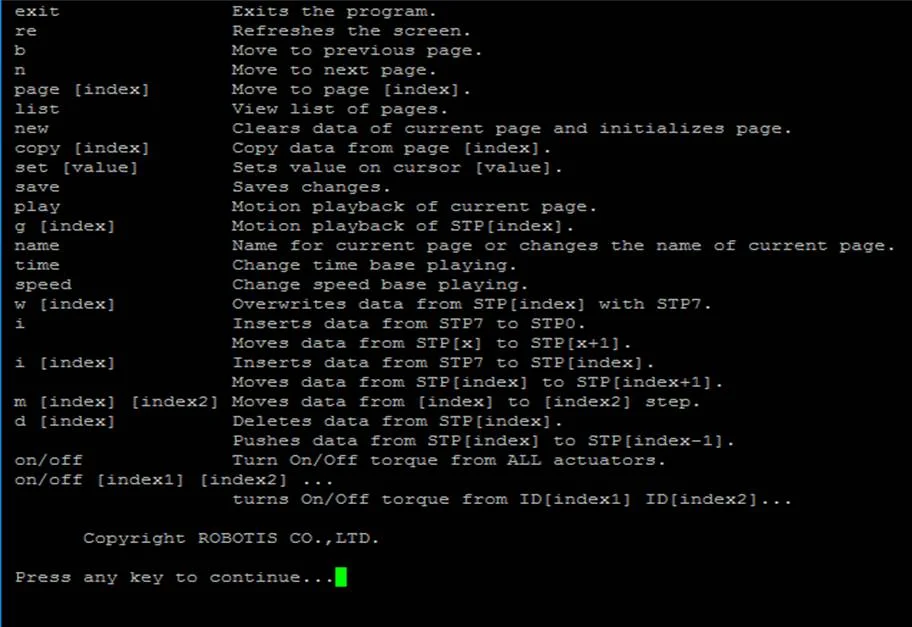
- exit: exits the program.
- re: refreshes the screen.
- b: moves to the previous page.
- n: moves to the next page.
- page [index]: moves to the [index] page. For example typing page 5 outputs data from page 5 on screen.
- list: outputs a list of pages.
- new: initializes current page by clearing all actuator position data.
- copy [index]: copies data from page [index] to current page. For example if you are on page 5 and want to copy page 9 then type copy 9.
- set [value]: sets position value on chosen actuator. For example If you want ID19 (head pan) to have a value of 512 then using the keyboard's directional keys place the cursor on ID19 and type set 512.
- save: saves any changes you've made. the saved motion file (motion_4096.bin can be found at "thormang3_action_module/data")
- play: plays motion(s) of current page.
- name: changes the name of the current page. You can view the name of the page at the top right portion of the screen. For example, page 2 is titled hello; to change the name type name and press the "ENTER" key. "name:" will appear at the bottom of the screen. Input the desired name for the page, good for instance, and press the "ENTER" key again.
- i: inserts data from STP7 to STP0. Moves data from STP[x] to STP[x + 1] if any.
- i [index]: inserts data from STP7 to STP[index]. Moves data from STP[index] to STP[index + 1] if any.
- m [index] [index2]: moves data from [index2] to [index].
- d [index]: deletes data from STP[index]. Moves data from STP[index] to STP[index - 1].
- on/off: turns on/off torque from all DYNAMIXEL's.
- on/off [index1] [index2] [index3] ... : turns torque on/off from ID[index1] ID[index2] ID[index3]. For example off 20 releases torque from ID20. Notice that STP7 for ID20 will read [----]. Typing on 20 turns torque from ID20 on again and the screen outputs the current position data of ID20.
Example Action editing with thormang3_action_editor
-
Run the thormang3_action_editor on MPC
-
Find the page where the "walking_init page" is by typing "list"
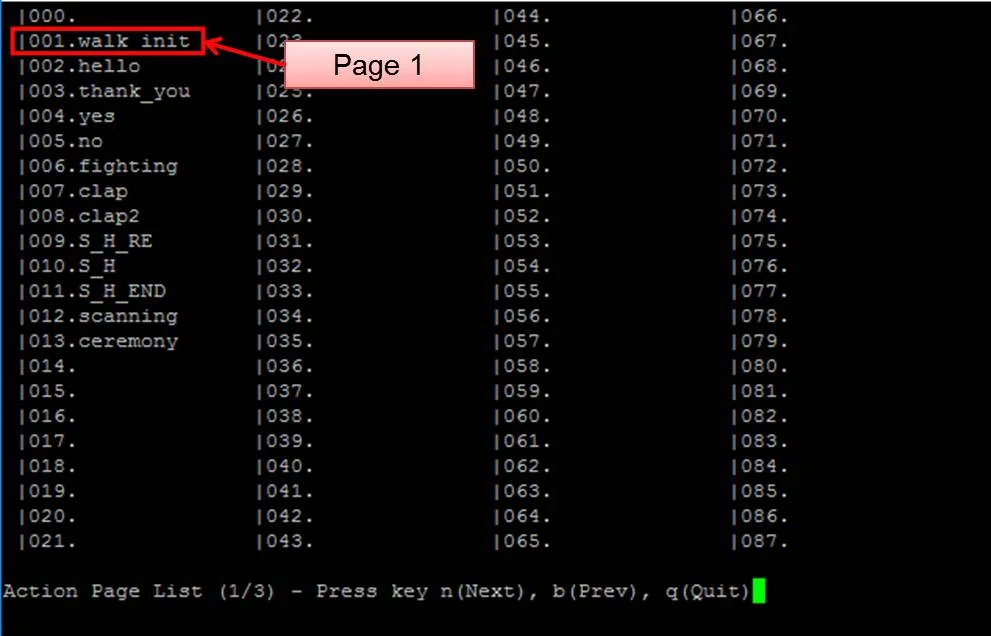
-
Exit the list and go to any blank page by typing "page [x]"(for example, page 15).
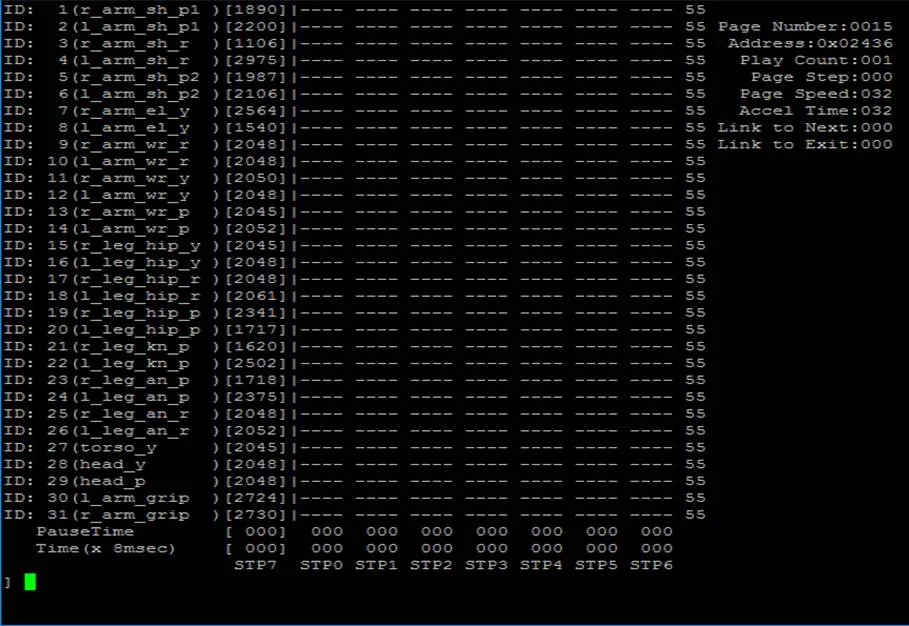
-
And copy the page 1 to page [x].
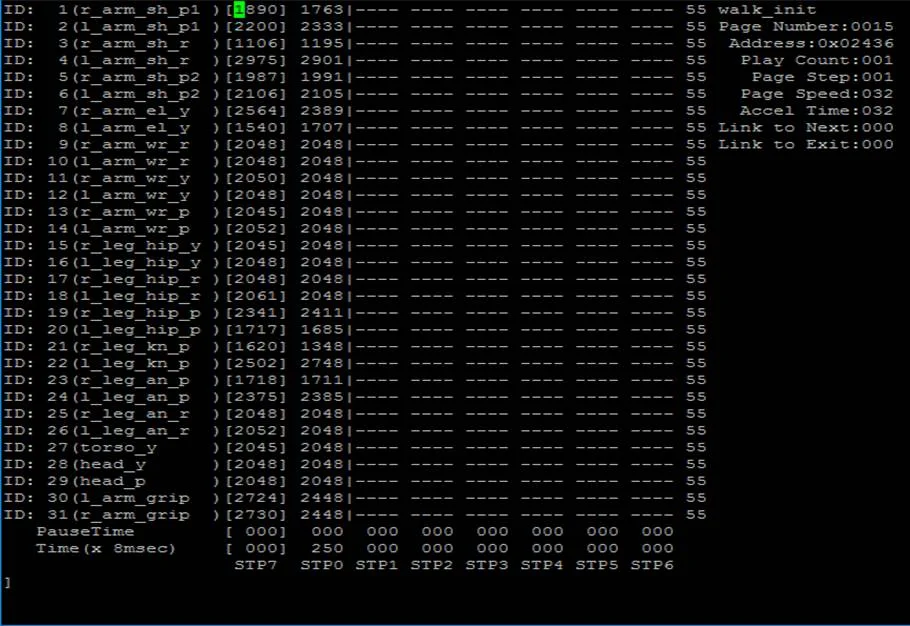
-
Go to "walking_init" pose by typing "play"
-
Turn off the torque of ID 2, 4 and 8 by typing "off 2 4 8"
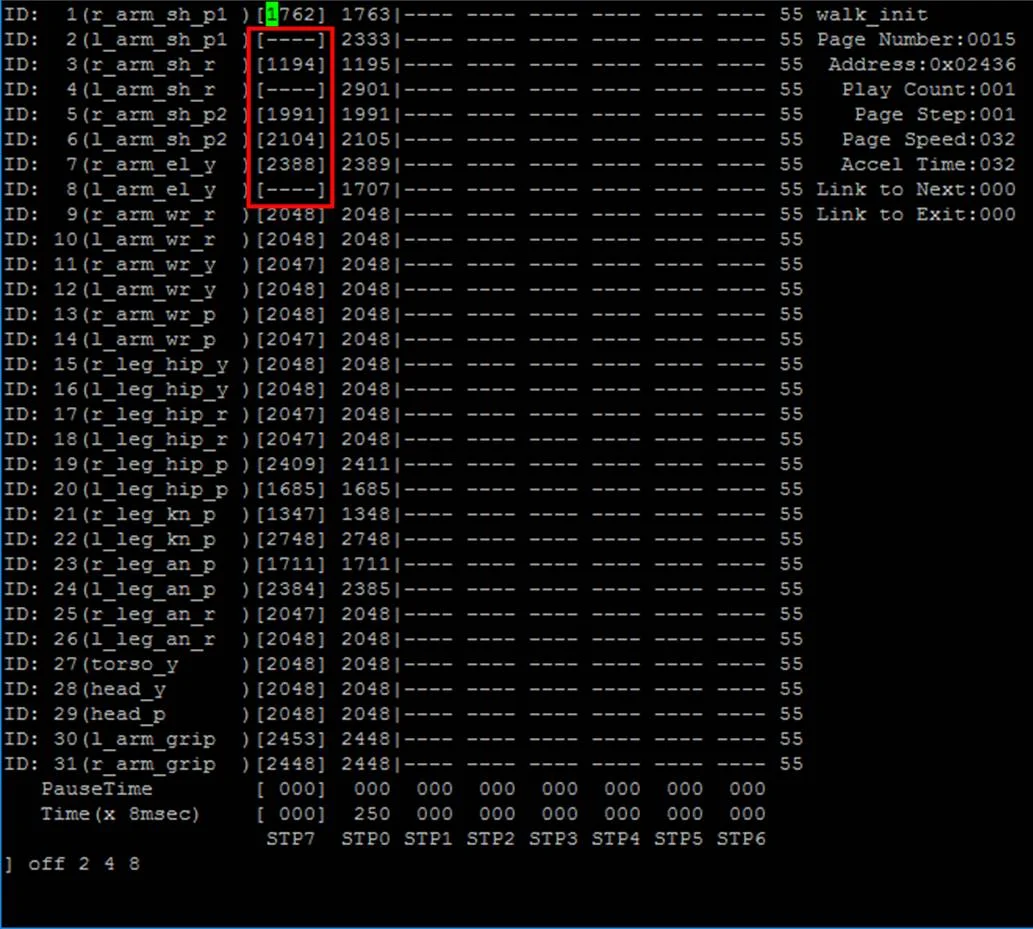
-
After getting the desired pose turn torque on again by simple typing on. And insert the pose to step 1 by typing "i 1"
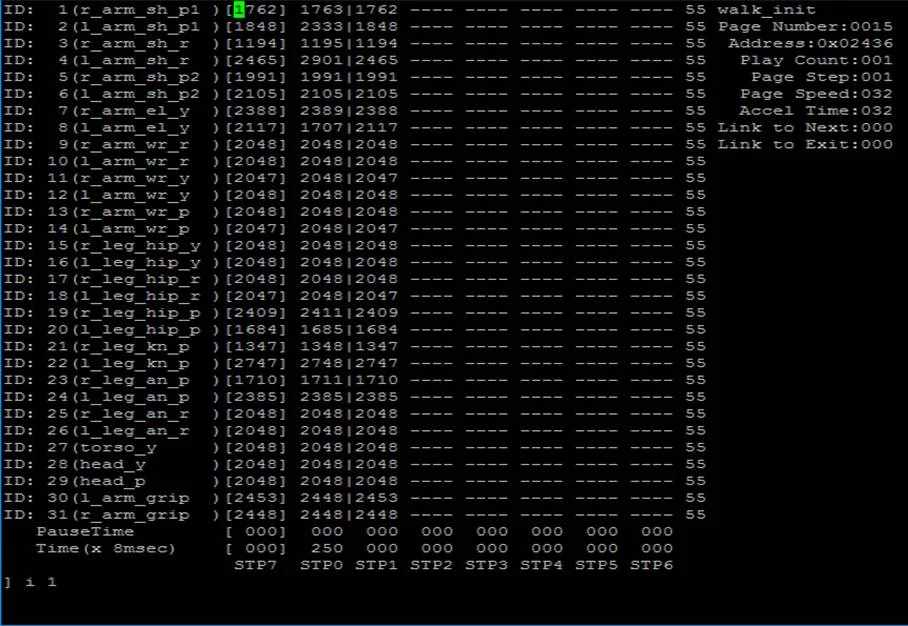
-
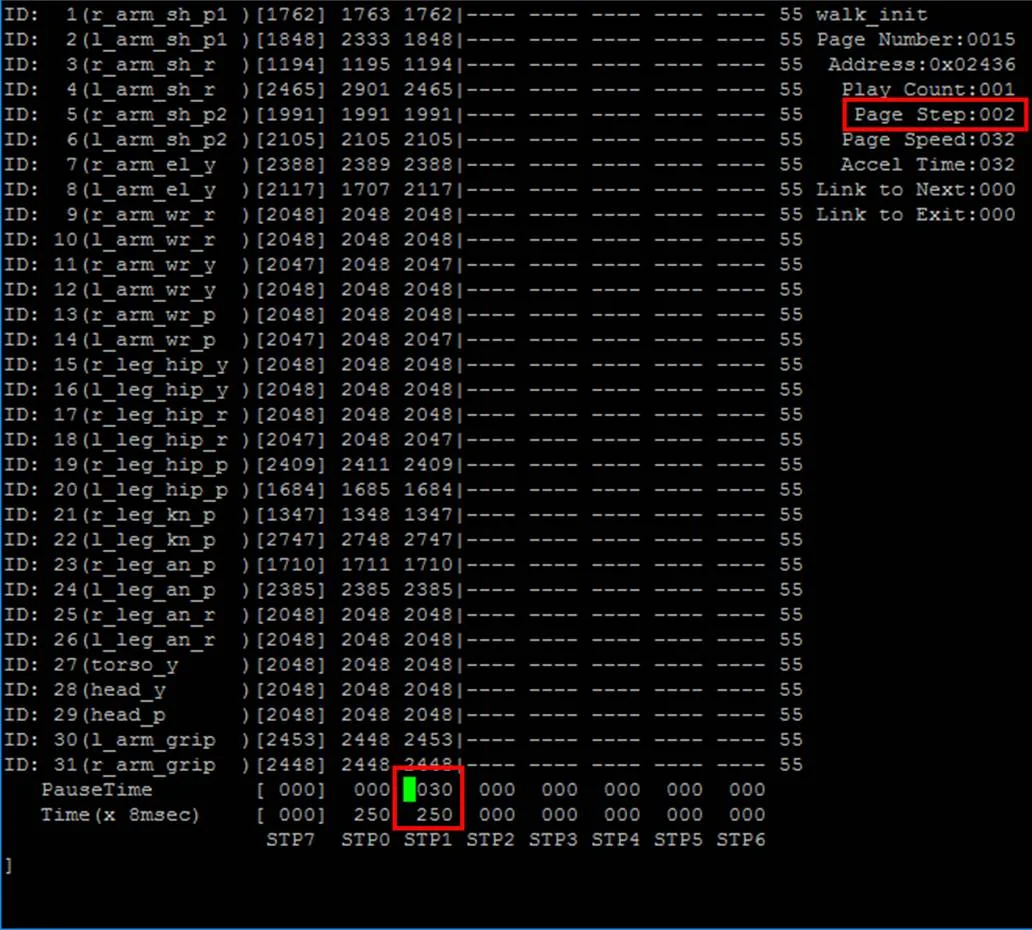
Edit "Pause Time", "Time" of STP1 and "Page Step" as shown below.
-
Type "play" and check the THORMANG3's action
THORMANG msgs Package
thormang3_action_module_msgs
The followings are Messages and Services used for the thormang3_action_module.
- ROS Message Type : StartAction.msg
- ROS Service Type : IsRunning.srv
thormang3_feet_ft_module_msgs
Message used in the thormang3_feet_ft_module.
- ROS Message Type : BothWrench.msg
thormang3_manipulation_module_msgs
Messages and Services used in the thormang3_manipulation_module
-
ROS Message Type
-
ROS Service Type
thormang3_walking_module_msgs
Messages and Services used in the thormang3_walking_module.
-
ROS Message Type
-
ROS Service Type
thormang3_head_control_module_msgs
Messages used in the thormang3_head_control_module
- ROS Message Type : HeadJointPose.msg
thormang3_offset_tuner_msgs
The following are Messages and Service used for the thormang3_offset_tuner_server and the thormang3_offset_tuner_client.
-
ROS Message Type
-
ROS Service Type
thormang3_alarm_module_msgs
The following messages alert user to overloading of both legs.
- ROS Message Type
thormang3_tuning_module_msgs
The following are Messages and Service used for the thormang3_tuning_module and the thormang3_tuner_client.
-
ROS Message Type
-
ROS Service Type