References
Router Setting
- Router Reset
To reset the router, press the front button for 10 seconds.
Front button is “MODE CHANGE” button.
-
Orange LED : Router Mode
-
Green LED : Repeater Mode
-
Red LED : AP Mode

-
Connect to Router
-
Default Wi-Fi Name:
- 2.4G : dlink-806a-z
- 5G : dlink-806a 5G-z
-
Administrator Account Setting:
- Name : admin
- Password : admin
-
-
Change Language
-
Connect to Router via Wi-Fi or Wired.
-
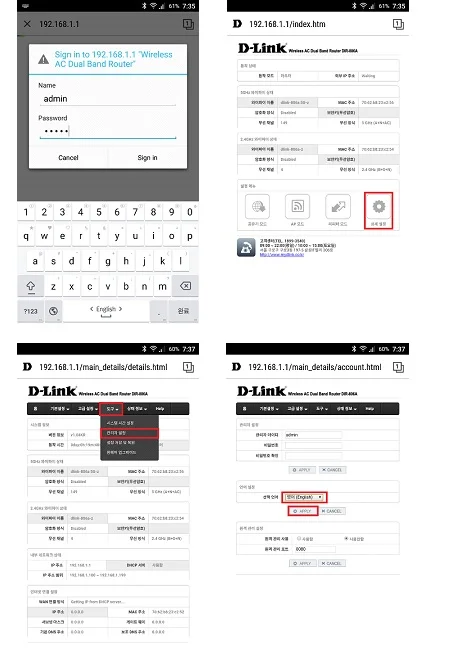
Open the browser and connect to ‘192.168.1.1’. Insert Administrator Account Info.
-
Click “상세 설정”(Details).
-
Click Menu “도구”(Tools) > “관리자 설정”(Administrator).
-
Select Language “영어(English)” and click “APPLY” button.
-
Select “예” and click “APPLY” button. The language has been changed.
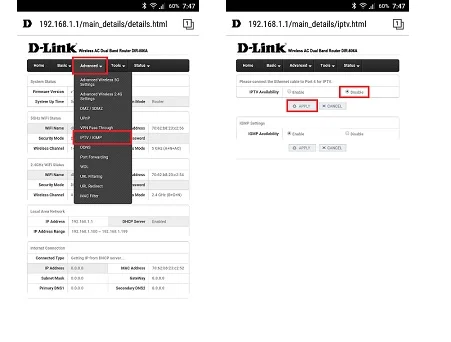
- Disable the IPTV Availability.
In order to use Port 4, IPTV Availability should be disabled.To use Port 4 must disable IPTV Availability.
-
“Advanced” > “IPTV/IGMP”
-
“IPTV Availability” > Select “Disable” > Click “APPLY” button
-
Reboot the router.
LIDAR IP Setting
-
Model : UTM-30LX-EW
-
Download IP address changing tool
https://www.hokuyo-aut.jp/02sensor/07scanner/download/products/utm-30lx-ew/ -
Reset the IP Setting
Pressing the button in the sensor’s body will reset the IP setting.-
Remove the rubber cap that covers the IP reset button.

-
Press the switch inside the hole for more than 3 seconds, using a thin stick.

-
Restart the sensor when the LED blinks, the IP setting will be completed.
The following table shows the network settings after the reset.
| Item | Description |
|---|---|
| IP | 192.168.0.10 |
| Subnet | 255.255.255.0 |
| Gateway address | 192.168.0.1 |
| TCP/IP Port | 10940 |
- Change the IP Setting
-
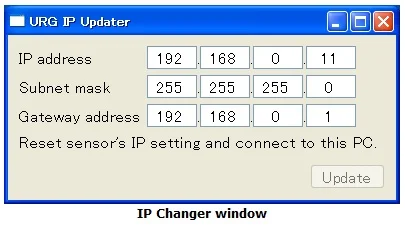
Below is the screen shot of IP changer’s screen shot.
-
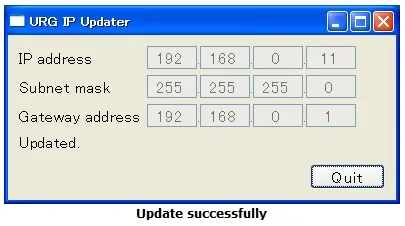
Change the IP address and push “Update” button. (The “Update” button can be pushed only when the sensor is connected.)
-
System Block Diagram
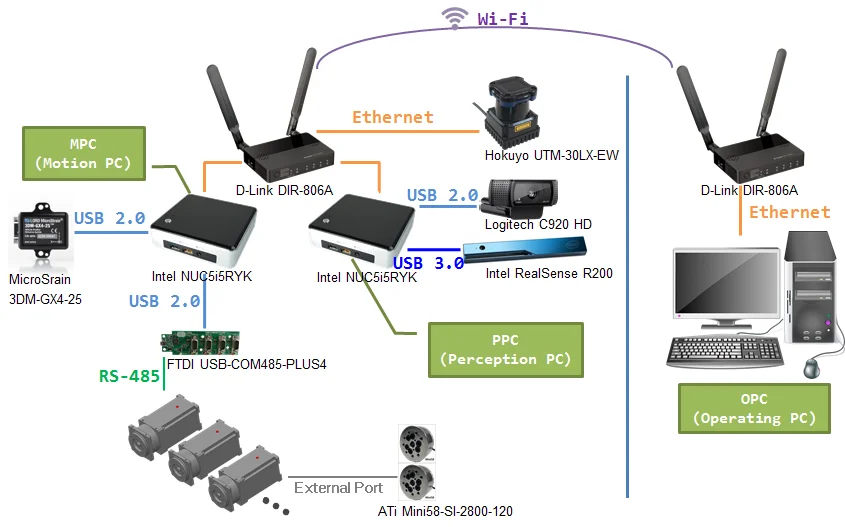
Technical Specifications
- PC

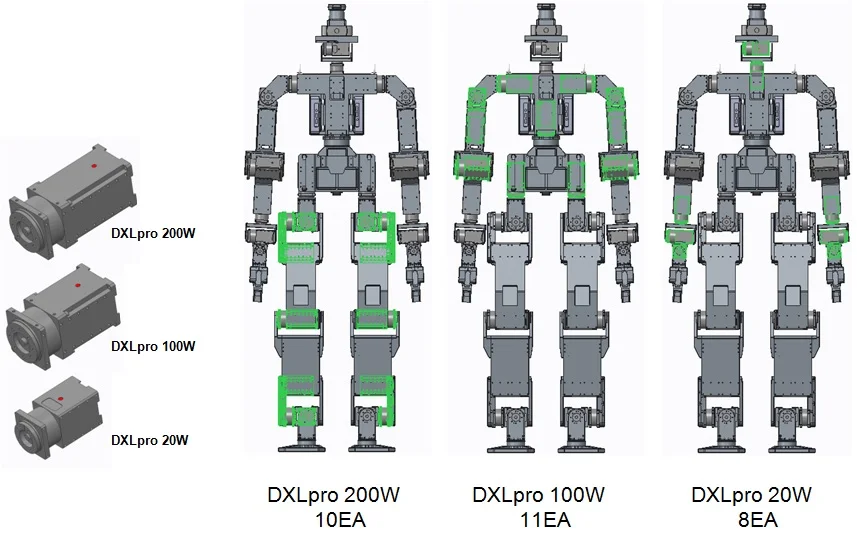
- Actuators
-
H54-200-S500-R x10
-
H54-100-S500-R x11
-
- Sensors
-
6-axis force-torque sensor(ATi Mini58-SI-2800-120)

-
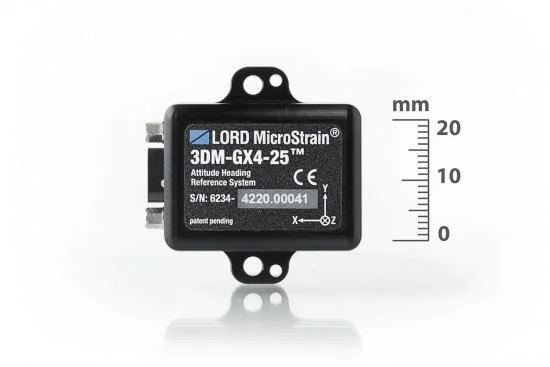
IMU sensor(MicroSrain 3DM-GX4-25)
-
LIDAR(Hokuyo UTM-30LX-EW)

-
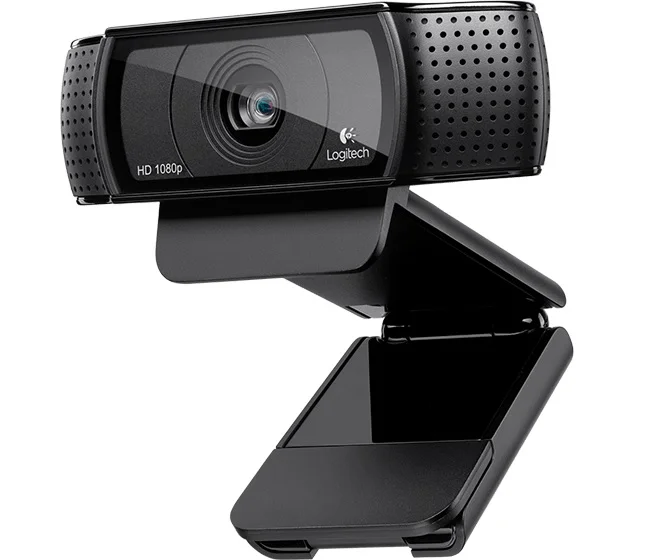
HD Camera(Logitech C920 HD)
-
Depth camera(Intel RealSense R200)

-
- Batteries
-
LiPo 22.2V, 22000mAh x 1EA(http://www.maxamps.com/proddetail.php?prod=Lipo-22000-222-Pack)
xt60 plug
-
LiPo 18.5V, 11000mAh x 1EA(http://www.maxamps.com/proddetail.php?prod=Lipo-11000-185-Pack)
no plug-12awg
-
-
Chargers(hitec smart charger h4, hitec e power box 30a)
http://hitecrcd.com/products/chargers/dcdc-chargers/h4-dcdc-four-port-multi-charger/producthttp://hitecrcd.com/products/chargers/epowerbox-30-amp-power-supply/product

ID Map
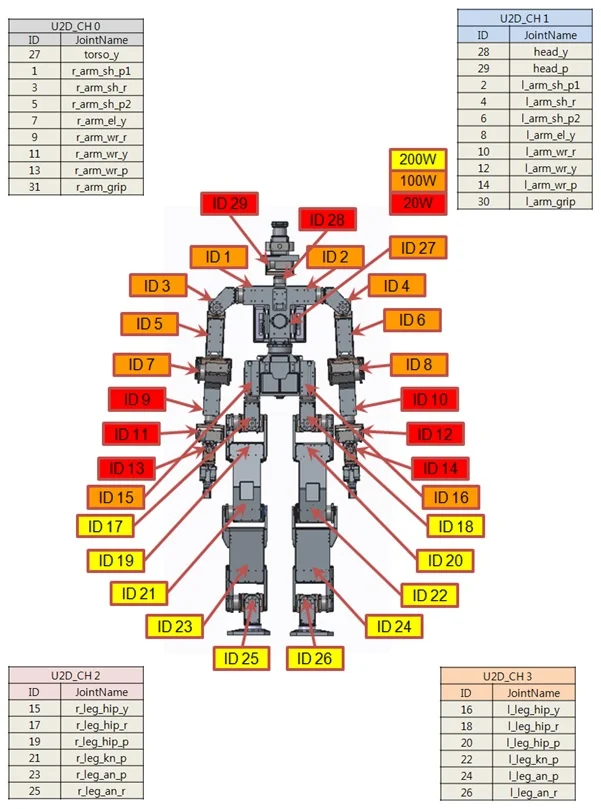
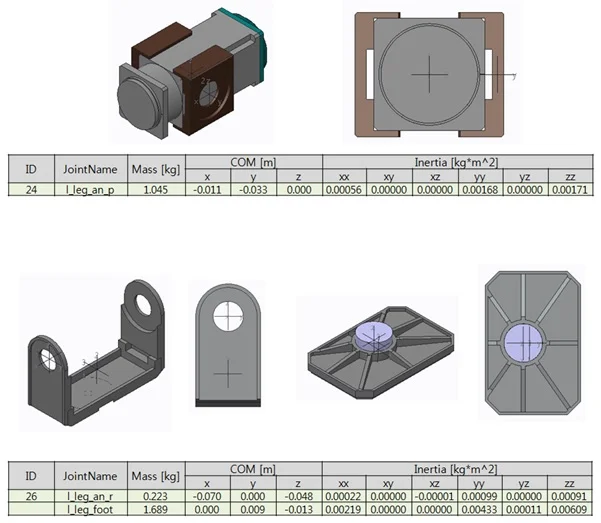
Physical Properties
Link Measurements
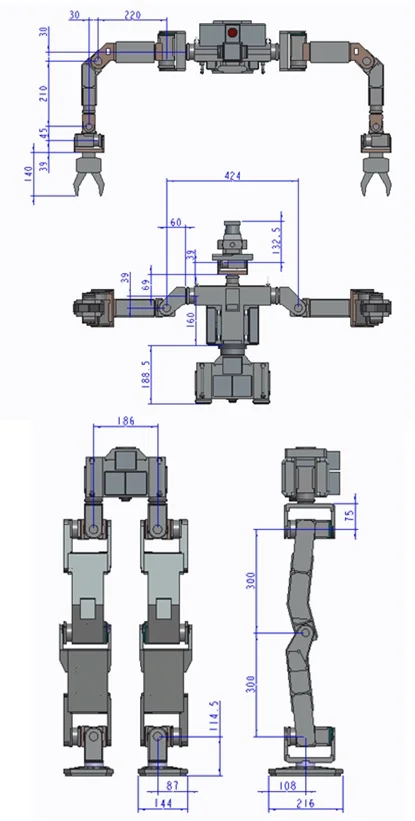
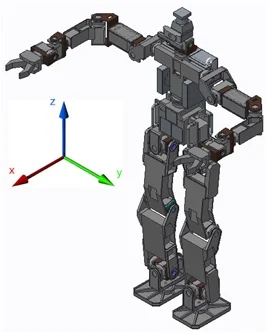
| body | x | y | z |
|---|---|---|---|
| Ground-origin | - | - | 807.5 |
| origin-27 | 0 | 0 | 170.5 |
| head | x | y | z |
|---|---|---|---|
| 27-28 | 0 | 0 | 229 |
| 28-29 | 0 | -45 | 39 |
| 29-cam | 68.2 | 45 | 56 |
| 29-lidar | 0 | 45 | 106.75 |
| 29-decam | 68.9 | 45 | 17 |
| L_Arm | x | y | z | R_Arm | x | y | z |
|---|---|---|---|---|---|---|---|
| 27-2 | 0 | 152 | 160 | 27-1 | 0 | -152 | 160 |
| 2-4 | 57 | 60 | -39 | 1-3 | 57 | -60 | -39 |
| 4-6 | -57 | 33 | -0 | 3-5 | -57 | -33 | 0 |
| 6-8 | 30 | 187 | 57 | 5-7 | 30 | -187 | 57 |
| 8-10 | 171 | 30 | -57 | 7-9 | 171 | -30 | -57 |
| 10-12 | 39 | 0 | 45 | 9-11 | 39 | 0 | 45 |
| 12-14 | 45 | -45 | -45 | 11-13 | 45 | 45 | -45 |
| 14-30 | 87.7 | -58.3 | 0 | 13-31 | 87.7 | -31.7 | 0 |
| 30-30_2 | 0 | -26.6 | 0 | 31-31_2 | 0 | -26.6 | 0 |
| L_Leg | x | y | z | R_Leg | x | y | z |
|---|---|---|---|---|---|---|---|
| base-16 | 0 | 93 | -18 | base-15 | 0 | -93 | -18 |
| 16-18 | 57 | 0 | -75 | 15-17 | 57 | 0 | -75 |
| 18-20 | -57 | 33 | 0 | 17-19 | -57 | 33 | 0 |
| 20-22 | 0 | 60 | -300 | 19-21 | 0 | -60 | -300 |
| 22-24 | 0 | -60 | -300 | 21-23 | 0 | 60 | -300 |
| 24-26 | 57 | -33 | 0 | 23-25 | 57 | 33 | 0 |
| 26-26_2 | -57 | 0 | -87 | 25-25_2 | -57 | 0 | -87 |
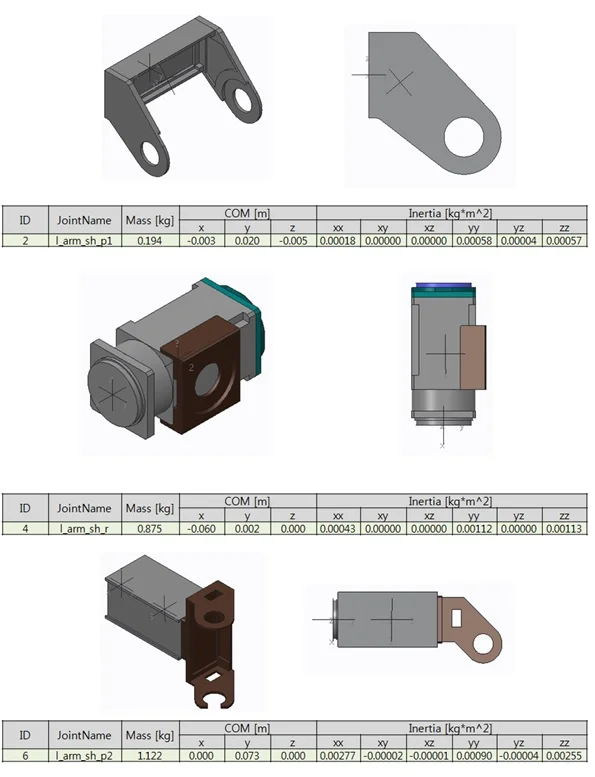
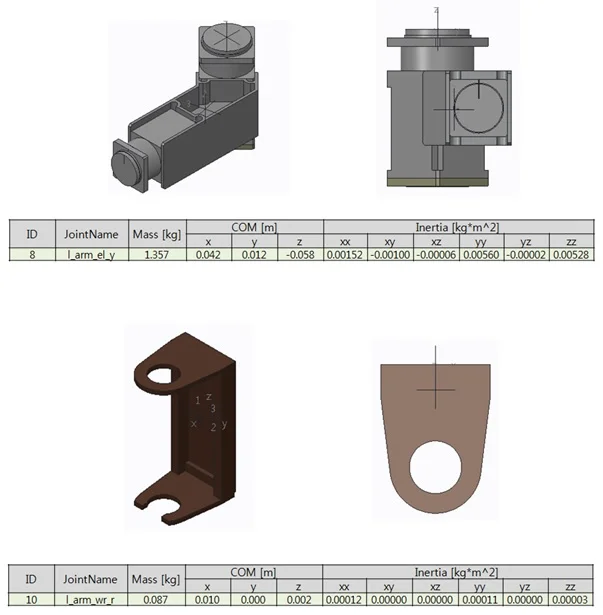
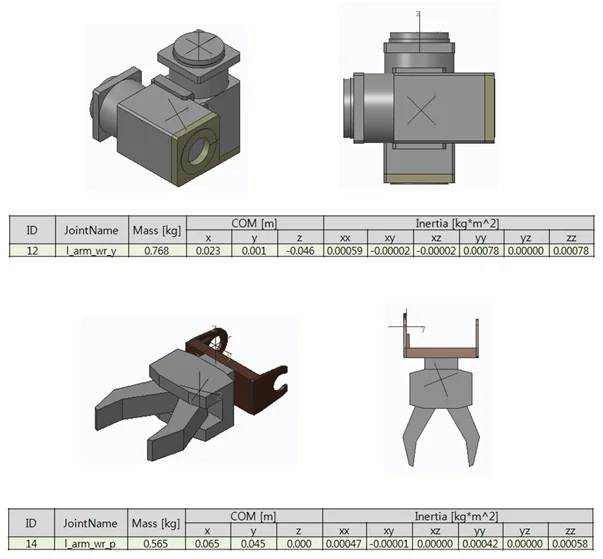
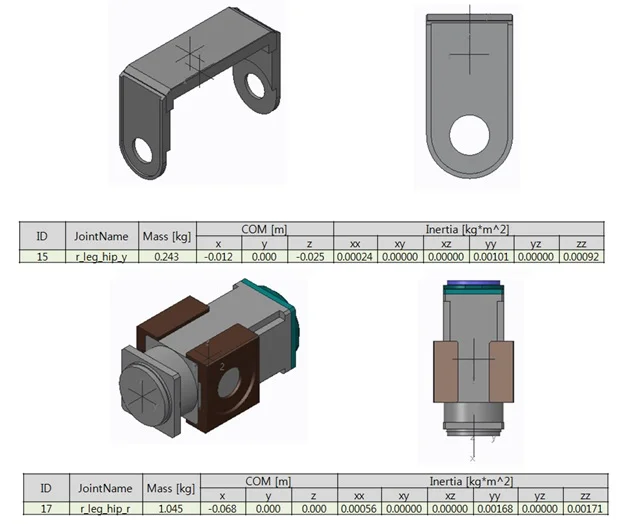
Mass & Inertia
Whole robot
- Mass = 41.6 kg
Body
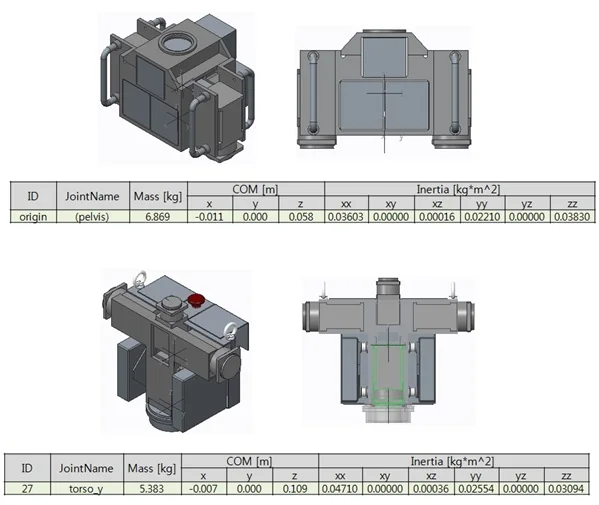
Head
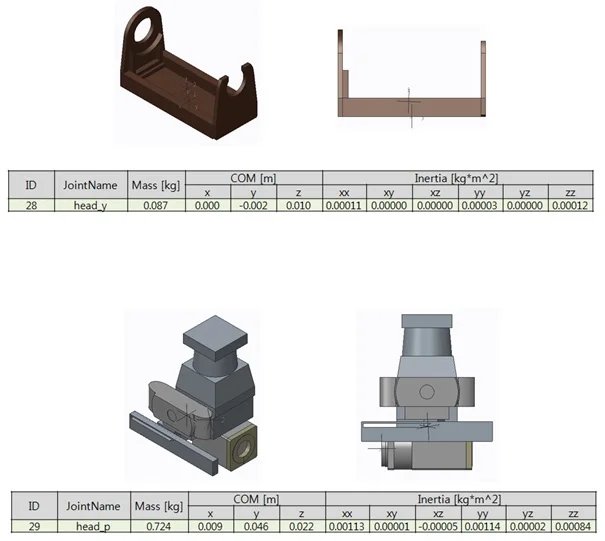
Right Arm
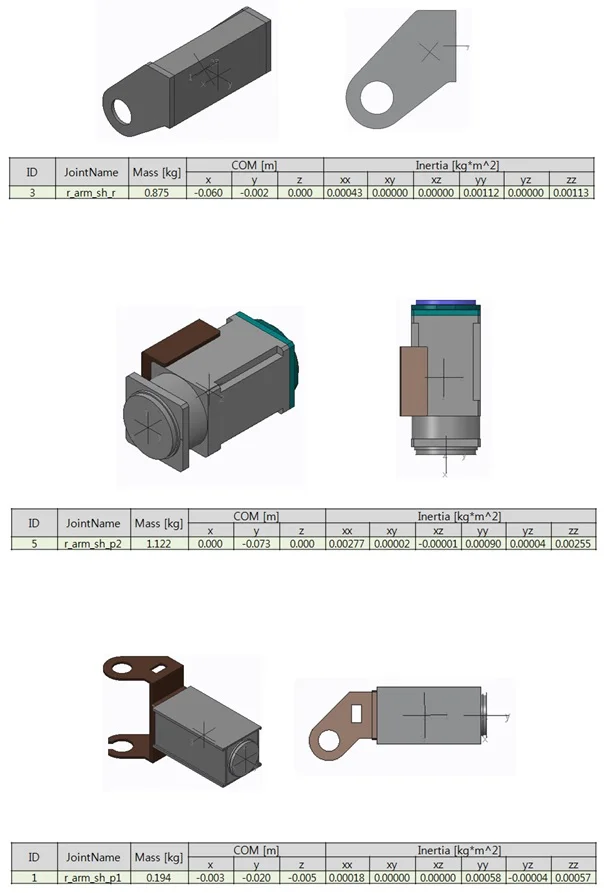
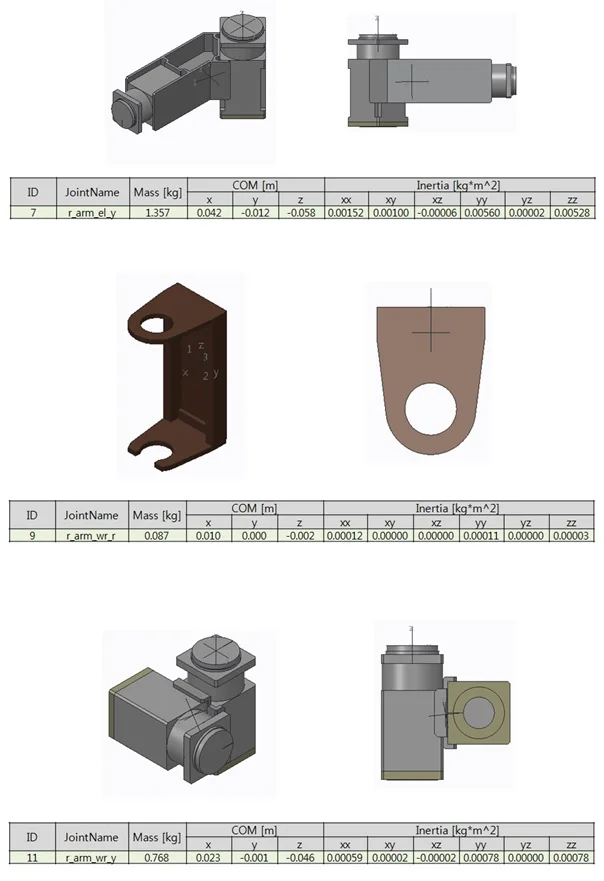
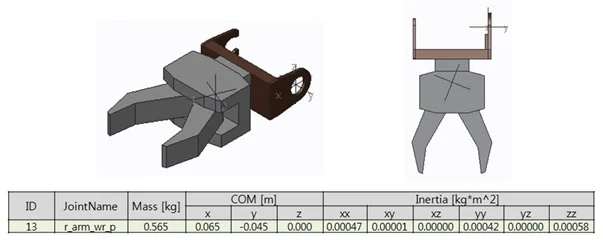
Left Arm
Right Leg
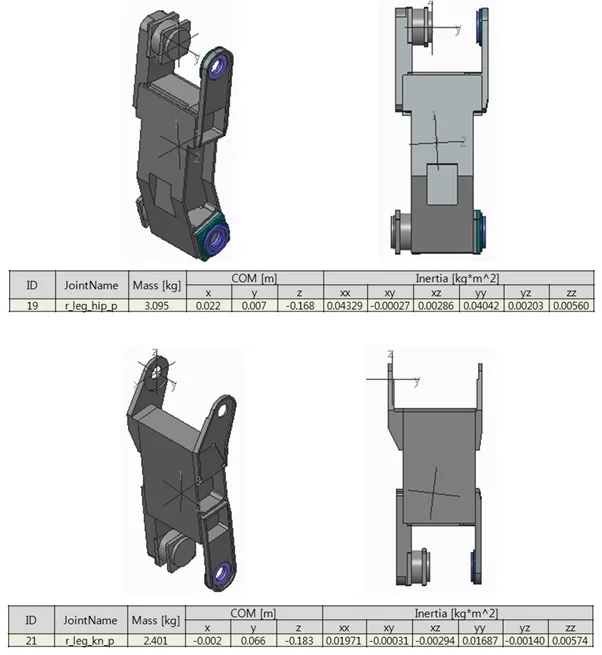
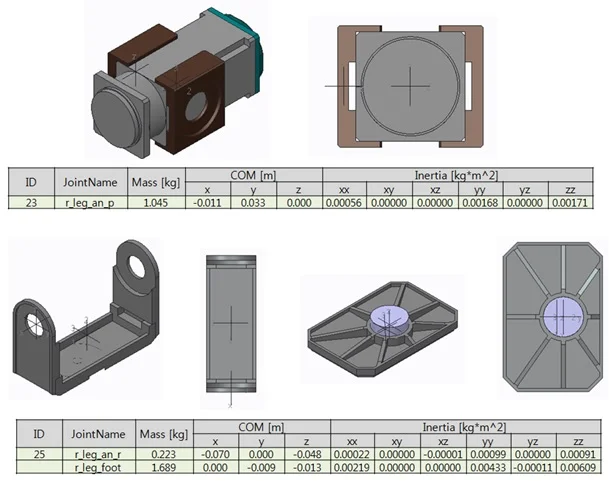
Left Leg
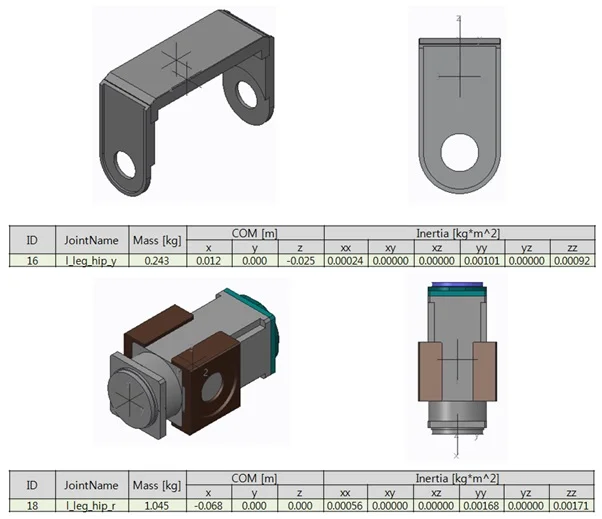
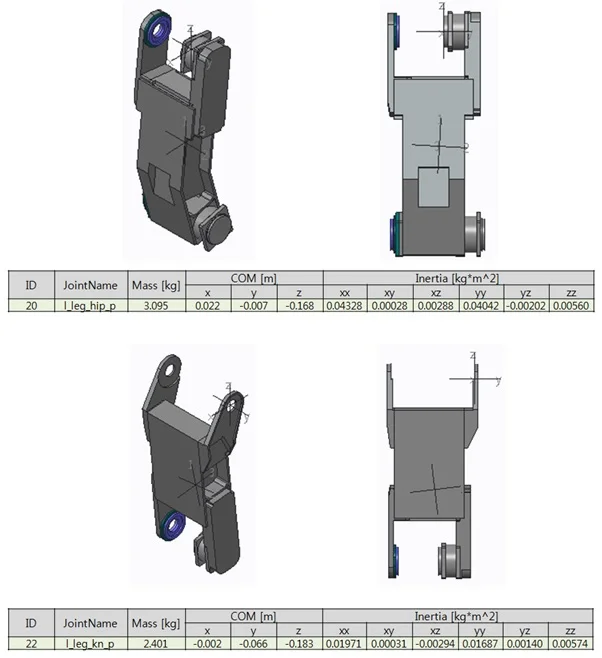
Joint & Angle Limit

Head Joint
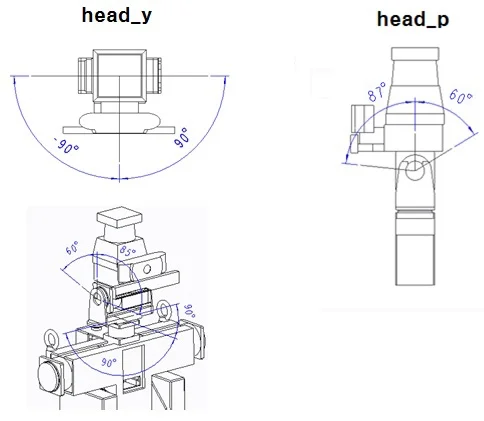
| Id | Name | Range(degrees) |
|---|---|---|
| 28 | head_y(Z) | -90 to 90 |
| 29 | head_p(Y) | -60 to 87 |
Body Joint
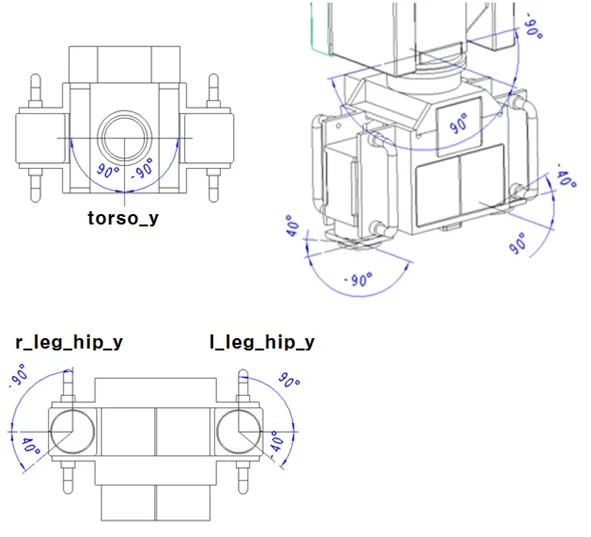
| Id | Name | Range(degrees) |
|---|---|---|
| 27 | torso_y(Z) | -90 to 90 |
| 15 | r_leg_hip_y(Z) | -90 to 40 |
| 16 | l_leg_hip_y(Z) | -40 to 90 |
Right_Arm Joint

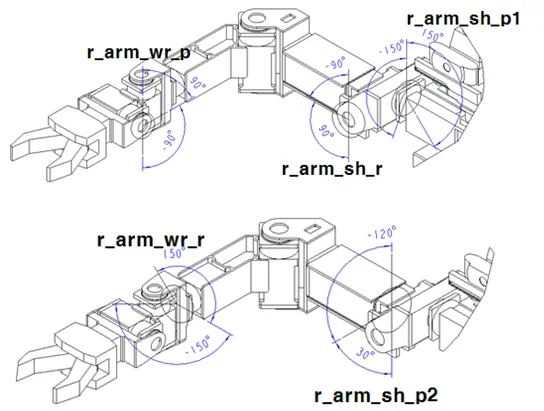
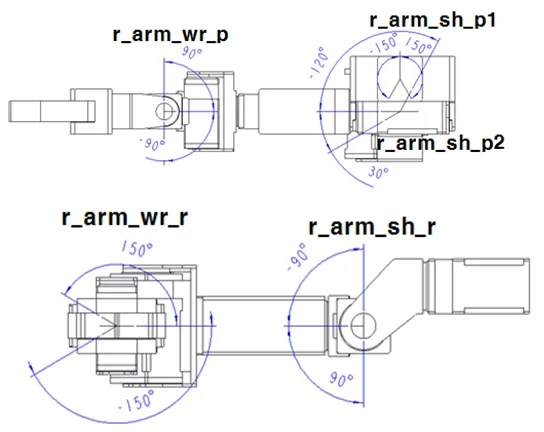
| Id | Name | Range(degrees) |
|---|---|---|
| 1 | r_arm_sh_p1(Y) | -150 to 150 |
| 3 | r_arm_sh_r(X) | -90 to 90 |
| 5 | r_arm_sh_p2(Y) | -120 to 30 |
| 7 | r_arm_el_y(Z) | -90 to 45 |
| 9 | r_arm_sh_wr_r(X) | -150 to 150 |
| 11 | r_arm_sh_wr_y(Z) | -90 to 90 |
| 13 | r_arm_sh_wr_p(Y) | -90 to 90 |
Left_Arm Joint

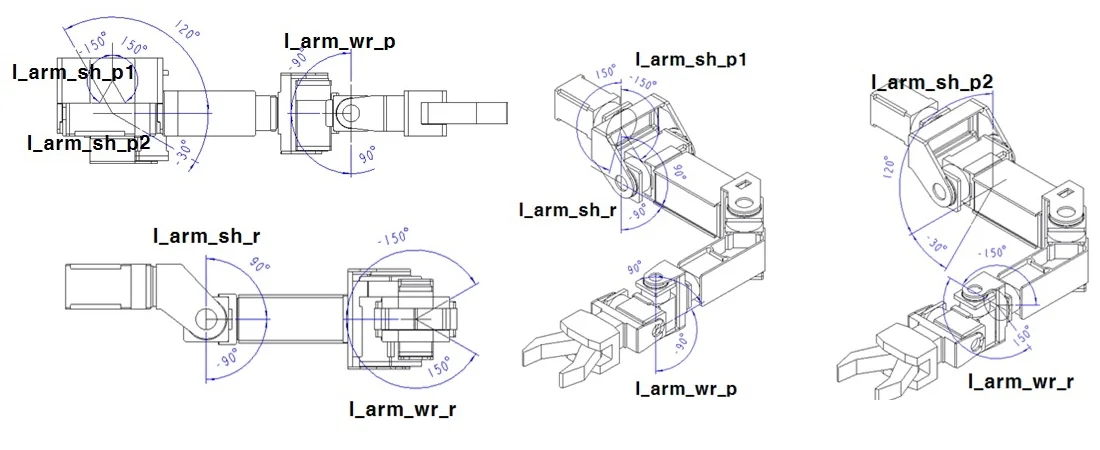
| Id | Name | Range(degrees) |
|---|---|---|
| 2 | l_arm_sh_p1(Y) | -150 to 150 |
| 4 | l_arm_sh_r(X) | -90 to 90 |
| 6 | l_arm_sh_p2(Y) | -30 to 120 |
| 8 | l_arm_el_y(Z) | -45 to 90 |
| 10 | l_arm_sh_wr_r(X) | -150 to 150 |
| 12 | l_arm_sh_wr_y(Z) | -90 to 90 |
| 14 | l_arm_sh_wr_p(Y) | -90 to 90 |
Right_Leg Joint
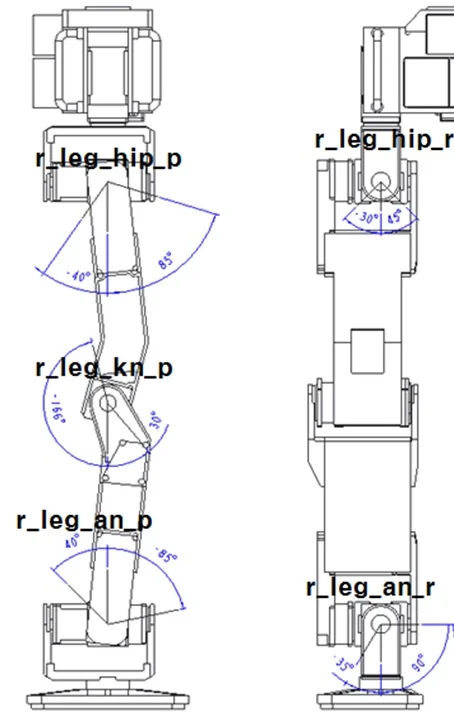
| Id | Name | Range(degrees) |
|---|---|---|
| 17 | r_leg_hip_r(X) | -30 to 45 |
| 19 | r_leg_hip_p(Y) | -40 to 85 |
| 21 | r_leg_kn_p(Y) | -166 to 30 |
| 23 | r_leg_an_p(Y) | -85 to 40 |
| 25 | r_leg_an_r(X) | -35 to 90 |
Left_Leg Joint
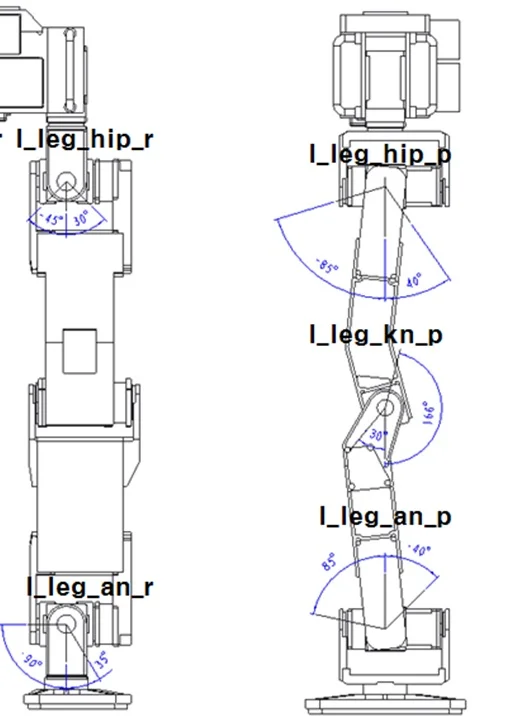
| Id | Name | Range(degrees) |
|---|---|---|
| 18 | l_leg_hip_r(X) | -45 to 30 |
| 20 | l_leg_hip_p(Y) | -85 to 40 |
| 22 | l_leg_kn_p(Y) | -30 to 166 |
| 24 | l_leg_an_p(Y) | -40 to 85 |
| 26 | l_leg_an_r(X) | -90 to 35 |