Applications
Master and Slave
- Jazzy
- Humble
- Noetic
- Arduino
Not supported
Not supported
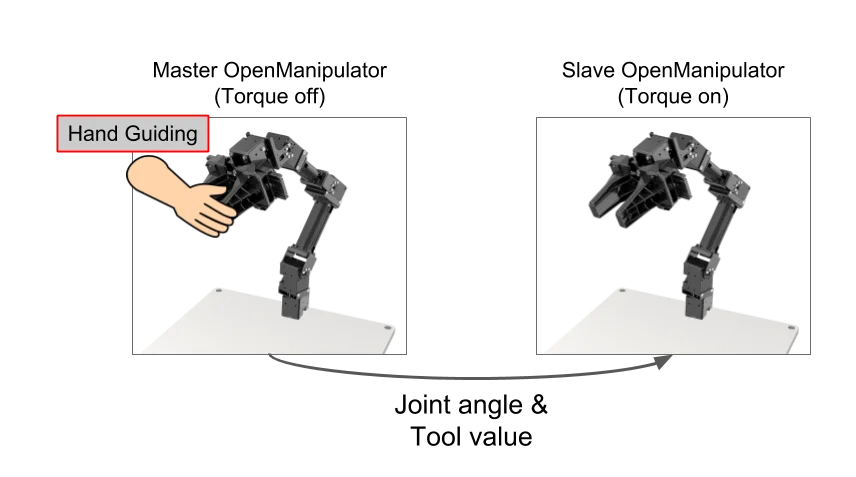
In this example, if the user is holding the master OpenMANIPULATOR, the slave OpenMANIPULATOR-X moves like master robot. Recording mode allows you to save the trajectory as you move the master OpenMANIPULATOR-X and play it back to the slave OpenMANIPULATOR.
Master and Slave is not supported in Arduino
Setup OpenMANIPULATOR-X
- Noetic
Since you need to control two OpenManipulators on one PC, use two U2D2s and two OpenManipulators to connect as shown below.
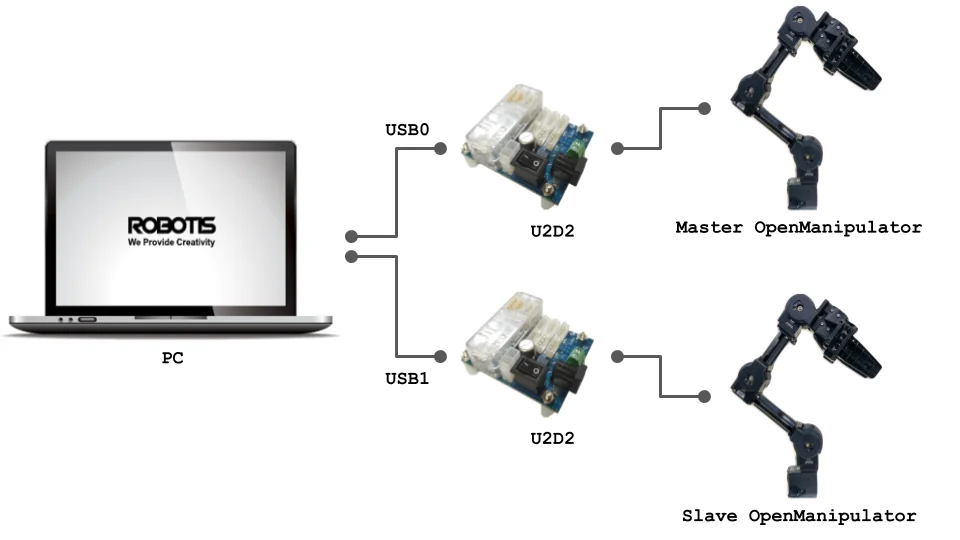
Master OpenMANIPULATOR-X
Master OpenMANIPULATOR-X is a robot that is controlled by the user. This is easy to move because no torque is applied to dynamixel. DYNAMIXEL of master OpenMANIPULATOR-X sets the ID as below and the baudrate as 1,000,000 bps.
| Name | DYNAMIXEL ID |
|---|---|
| Joint 1 | 21 |
| Joint 2 | 22 |
| Joint 3 | 23 |
| Joint 4 | 24 |
| Gripper | 25 |
Slave OpenMANIPULATOR-X
Slave OpenMANIPULATOR-X moves synchronously with Master OpenMANIPULATOR. DYNAMIXEL of slave OpenMANIPULATOR-X sets the ID as below and the baudrate as 1,000,000 bps. This is the same as the default OpenMANIPULATOR-X setting.
| Name | DYNAMIXEL ID |
|---|---|
| Joint 1 | 11 |
| Joint 2 | 12 |
| Joint 3 | 13 |
| Joint 4 | 14 |
| Gripper | 15 |
Install Package
- Noetic
Run the following command in a terminal window.
$ cd ~/catkin_ws/src/
$ git clone https://github.com/ROBOTIS-GIT/open_manipulator_applications.git
$ cd ~/catkin_ws && catkin_make
If the catkin_make command has been completed without any errors, all the preparations are done.
Execute Example
- Noetic
WARNING :
Please check each joint position before running OpenMANIPULATOR-X.
The manipulator will not operate if any joint is out of operable range.
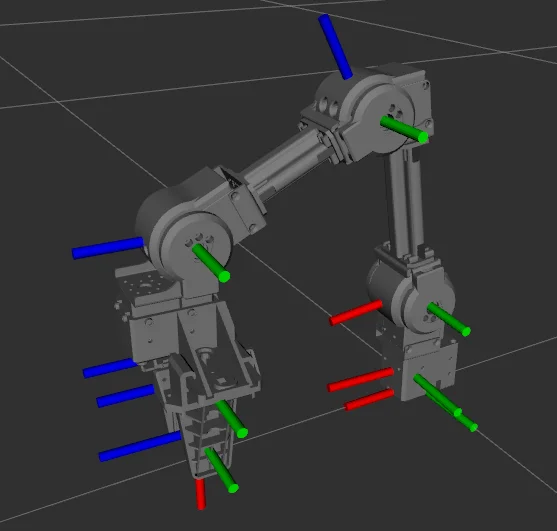
The following image describes the recommended pose of OpenMANIPULATOR-X at start up.
Please adjust the pose before the torque is turned on by the controller.
- Open a new terminal and enter the following command to run the controller for the Slave OpenMANIPULATOR-X.
Thedynamixel_usb_portis a parameter that sets the port of the slave OpenMANIPULATOR-X.
Please check your OS and use the appropriate usb port assigned to the U2D2.
$ roslaunch open_manipulator_controller open_manipulator_controller.launch dynamixel_usb_port:=/dev/ttyUSB0
-
If the slave OpenMANIPULATOR-X controller is launched successfully, the terminal will print the following message.
SUMMARY========PARAMETERS* /open_manipulator_controller/control_period: 0.01* /open_manipulator_controller/using_platform: True* /rosdistro: noetic* /rosversion: 1.15.9NODES/open_manipulator_controller (open_manipulator_controller/open_manipulator_controller)auto-starting new masterprocess[master]: started with pid [2049]ROS_MASTER_URI=http://localhost:11311setting /run_id to 60ac9f42-fa5b-11eb-a3d8-ef395547902cprocess[rosout-1]: started with pid [2059]started core service [/rosout]process[open_manipulator_controller-2]: started with pid [2062]port_name and baud_rate are set to /dev/ttyUSB0, 1000000Joint Dynamixel ID : 11, Model Name : XM430-W350Joint Dynamixel ID : 12, Model Name : XM430-W350Joint Dynamixel ID : 13, Model Name : XM430-W350Joint Dynamixel ID : 14, Model Name : XM430-W350Gripper Dynamixel ID : 15, Model Name :XM430-W350[INFO] Succeeded to init /open_manipulator_controller -
Open another terminal and enter the following command to run the Master OpenMANIPULATOR-X controller.
Theusb_portis a parameter that sets the port of the master OpenMANIPULATOR-X.
Please check your OS and use the appropriate serial port assigned to the U2D2.
$ roslaunch open_manipulator_master_slave open_manipulator_master.launch usb_port:=/dev/ttyUSB1
-
If the master OpenMANIPULATOR-X controller has been launched successfully, the terminal will print the following message.
SUMMARY========PARAMETERS* /open_manipulator/open_manipulator_master/gripper_id: 25* /open_manipulator/open_manipulator_master/joint1_id: 21* /open_manipulator/open_manipulator_master/joint2_id: 22* /open_manipulator/open_manipulator_master/joint3_id: 23* /open_manipulator/open_manipulator_master/joint4_id: 24* /open_manipulator/open_manipulator_master/service_call_period: 0.01* /rosdistro: noetic* /rosversion: 1.15.9NODES/open_manipulator/open_manipulator_master (open_manipulator_master_slave/open_manipulator_master)ROS_MASTER_URI=http://localhost:11311process[open_manipulator/open_manipulator_master-1]: started with pid [32026]Joint Dynamixel ID : 21, Model Name : XM430-W350Joint Dynamixel ID : 22, Model Name : XM430-W350Joint Dynamixel ID : 23, Model Name : XM430-W350Joint Dynamixel ID : 24, Model Name : XM430-W350Gripper Dynamixel ID : 25, Model Name :XM430-W350 -
The following message will appear in the terminal. Current control mode and robot status(joint angle, tool position) will be updated.
-----------------------------Control Your OpenMANIPULATOR!-----------------------------Present Control ModeMaster - Slave Mode-----------------------------1 : Master - Slave Mode2 : Start Recording Trajectory3 : Stop Recording Trajectory4 : Play Recorded Trajectory-----------------------------Present Joint Angle J1: -0.170 J2: 0.367 J3: -0.046 J4: 0.959Present Tool Position: 0.000----------------------------- -
Four control modes are available. Please select and enter the number in the terminal.
1: Master-Slave Mode- Master robot and slave robot move synchronously.
2: Start Recording Trajectory- Master robot and slave robot move synchronously and the controller records the moving trajectory.
3: Stop Recording Trajectory- Ends the recording.
4: Play Recorded Trajectory- The trajectory recorded in the 2nd mode is reproduced only by the slave robot.
OpenCR Teaching
This controller is not compatible with ROS, but runs on the OpenCR as a standalone controller.