[ROS] Controller Package
NOTE :
- The test is done on
ROS Kinetic Kameinstalled inUbuntu 16.04. - The test is done on
ROS Melodic Moreniainstalled inUbuntu 18.04. - Make sure ROS dependencies are installed before performing these instructions - Install ROS Packages
You can control each joint of OpenMANIPULATOR-P and check states of OpenMANIPULATOR-P through messages by utilizing an exclusive controller program.
Before launching the controller, please check open_manipulator_p_controller launch file in open_manipulator_p_controller package.
<launch>
 <arg name="use_robot_name"         default="open_manipulator_p"/>

 <arg name="dynamixel_usb_port"     default="/dev/ttyUSB0"/>
 <arg name="dynamixel_baud_rate"    default="1000000"/>

 <arg name="control_period"         default="0.010"/>

 <arg name="use_platform"           default="true"/>

 <arg name="use_moveit"             default="false"/>
 <arg name="planning_group_name"    default="arm"/>
 <arg name="moveit_sample_duration" default="0.050"/>

 <group if="$(arg use_moveit)">
   <include file="$(find open_manipulator_p_controller)/launch/open_manipulator_p_moveit.launch">
     <arg name="robot_name"      value="$(arg use_robot_name)"/>
     <arg name="sample_duration" value="$(arg moveit_sample_duration)"/>
   </include>
 </group>

 <node name="$(arg use_robot_name)" pkg="open_manipulator_p_controller" type="open_manipulator_p_controller" output="screen" args="$(arg dynamixel_usb_port) $(arg dynamixel_baud_rate)">
     <param name="using_platform"       value="$(arg use_platform)"/>
     <param name="using_moveit"         value="$(arg use_moveit)"/>
     <param name="planning_group_name"  value="$(arg planning_group_name)"/>
     <param name="control_period"       value="$(arg control_period)"/>
     <param name="moveit_sample_duration"  value="$(arg moveit_sample_duration)"/>
 </node>

</launch>
Parameter Description
The following patameters are used to set the controls.
use_robot_name
- Specifies the name of manipulator (namespace of ROS messages)
dynamixel_usb_port
- Specifies a USB port. The @ symbol appended at the end of the port name indicates a port number on DYNAMIXEL.
- Port of U2D2: /dev/ttyUSB@
- Port of OpenCR: /dev/ttyACM@
dynamixel_baud_rate
- Specifies baud rate of DYNAMIXEL. The default baud rate is 1000000.
control_period
- Specifies a communication period (control loop time) between DYNAMIXEL and PC.
use_platform
- Sets to true/false to use Simulation feature.
- true for using an actual robot.
- false for using an virtual robot in Gazebo (3D robotics simulator).
use_moveit, planning_group_name and moveit_sample_duration
- Load move_group package.
- More information on these parmeters is available at MoveIt!.
Launch Controller
After setting those parameters, launch OpenMANIPULATOR-P controller to start [ROS] Operation.
First, open a terminal then run roscore along with following command.
$ roscore
Next, open a new Terminal and launch the controller package along with following command.
$ roslaunch open_manipulator_p_controller open_manipulator_p_controller.launch
WARNING: It is recommended to place OpenMANIPULATOR-P at the following pose and start the controller so that each component of OpenMANIPULATOR-P does not conflict.
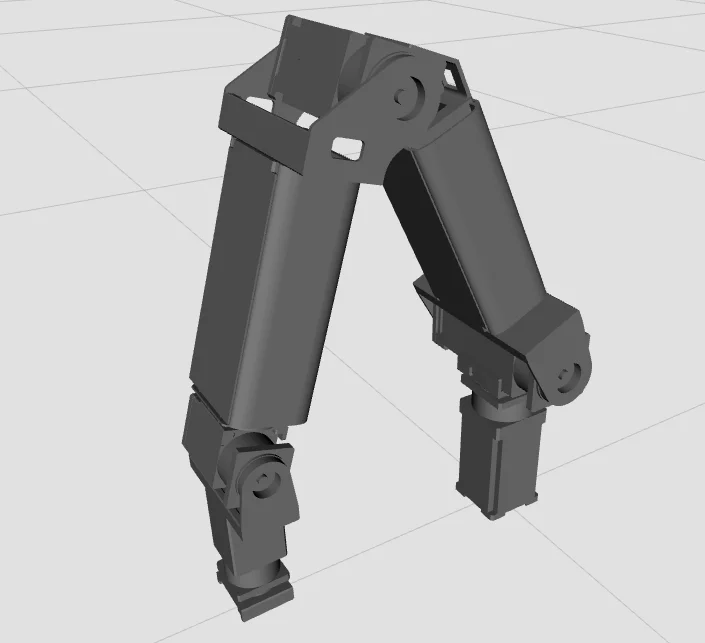
Follwing message will be shown in a terminal after the process is done successfully.
SUMMARY
========

PARAMETERS
 * /open_manipulator_p/control_period: 0.01
 * /open_manipulator_p/moveit_sample_duration: 0.05
 * /open_manipulator_p/planning_group_name: arm
 * /open_manipulator_p/using_moveit: False
 * /open_manipulator_p/using_platform: True
 * /rosdistro: kinetic
 * /rosversion: 1.12.14

NODES
  /
    open_manipulator_p (open_manipulator_p_controller/open_manipulator_p_controller)

ROS_MASTER_URI=http://192.168.3.149:11311

process[open_manipulator_p-1]: started with pid [12510]
Joint Dynamixel ID : 1, Model Name : PRO-PLUS-PH54-200-S500-R
Joint Dynamixel ID : 2, Model Name : PRO-PLUS-PH54-200-S500-R
Joint Dynamixel ID : 3, Model Name : PRO-PLUS-PH54-100-S500-R
Joint Dynamixel ID : 4, Model Name : PRO-PLUS-PH54-100-S500-R
Joint Dynamixel ID : 5, Model Name : PRO-PLUS-PH42-020-S300-R
Joint Dynamixel ID : 6, Model Name : PRO-PLUS-PH42-020-S300-R
[INFO] Succeeded to init /open_manipulator_p
TIP:
-
If you can't load DYNAMIXEL, please check your DYNAMIXEL settings by using the following command from DYNAMIXEL Workbench packages.
rosrun dynamixel_workbench_controllers find_dynamixel /dev/ttyUSB0
if DYNAMIXEL aren't recoginized, please check firmware with ROBOTIS software (R+ Manager 2.0 or DYNAMIXEL Wizard 2.0) -
If you would like to change DYNAMIXEL ID, please check
open_manipulator_p.cppin the open_manipulator_p_lib folder. The default ID is 1, 2, 3, 4 ,5 and 6 for joints.
NOTE: OpenMANIPULATOR-P controller is compatible with Protocol 2.0. Protocol 1.0 doesn't support SyncRead instructions that access to multiple DYNAMIXEL's simultaneously. Protocol 2.0 supports MX 2.0, X, Pro, Pro + series, but it does not support AX, RX and EX.
Check Setting
Manipulator Description
NOTE:
- The test is done on
ROS Kinetic Kameinstalled inUbuntu 16.04. - The test is done on
ROS Melodic Moreniainstalled inUbuntu 18.04. - Make sure ROS dependencies are installed before performing these instructions - Install ROS Packages
- Make sure to launch the OpenMANIPULATOR-P controller before use of the instruction
Publish a topic message to check the OpenMANIPULATOR-P setting.
$ rostopic pub /open_manipulator_p/option std_msgs/String "print_open_manipulator_prp_setting"
<Manipulator Description> will be printed on Terminal.
Launch the open_manipulator_controller. It is shown that present states of the OpenMANIPULATOR-P.
This parameter is descripted on OpenMANIPULATOR.cpp in open_manipulator_libs package.
~/catkin_ws/src/open_manipulator_p/open_manipulator_p_libs/src/open_manipulator_p.cpp
----------<Manipulator Description>----------
<Degree of Freedom>
6.000
<Number of Components>
7.000

<World Configuration>
[Name]
-World Name : world
-Child Name : joint1
[Static Pose]
-Position :
(0.000, 0.000, 0.000)
-Orientation :
(1.000, 0.000, 0.000
0.000, 1.000, 0.000
0.000, 0.000, 1.000)
[Dynamic Pose]
-Linear Velocity :
(0.000, 0.000, 0.000)
-Linear acceleration :
(0.000, 0.000, 0.000)
-Angular Velocity :
(0.000, 0.000, 0.000)
-Angular acceleration :
(0.000, 0.000, 0.000)

<gripperConfiguration>
[Component Type]
Tool
[Name]
-Parent Name : joint6
[Actuator]
-Actuator Name :
-ID :  -1
-Joint Axis :
(0.000, 0.000, 0.000)
-Coefficient :  -0.015
-Position Limit :
  Maximum : 0.010, Minimum : -0.010
[Actuator Value]
-Position :  0.000
-Velocity :  0.000
-Acceleration :  0.000
-Effort :  0.000
[Constant]
-Relative Position from parent component :
(0.000, 0.000, 0.000)
-Relative Orientation from parent component :
(1.000, 0.000, 0.000
0.000, 1.000, 0.000
0.000, 0.000, 1.000)
-Mass :  0.064
-Inertia Tensor :
(0.000, 0.000, -0.000
0.000, 0.000, -0.000
-0.000, -0.000, 0.000)
-Center of Mass :
(0.036, 0.025, -0.000)
[Variable]
-Position :
(0.223, -0.000, -0.001)
-Orientation :
(0.006, -0.004, 1.000
-0.001, 1.000, 0.004
-1.000, -0.001, 0.006)
-Linear Velocity :
(0.000, 0.000, 0.000)
-Linear acceleration :
(0.000, 0.000, 0.000)
-Angular Velocity :
(0.000, 0.000, 0.000)
-Angular acceleration :
(0.000, 0.000, 0.000)

<
joint1Configuration> [Component Type]
Active Joint
[Name]
-Parent Name : world
-Child Name 1 : joint2
[Actuator]
-Actuator Name : joint_dxl
-ID :  1
-Joint Axis :
(0.000, 0.000, 1.000)
-Coefficient :  1.000
-Position Limit :
  Maximum : 3.142, Minimum : -3.142
[Actuator Value]
-Position :  -0.001
-Velocity :  0.000
-Acceleration :  0.000
-Effort :  0.000
[Constant]
-Relative Position from parent component :
(0.000, 0.000, 0.126)
-Relative Orientation from parent component :
(1.000, 0.000, 0.000
0.000, 1.000, 0.000
0.000, 0.000, 1.000)
-Mass :  0.098
-Inertia Tensor :
(0.000, -0.000, -0.000
-0.000, 0.000, 0.000
-0.000, 0.000, 0.000)
-Center of Mass :
(-0.000, 0.001, 0.047)
[Variable]
-Position :
(0.000, 0.000, 0.126)
-Orientation :
(1.000, 0.001, 0.000
-0.001, 1.000, 0.000
0.000, 0.000, 1.000)
-Linear Velocity :
(0.000, 0.000, 0.000)
-Linear acceleration :
(0.000, 0.000, 0.000)
-Angular Velocity :
(0.000, 0.000, 0.000)
-Angular acceleration :
(0.000, 0.000, 0.000)

<
joint2Configuration> [Component Type]
Active Joint
[Name]
-Parent Name : joint1
-Child Name 1 : joint3
[Actuator]
-Actuator Name : joint_dxl
-ID :  2
-Joint Axis :
(0.000, 1.000, 0.000)
-Coefficient :  1.000
-Position Limit :
  Maximum : 3.142, Minimum : -3.142
[Actuator Value]
-Position :  0.517
-Velocity :  0.000
-Acceleration :  0.000
-Effort :  0.000
[Constant]
-Relative Position from parent component :
(0.000, 0.000, 0.033)
-Relative Orientation from parent component :
(1.000, 0.000, 0.000
0.000, 1.000, 0.000
0.000, 0.000, 1.000)
-Mass :  0.139
-Inertia Tensor :
(0.000, 0.000, -0.000
0.000, 0.000, -0.000
-0.000, -0.000, 0.000)
-Center of Mass :
(0.010, 0.000, 0.102)
[Variable]
-Position :
(0.000, 0.000, 0.159)
-Orientation :
(0.869, 0.001, 0.494
-0.001, 1.000, -0.000
-0.494, 0.000, 0.869)
-Linear Velocity :
(0.000, 0.000, 0.000)
-Linear acceleration :
(0.000, 0.000, 0.000)
-Angular Velocity :
(0.000, 0.000, 0.000)
-Angular acceleration :
(0.000, 0.000, 0.000)

<
joint3Configuration> [Component Type]
Active Joint
[Name]
-Parent Name : joint2
-Child Name 1 : joint4
[Actuator]
-Actuator Name : joint_dxl
-ID :  3
-Joint Axis :
(0.000, 1.000, 0.000)
-Coefficient :  1.000
-Position Limit :
  Maximum : 3.142, Minimum : -3.142
[Actuator Value]
-Position :  0.915
-Velocity :  0.000
-Acceleration :  0.000
-Effort :  0.000
[Constant]
-Relative Position from parent component :
(0.030, 0.000, 0.264)
-Relative Orientation from parent component :
(1.000, 0.000, 0.000
0.000, 1.000, 0.000
0.000, 0.000, 1.000)
-Mass :  0.133
-Inertia Tensor :
(0.000, -0.000, -0.000
-0.000, 0.000, 0.000
-0.000, 0.000, 0.000)
-Center of Mass :
(0.091, 0.000, 0.000)
[Variable]
-Position :
(0.157, -0.000, 0.374)
-Orientation :
(0.138, 0.001, 0.990
-0.000, 1.000, -0.001
-0.990, 0.000, 0.138)
-Linear Velocity :
(0.000, 0.000, 0.000)
-Linear acceleration :
(0.000, 0.000, 0.000)
-Angular Velocity :
(0.000, 0.000, 0.000)
-Angular acceleration :
(0.000, 0.000, 0.000)

<
joint4Configuration> [Component Type]
Active Joint
[Name]
-Parent Name : joint3
-Child Name 1 : joint5
[Actuator]
-Actuator Name : joint_dxl
-ID :  4
-Joint Axis :
(1.000, 0.000, 0.000)
-Coefficient :  1.000
-Position Limit :
  Maximum : 3.142, Minimum : -3.142
[Actuator Value]
-Position :  -0.007
-Velocity :  0.000
-Acceleration :  0.000
-Effort :  0.000
[Constant]
-Relative Position from parent component :
(0.195, 0.000, 0.030)
-Relative Orientation from parent component :
(1.000, 0.000, 0.000
0.000, 1.000, 0.000
0.000, 0.000, 1.000)
-Mass :  0.143
-Inertia Tensor :
(0.000, 0.000, -0.000
0.000, 0.000, 0.000
-0.000, 0.000, 0.000)
-Center of Mass :
(0.044, 0.000, 0.009)
[Variable]
-Position :
(0.213, -0.000, 0.185)
-Orientation :
(0.138, -0.006, 0.990
-0.000, 1.000, 0.006
-0.990, -0.001, 0.138)
-Linear Velocity :
(0.000, 0.000, 0.000)
-Linear acceleration :
(0.000, 0.000, 0.000)
-Angular Velocity :
(0.000, 0.000, 0.000)
-Angular acceleration :
(0.000, 0.000, 0.000)

<
joint5Configuration> [Component Type]
Active Joint
[Name]
-Parent Name : joint4
-Child Name 1 : joint6
[Actuator]
-Actuator Name : joint_dxl
-ID :  5
-Joint Axis :
(0.000, 1.000, 0.000)
-Coefficient :  1.000
-Position Limit :
  Maximum : 3.142, Minimum : -3.142
[Actuator Value]
-Position :  0.132
-Velocity :  0.000
-Acceleration :  0.000
-Effort :  0.000
[Constant]
-Relative Position from parent component :
(0.063, 0.000, 0.000)
-Relative Orientation from parent component :
(1.000, 0.000, 0.000
0.000, 1.000, 0.000
0.000, 0.000, 1.000)
-Mass :  0.143
-Inertia Tensor :
(0.000, 0.000, -0.000
0.000, 0.000, 0.000
-0.000, 0.000, 0.000)
-Center of Mass :
(0.044, 0.000, 0.009)
[Variable]
-Position :
(0.222, -0.000, 0.122)
-Orientation :
(0.006, -0.006, 1.000
-0.001, 1.000, 0.006
-1.000, -0.001, 0.006)
-Linear Velocity :
(0.000, 0.000, 0.000)
-Linear acceleration :
(0.000, 0.000, 0.000)
-Angular Velocity :
(0.000, 0.000, 0.000)
-Angular acceleration :
(0.000, 0.000, 0.000)

<
joint6Configuration> [Component Type]
Active Joint
[Name]
-Parent Name : joint5
-Child Name 1 : gripper
[Actuator]
-Actuator Name : joint_dxl
-ID :  6
-Joint Axis :
(1.000, 0.000, 0.000)
-Coefficient :  1.000
-Position Limit :
  Maximum : 3.142, Minimum : -3.142
[Actuator Value]
-Position :  0.002
-Velocity :  0.000
-Acceleration :  0.000
-Effort :  -2.690
[Constant]
-Relative Position from parent component :
(0.123, 0.000, 0.000)
-Relative Orientation from parent component :
(1.000, 0.000, 0.000
0.000, 1.000, 0.000
0.000, 0.000, 1.000)
-Mass :  0.143
-Inertia Tensor :
(0.000, 0.000, -0.000
0.000, 0.000, 0.000
-0.000, 0.000, 0.000)
-Center of Mass :
(0.044, 0.000, 0.009)
[Variable]
-Position :
(0.223, -0.000, -0.001)
-Orientation :
(0.006, -0.004, 1.000
-0.001, 1.000, 0.004
-1.000, -0.001, 0.006)
-Linear Velocity :
(0.000, 0.000, 0.000)
-Linear acceleration :
(0.000, 0.000, 0.000)
-Angular Velocity :
(0.000, 0.000, 0.000)
-Angular acceleration :
(0.000, 0.000, 0.000)
---------------------------------------------
RViz
NOTE:
- The test is done on
ROS Kinetic Kameinstalled inUbuntu 16.04. - The test is done on
ROS Melodic Moreniainstalled inUbuntu 18.04. - Make sure ROS dependencies are installed before performing these instructions - Install ROS Packages
Load OpenMANIPULATOR-P on RViz.
$ roslaunch open_manipulator_p_description open_manipulator_p_rviz.launch
NOTE:
- If you launched the OpenMANIPULATOR-P controller before launching the open_manipulator_p_controller file, the robot model on RViz would be synchronized with the actual robot.
- If users would like to check only model of OpenMANIPULATOR-P without OpenMANIPULATOR-P, the user can launch the RViz without the OpenMANIPULATOR-P controller.
The user can change each joint by GUI, if the user launch only RViz by executing the following command :$ roslaunch open_manipulator_p_description open_manipulator_p_rviz.launch use_gui:=true
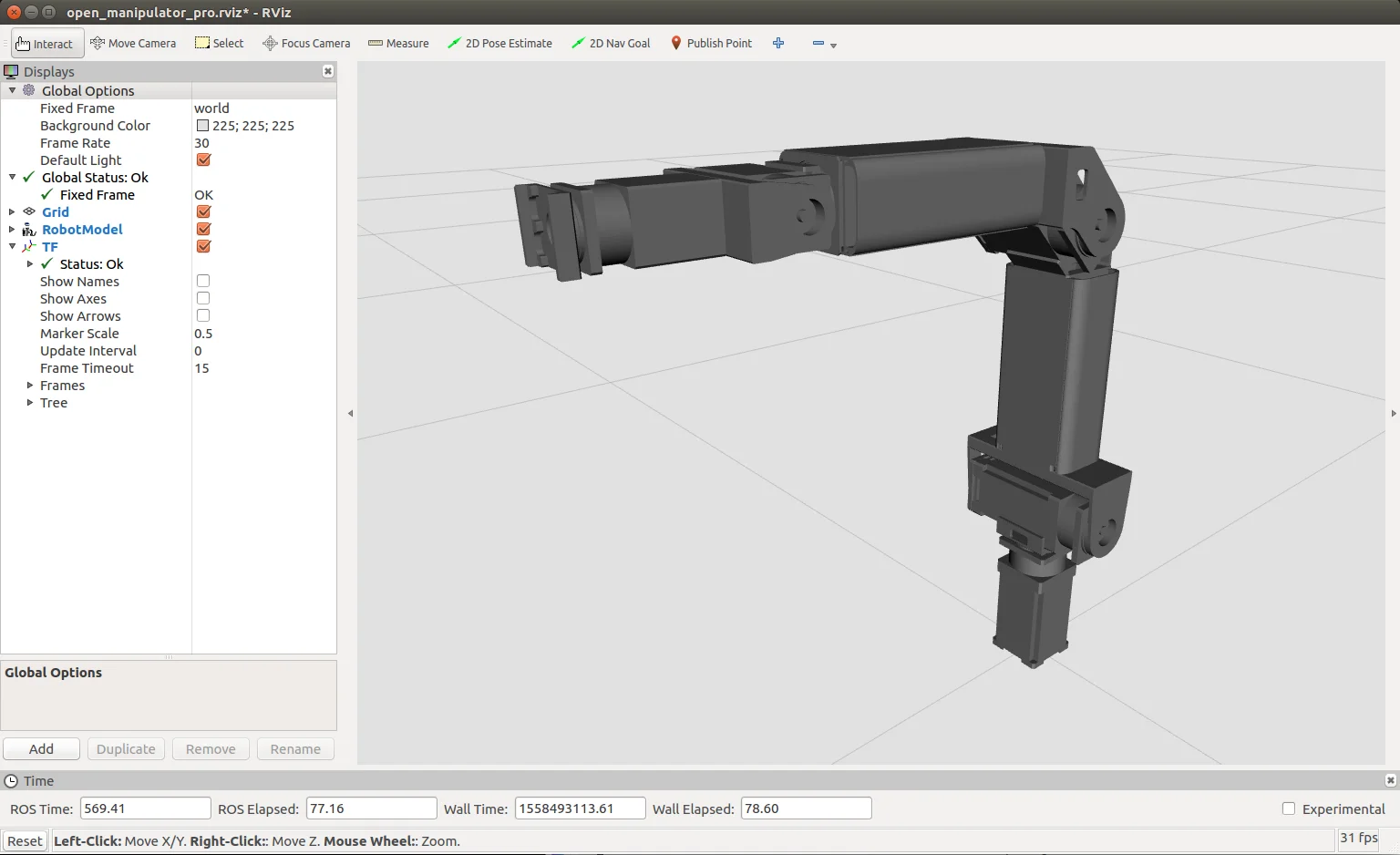
Message List
NOTE:
- The test is done on
ROS Kinetic Kameinstalled inUbuntu 16.04. - The test is done on
ROS Melodic Moreniainstalled inUbuntu 18.04. - Make sure ROS dependencies are installed before performing these instructions - Install ROS Packages
- Make sure to launch the OpenMANIPULATOR-P controller before use of the instruction
OpenMANIPULATOR-P controller provides topic and service messages to control manipulator and check the states of manipulator.
Topic
Topic Monitor
In order to check the topics of OpenMANIPULATOR-P controller, you can use rqt provided by ROS. Rqt is a Qt-based framework for GUI development for ROS. Rqt allows users to easily see topic status by displaying all topics on a topic list. You can see topic name, type, bandwidth, Hz and value on rqt.
Run rqt.
$ rqt
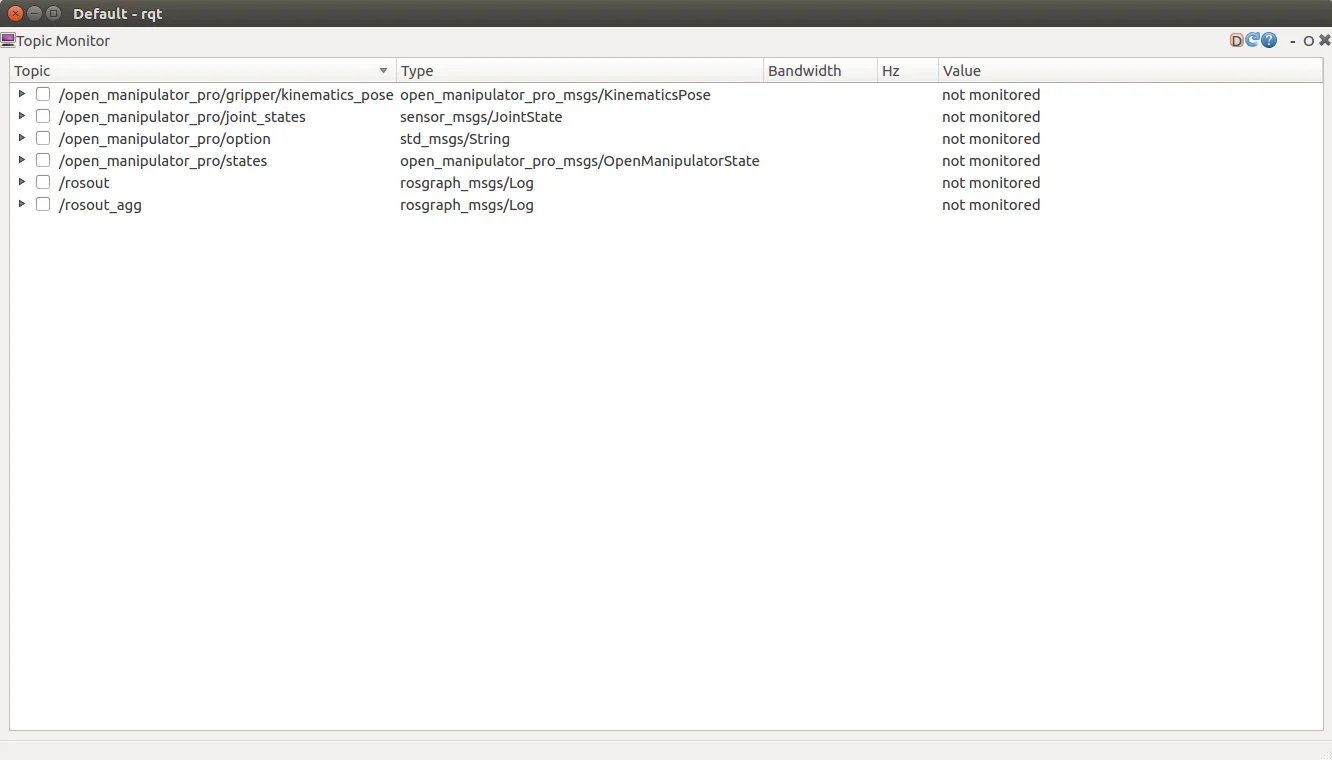
TIP: If rqt is not displayed, select the plugin -> Topic Monitor -> OpenMANIPULATOR-P.
Topics without a check mark will not be monitored. To monitor topics, click the checkboxes next.
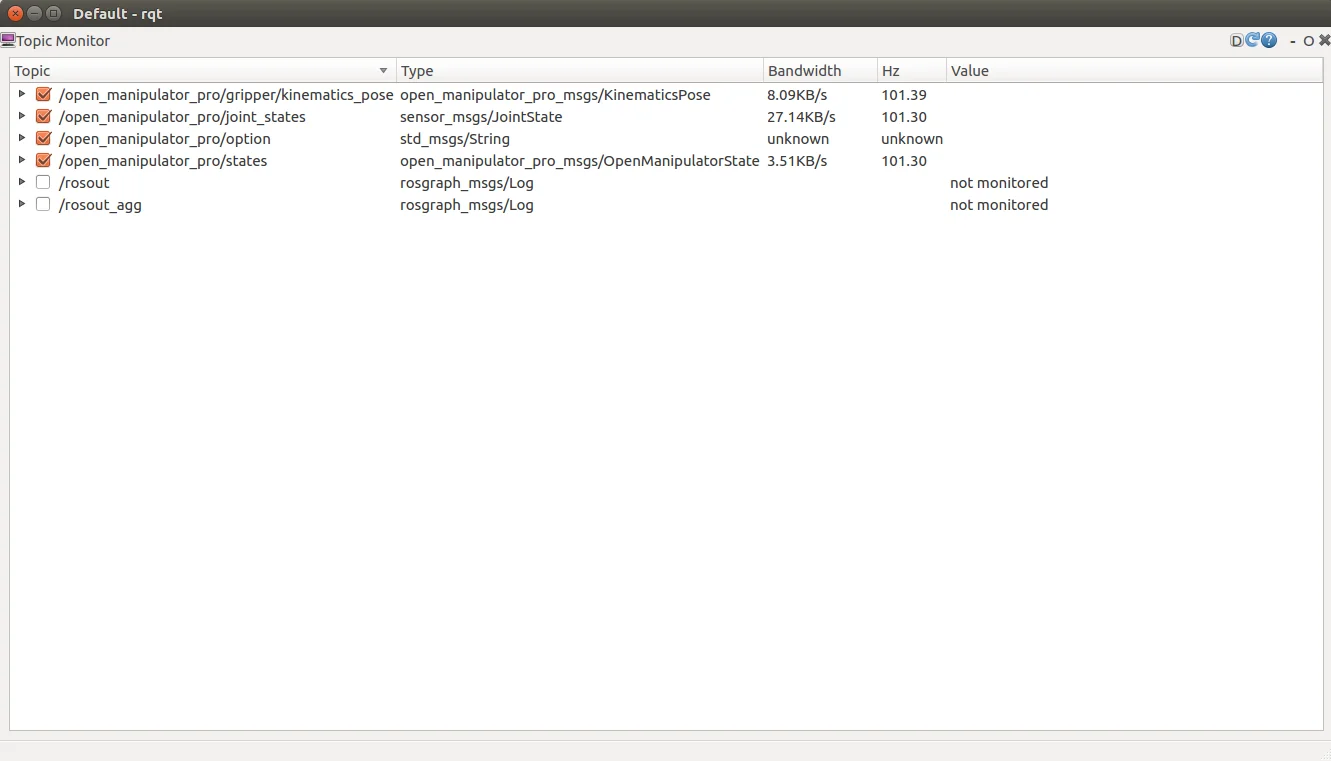
If you would like to see more details about topic message, click the ▶ button next to each checkbox.
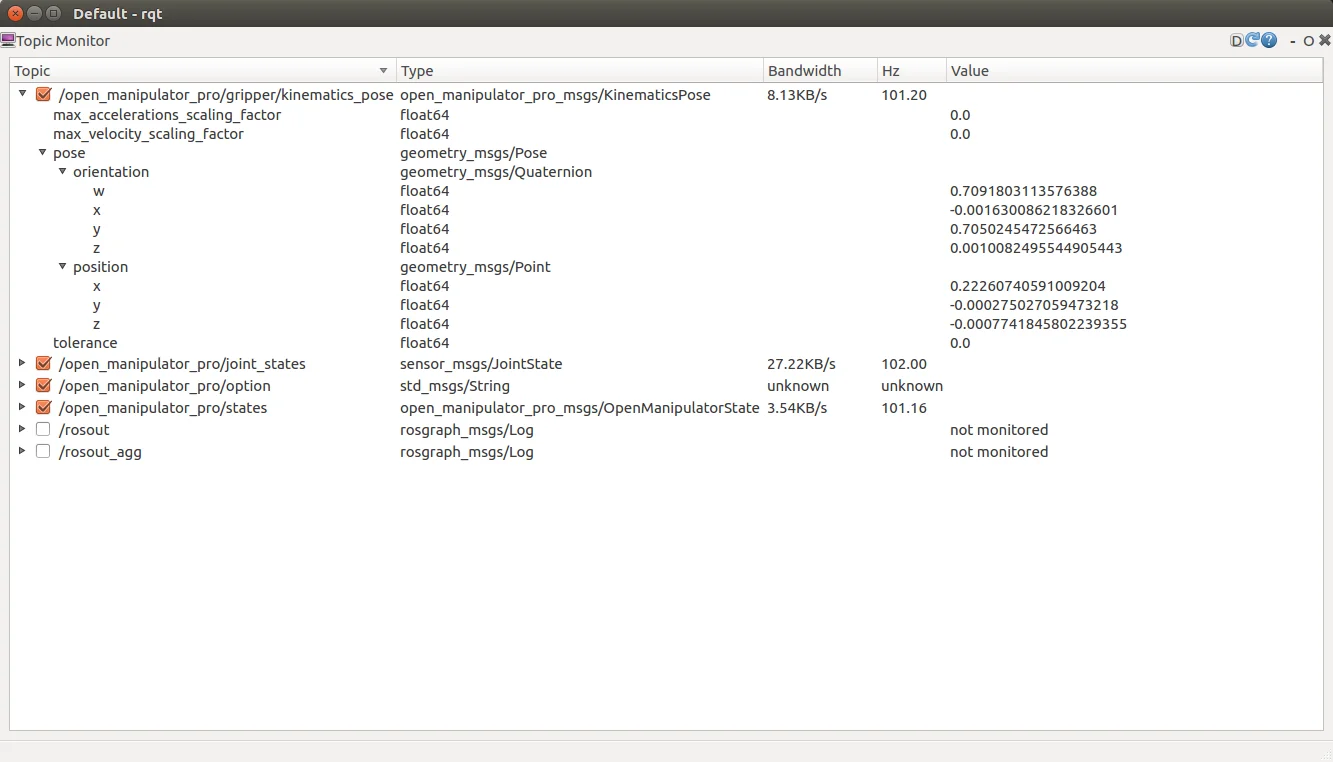
Published Topic List
Published Topic List : A list of topics that the open_manipulator_p_controller publishes.
/open_manipulator/states/open_manipulator/joint_states/open_manipulator/gripper/kinematics_pose/open_manipulator/*joint_name*_position/command/open_manipulator/rviz/moveit/update_start_state
NOTE: These topics are messages for checking the status of the robot regardless of the robot's motion.
/open_manipulator/joint_states(sensor_msgs/JointState) is a message indicating the states of joints of OpenMANIPULATOR-P. "name" indicates joint component names. "effort" shows currents of the joint DYNAMIXEL. "position" and "velocity" indicates angles and angular velocities of joints.
/open_manipulator/gripper/kinematics_pose(open_manipulator_msgs/KinematicsPose) is a message indicating pose (position and orientation) in task space. "position" indicates the x, y and z values of the center of the end-effector (tool). "Orientation" indicates the direction of the end-effector (tool) as quaternion.
/open_manipulator/states(open_manipulator_msgs/OpenManipulatorState) is a message indicating the status of OpenMANIPULATOR-P. "open_manipulator_actuator_state" indicates whether actuators (DYNAMIXEL) are enabled ("ACTUATOR_ENABLE") or disabled ("ACTUATOR_DISABLE"). "open_manipulator_moving_state" indicates whether OpenMANIPULATOR-P is moving along the trajectory ("IS_MOVING") or stopped ("STOPPED").
/open_manipulator/*joint_name*_position/command(std_msgs/Float64) are the messages to publish goal position of each joint to gazebo simulation node. *joint_name* shows the name of each joint. The messages will only be published if you run the controller package with the use_platform parameter set to false.
/rviz/moveit/update_start_state(std_msgs/Empty) is a message to update start state of moveit! trajectory. This message will only be published if you run the controller package with the use_moveit parameter set to true.
Subscribed Topic List
Subscribed Topic List: A list of topics that the open_manipulator_p_controller subscribes.
/open_manipulator/option/open_manipulator/move_group/display_planned_path/open_manipulator/move_group/goal/open_manipulator/execute_trajectory/goal
NOTE: These topics are messages for checking the status of the robot regardless of the robot's motion.
/open_manipulator/option(std_msgs/String) is used to set OpenMANIPULATOR-P options. "print_open_manipulator_setting" : is to request the open_manipulator_p_controller to display "Manipulator Description".
/open_manipulator/option(moveit_msgs/DisplayTrajectory) is used to subscribe a planned joint trajectory published from moveit!
/move_group/goal(moveit_msgs/MoveGroupActionGoal) is used to subscribe a planning option data published from moveit!
/move_group/execute_trajectory/goal(moveit_msgs/ExecuteTrajectoryActionGoal) is used to subscribe states of trajectory execution published from moveit!
In addition, you can monitor topics through rqt whenever you have a topic added in your controller.
Service
Service Server List
NOTE: These services are messages to operate OpenMANIPULATOR-P or to change the status of DYNAMIXEL of OpenMANIPULATOR-P.
Service Server List : A list of service servers that open_manipulator_p_controller has.
-
/open_manipulator/goal_joint_space_path(open_manipulator_msgs/SetJointPosition)
The user can use this service to create a trajectory in the joint space. The user inputs the angle of the target joint and the total time of the trajectory. -
/open_manipulator/goal_joint_space_path_to_kinematics_pose(open_manipulator_msgs/SetKinematicsPose)
The user can use this service to create a trajectory in the joint space. The user inputs the kinematics pose of the OpenMANIPULATOR-P end-effector(tool) in the task space and the total time of the trajectory. -
/open_manipulator/goal_joint_space_path_to_kinematics_position(open_manipulator_msgs/SetKinematicsPose)
The user can use this service to create a trajectory in the joint space. The user inputs the kinematics pose(position only) of the OpenMANIPULATOR-P end-effector(tool) in the task space and the total time of the trajectory. -
/open_manipulator/goal_joint_space_path_to_kinematics_orientation(open_manipulator_msgs/SetKinematicsPose)
The user can use this service to create a trajectory in the joint space. The user inputs the kinematics pose(orientation only) of the OpenMANIPULATOR-P end-effector(tool) in the task space and the total time of the trajectory. -
/open_manipulator/goal_task_space_path(open_manipulator_msgs/SetKinematicsPose)
The user can use this service to create a trajectory in the task space. The user inputs the kinematics pose of the OpenMANIPULATOR-P end-effector(tool) in the task space and the total time of the trajectory. -
/open_manipulator/goal_task_space_path_position_only(open_manipulator_msgs/SetKinematicsPose)
The user can use this service to create a trajectory in the task space. The user inputs the kinematics pose(position only) of the OpenMANIPULATOR-P end-effector(tool) in the task space and the total time of the trajectory. -
/open_manipulator/goal_task_space_path_orientation_only(open_manipulator_msgs/SetKinematicsPose)
The user can use this service to create a trajectory in the task space. The user inputs the kinematics pose(orientation only) of the OpenMANIPULATOR-P end-effector(tool) in the task space and the total time of the trajectory. -
/open_manipulator/goal_joint_space_path_from_present(open_manipulator_msgs/SetJointPosition)
The user can use this service to create a trajectory from present joint angle in the joint space. The user inputs the angle of the target joint to be changed and the total time of the trajectory. -
/open_manipulator/goal_task_space_path_from_present(open_manipulator_msgs/SetKinematicsPose)
The user can use this service to create a trajectory from present kinematics pose in the task space. The user inputs the kinematics pose to be changed of the OpenMANIPULATOR-P end-effector(tool) in the task space and the total time of the trajectory. -
/open_manipulator/goal_task_space_path_from_present_position_only(open_manipulator_msgs/SetKinematicsPose)
The user can use this service to create a trajectory from present kinematics pose in the task space. The user inputs the kinematics pose(position only) of the OpenMANIPULATOR-P end-effector(tool) in the task space and the total time of the trajectory. -
/open_manipulator/goal_task_space_path_from_present_orientation_only(open_manipulator_msgs/SetKinematicsPose)
The user can use this service to create a trajectory from present kinematics pose in the task space. The user inputs the kinematics pose(orientation only) of the OpenMANIPULATOR-P end-effector(tool) in the task space and the total time of the trajectory. -
/open_manipulator/goal_tool_control(open_manipulator_msgs/SetJointPosition)
The user can use this service to move the tool of OpenMANIPULATOR_PRO. -
/open_manipulator/set_actuator_state(open_manipulator_msgs/SetActuatorState)
The user can use this service to control the state of actucators.
If the user set true at set_actuator_state valuable, the actuator will be enabled.
If the user set false at set_actuator_state valuable, the actuator will be disabled. -
/open_manipulator/goal_drawing_trajectory(open_manipulator_msgs/SetDrawingTrajectory)
The user can use this service to create a drawing trajectory. The user can create the circle, the rhombus, the heart, and the straight line trajectory. -
/moveit/get_joint_position(open_manipulator_msgs/GetJointPosition)
This service is used when using moveit! The user can use this service to receives a joint position which is calculated by move_group. -
/moveit/get_kinematics_pose(open_manipulator_msgs/GetKinematicsPose)
This service is used when using moveit! The user can use this service to receives a kinematics pose which is calculated by move_group. -
/moveit/set_joint_position(open_manipulator_msgs/SetJointPosition)
This service is used when using moveit! The user can use this service to create a trajectory in the joint space by move_group. The user inputs the angle of the target joint and the total time of the trajectory. -
/moveit/set_kinematics_pose(open_manipulator_msgs/SetKinematicsPose)
This service is used when using moveit! The user can use this service to create a trajectory in the task space by move_group. The user inputs the kinematics pose of the OpenMANIPULATOR-P end-effector(tool) in the task space and the total time of the trajectory.