- 2025 ~
- ~ 2023
Introduction
What is OP3?
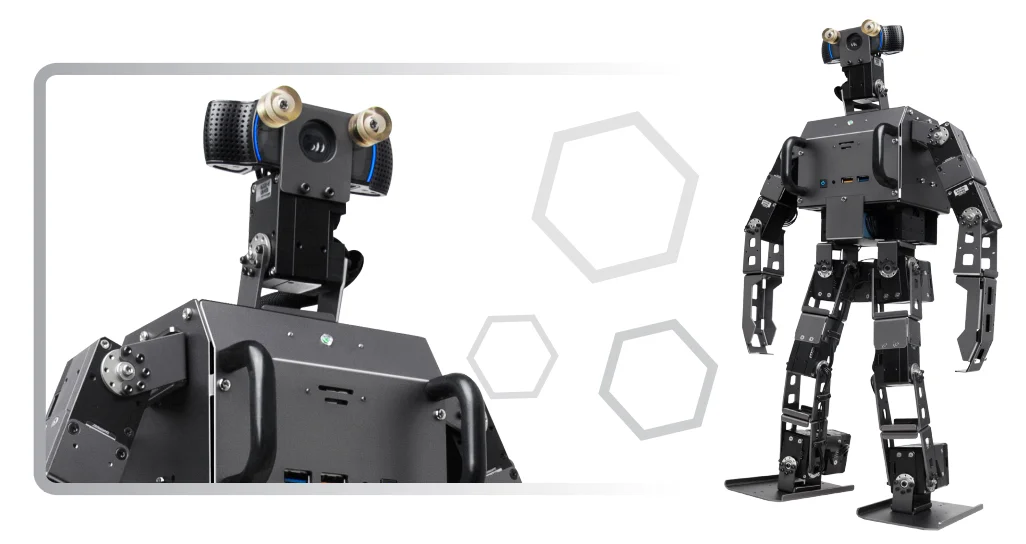
The ROBOTIS OP3 is the latest miniature humanoid robot platform from ROBOTIS, the successor to the ROBOTIS OP (or “DARWIN OP”) and ROBOTIS OP2 (“DARWIN 2” or “DARWIN OP2”). One of the most noticeable changes for the ROBOTIS OP3 is the replacement of MX-28 actuators with the more modern XM-430 DYNAMIXEL Protocol 2.0 servos featuring improved torque, current-based control, and various additional performance improvements. Another major upgrade is the change from an Intel Atom based SBC to a complete Intel i3-based NUC. The Intel NUC provides significantly enhanced computing power, supporting a 64-bit OS and Bluetooth 5. Additionally, the new 2025 OP3 re-release has been developed from the ground up for ROS2 operation (Robot Operating System 2), allowing developers to leverage a wide range of packages from the ROS ecosystem. All these hardware improvements, combined with ROS2 support, enable developers to focus more on research and development compared to the OP3's predecessors and competitors.
- Physical Differences from ROBOTIS OP2:
OP3 supports HDMI and Display Port(DP) while OP2 only supports mini HDMI.
There are 1 RGB LED and 3 LEDs, 4 buttons on the back of OP3. From left to right, each button stands for Mode, Start, User, Reset.
-
Here are some mechanical differences :
- The ROBOTIS OP3 features HDMI and DisplayPort output, while the OP2 only supports mini HDMI.
- ROBOTIS OP3 no longer has 3.5mm microphone and audio jacks
- ROBOTIS OP3 does not include an aesthetic skin by default; however, 3D model files are provided to enable 3D printing the default design skin, or the customization of your own.
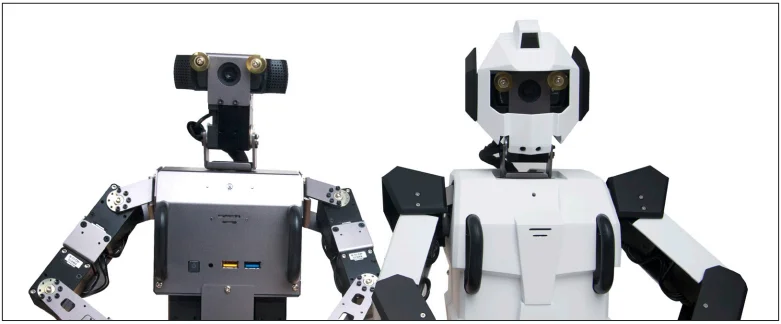
- The location of the I/O ports has been changed.
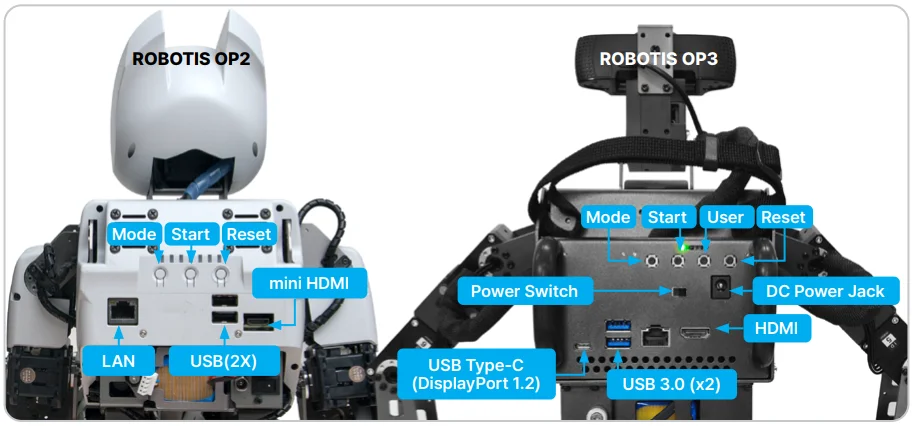
Moderate changes have been made to the back panel of the OP3.
-
Advantages of developing with the ROBOTIS OP3 compared to ROBOTIS OP2
- New Actuators (higher torque)
- Increased SSD capacity
- Increased RAM capacity
- Dramatic improvement in computational power
- Replacing Mini HDMI with HDMI
- User friendly sub-controller (CM-730 → OpenCR)
- Improved camera
-
Hardware Spec Comparison
| ROBOTIS OP2 | ROBOTIS OP3 | |
|---|---|---|
| Actuator | MX-28 | XM430-W350 |
| CPU | Intel Atom N2600 @1.6GHz dual core | Intel Core i3 processor dual core |
| RAM | 2GB DDR3 SODIMM 1066MHz (user-replaceable) | 8GB DDR4 SODIMMs 2666MHz (32GB maximum) (user-replaceable) |
| Storage | half-size mSATA module (32GB) (user-replaceable) | M.2 SSD module (250GB) (user-replaceable) |
| Compatible OS | any Linux release (32-bit) any Windows release (32-bit) | any Linux release (32-bit/64-bit) any Windows release (32-bit/64-bit) |
| Networking | Realtek 10/100/1000 Mbps Ethernet 802.11n (2.4GHz-only) | Intel 10/100/1000 Mbps Ethernet 802.11ax (2.4GHz, 5GHz) Bluetooth 5 |
| Camera | Logitech C905 (1600x1200) | Logitech C920 (1920x1080) |
ROBOTIS OP3 is an affordable, miniature humanoid robot platform with advanced computational power, sophisticated sensors, high payload capacity, and dynamic motion ability to enable many exciting research and education activities.
- Actuator Spec Comparisons
| MX-28 | XM430-W350 | |
|---|---|---|
| Weight | 77g | 82g |
| Dimension | 35.6mm x 50.6mm x 35.5mm | 28.5mm x 46.5mm x 34.0mm |
| Gear Ratio | 193 : 1 | 353.5 : 1 |
| Stall Torque | 2.5 N.m | 4.1 N.m |
| Stall Current | 1.4 A | 2.3 A |
| No Load Speed | 55 RPM | 46 RPM |
| Protocol | 1.0 Only | 1.0, 2.0 |
-
Our new X-series XM430 series actuator is easier to assemble and maintain and also supports new control algorithms and operational features.
- Reduced size and increased torque
- Metal case with integrated tapped assembly points
- Hollow back case with cable cover
- 6 operating modes
- Current-based torque control
- Profile control for smooth motion planning
-
ROBOTIS-OP3 Specifications
| ROBOTIS OP3 | |
|---|---|
| Height | About 510mm |
| Weight | About 3.5kg (without skin cover) |
| DOF | 20 |
| Actuator | XM430-W350-R |
| Main Controller | INTEL NUC i3 Intel Core i3 processor dual core 8GB RAM DDR4 SODIMMs 2666MHz 250GB M.2 SSD |
| Sub Controller | OpenCR |
| Camera | Logitech C920 HD Pro Webcam |
| IMU Sensor | 3-Axis Gyroscope, 3-Axis Accelerometer, 3-Axis Magnetometer |
| Battery | Lipo 3cell 11.1v 3300mA |
| IO Device | RGB LED x 1, LED x 3 (Red, Green, Blue), Button x 4, Speaker x 1 |
| Installable OS | any Linux release (32-bit/64-bit) any Windows release (32-bit/64-bit) |
| Development Environment | OS : Linux (64-bit) C++, ROS2, DYNAMIXEL SDK |
Safety Information
CAUTION : ROBOTIS is not responsible for any loss or damage whatsoever caused resulting from the end user’s negligence or misuse of the product.
- Read the instruction manual carefully before getting started.
- Not suitable for children under 15 years old.
- Do not use any tools other than those provided in the kit.
- Keep the robot away from your face and body when the robot is in motion.
- Take appropriate caution to prevent getting your fingers pinched between frames.
- Do not place the robot in or near water, heat or fire.
- Only use the battery and charger included in the kit.
- Servo Gears must be replaced occasionally following use, in order to maintain maximum lifetime and performance.
Package Contents
Check your ROBOTIS OP3 package for the following items.
| No | Item | Quantity |
|---|---|---|
| 1 | Fully-assembled ROBOTIS OP3 robot | 1 |
| 2 | Battery Pack | 2 |
| 3 | Battery Charger | 1 |
| 4 | DC Power Supply | 1 |
| 5 | Power Cable | 1 |
| 6 | Ethernet Cable | 1 |
| 7 | Wrenches x 2 & Screw Driver x 2 | 1 set |
| 8 | Spare Cables | 1 pack |
| 9 | Spare Bolts and Nuts | 1 pack |
| 10 | Ball | 1 |
| 11 | USB Thumb Drive (with recovery software) | 1 |
| 12 | Fuse | 2 |
| 13 | Hard Case | 1 |
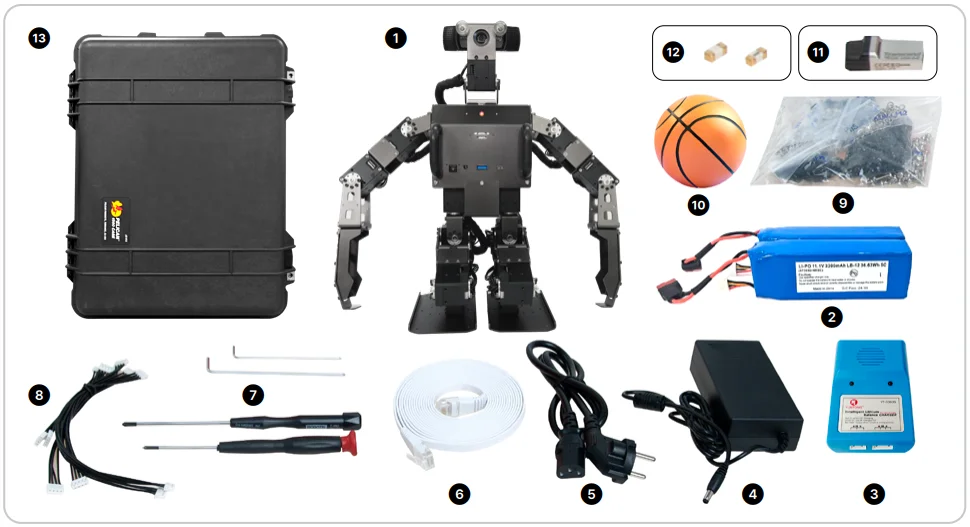
Layout
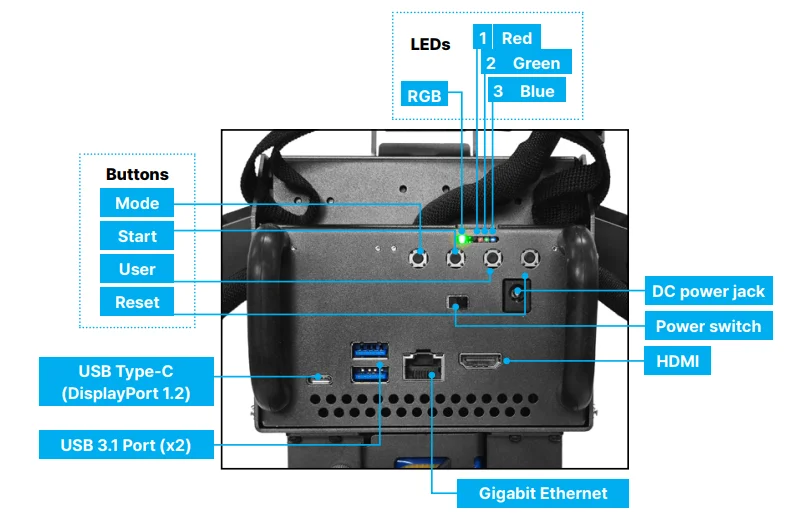
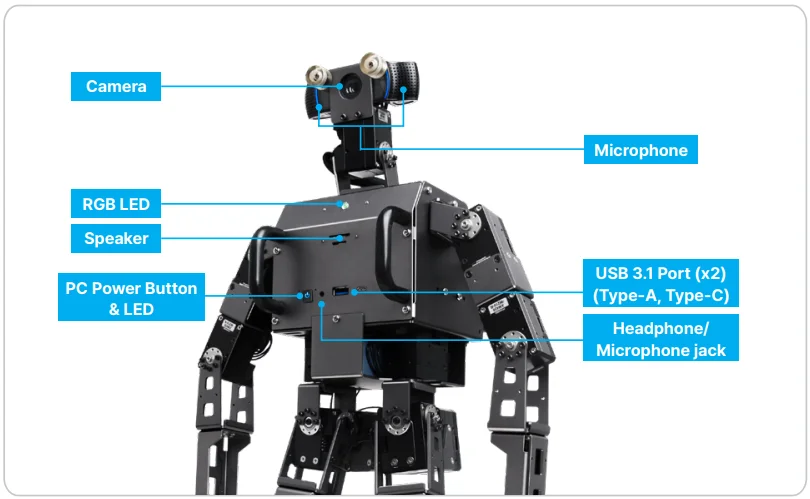
CAUTION : The Layout of the front and back panel is subject to change depending on the availability of the built-in PC.
Charging Battery
This section describes how to charge a battery using the provided charger.
Use the appropriate instruction set depending on the model of charger you intend to use.
Using LBC-010
The following video provides instructions on how to charge a battery using the LBC-010.
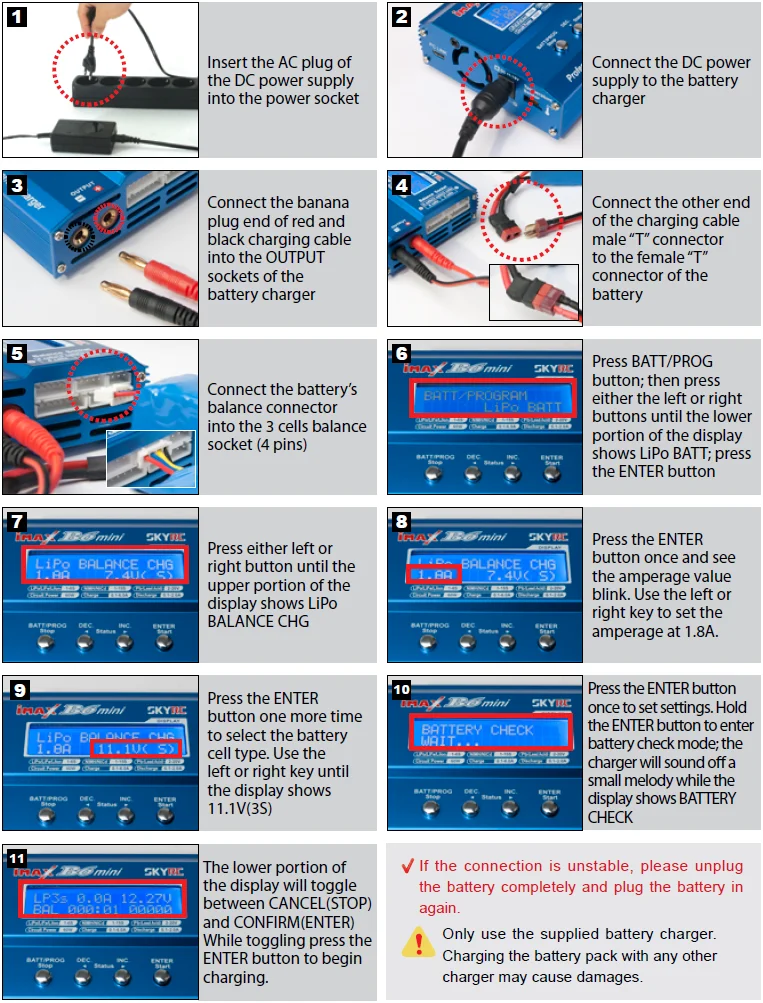
Using IMAX B6MINI CHARGER
The following image provides instructions on how to charge a battery using the IMAX B6MINI charger.
Battery Hot Swap
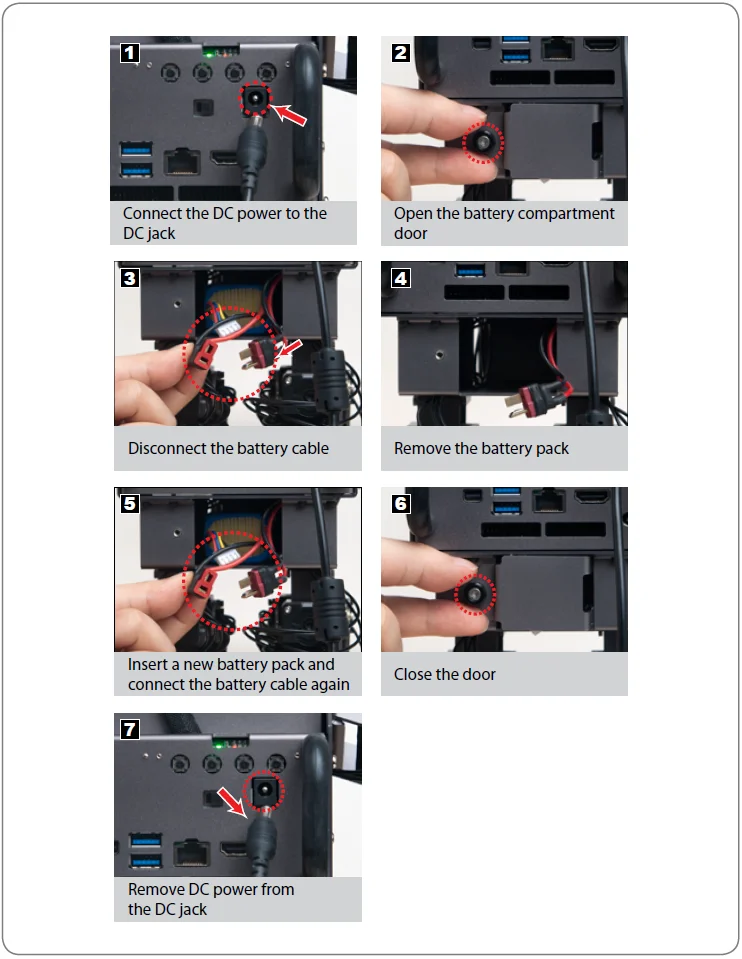
The ROBOTIS-OP3 battery can be replaced without shutting down the robot.
To replace the battery during operation, please follow the procedure below.
Introduction
What is OP3?
Open Platform Humanoid Project
ROBOTIS OP3 is the latest miniature humanoid robot platform from ROBOTIS that succeeds ROBOTIS OP(aka “DARWIN OP”) and ROBOTIS OP2(aka “DARWIN 2” or “DARWIN OP2”). One of the noticeable changes of ROBOTIS OP3 is made in actuator by replacing MX-28 actuators with XM-430 actuators. Another significant change is also made in internal PC by replacing Atom based SBC(Single Board Computer) with Intel i3 based NUC. With the XM-430 which supports DYNAMIXEL Protocol 2.0, OP3 has improved torque along with current based control and loaded with various functions. Intel NUC allows highly improved computing power that supports 64-bit OS and Bluetooth 4.1. In addition, OP3 is developed under ROS(Robot Operating System) to utilize various packages in ROS ecosystem. All these hardware improvements and ROS support allows developers to focus more on research and development compare to the preceding robots.
-
Physical Differences from ROBOTIS OP2
- ROBOTIS OP3 does not come with a design skin, however, 3D modeling files are provided in order to support 3D print for the default design skin.
OP3 looks quite different from OP2 as default skin is not provided. Users can download design skin files.
Downloaded skin files can be used for 3D printing.
ROBOTIS OP3 is loaded Intel NUC with i3 processor to achieve significant improvement in computing power.
OP3 supports HDMI and Display Port(DP) while OP2 only supports mini HDMI.
There are 1 RGB LED and 3 LEDs, 4 buttons on the back of OP3. From left to right, each button stands for Mode, Start, User, Reset.
-
Here are some mechanical differences :
- New mini HDMI port connector on the ROBOTIS OP2
- Location of the ports
- ROBOTIS OP3 no longer has the 3.5mm microphone and audio jacks
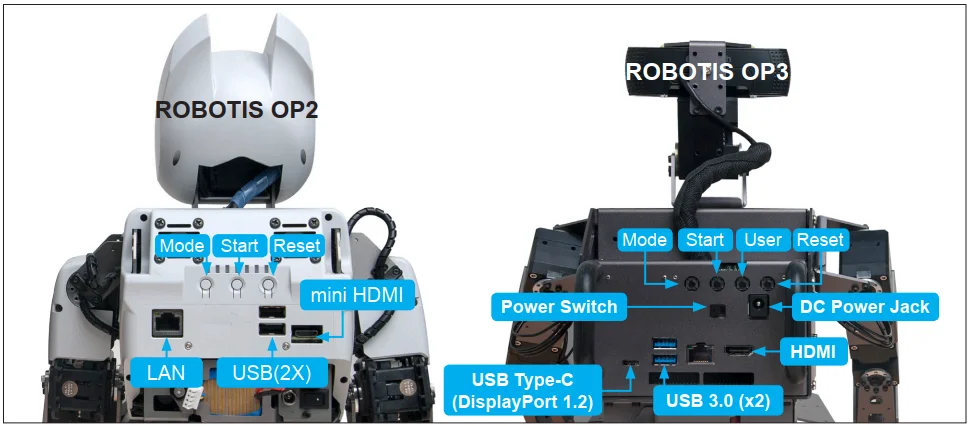
Moderate changes have been made in the back panel of OP3.
-
Advantages of developing with ROBOTIS OP3 compared to ROBOTIS OP2
As mentioned above, there are several changes in OP3 and advantages of the new OP3 are listed as follows:- New Actuators(higher torque)
- Increase of SSD capacity
- Increase of RAM capacity
- Dramatic improvement in computational power
- Replacing Mini HDMI with HDMI
- User friendly sub-controller(CM-730 → OpenCR)
- Improved camera
-
Hardware Spec Comparison
| ROBOTIS OP2 | ROBOTIS OP3 | |
|---|---|---|
| Actuator | MX-28 | XM430-W350 |
| CPU | Intel Atom N2600 @1.6GHz dual core | Intel Core i3 processor dual core |
| RAM | 2GB DDR3 SODIMM 1066MHz (user-replaceable) | 8GB DDR4 SODIMMs 2133MHz (32GB maximum) (user-replaceable) |
| Storage | half-size mSATA module (32GB) (user-replaceable) | M.2 SSD module (128GB) (user-replaceable) |
| Compatible OS | any Linux release (32-bit) any Windows release (32-bit) | any Linux release (32-bit/64-bit) any Windows release (32-bit/64-bit) |
| Networking | Realtek 10/100/1000 Mbps Ethernet 802.11n (2.4GHz-only) | Intel 10/100/1000 Mbps Ethernet 802.11ac (2.4GHz, 5GHz) Bluetooth 4.1 |
| Camera | Logitech C905 (1600x1200) | Logitech C920 (1920x1080) |
ROBOTIS OP3 is an affordable, miniature humanoid robot platform with advanced computational power, sophisticated sensors, high payload capacity, and dynamic motion ability to enable many exciting research and education activities.
- Actuator Spec Comparisons
| MX-28 | XM430-W350 | |
|---|---|---|
| Weight | 77g | 82g |
| Dimension | 35.6mm x 50.6mm x 35.5mm | 28.5mm x 46.5mm x 34.0mm |
| Gear Ratio | 193 : 1 | 353.5 : 1 |
| Stall Torque | 2.5 N.m | 4.1 N.m |
| Stall Current | 1.4 A | 2.3 A |
| No Load Speed | 55 RPM | 46 RPM |
| Protocol | 1.0 Only | 1.0, 2.0 |
-
XM430 series actuator is easier to assemble and maintain as well as supporting various control algorithms.
- Reduced size and increased torque
- Metal case with integrated assembly bolt taps
- Hollow back case with cable cover
- 6 operating modes
- Current-based torque control
- Profile control for smooth motion planning
-
ROBOTIS-OP3 Specifications
| ROBOTIS OP3 | |
|---|---|
| Height | About 510mm |
| Weight | About 3.5kg (without skin cover) |
| DOF | 20 |
| Actuator | XM430-W350-R |
| Main Controller | INTEL NUC i3 Intel Core i3 processor dual core 8GB RAM DDR4 SODIMMs 2133MHz 128GB M.2 SSD |
| Sub Controller | OpenCR |
| Camera | Logitech C920 HD Pro Webcam |
| IMU Sensor | 3-Axis Gyroscope, 3-Axis Accelerometer, 3-Axis Magnetometer |
| Battery | Lipo 3cell 11.1v 1800mA |
| IO Device | RGB LED x 1, LED x 3 (Red, Green, Blue), Button x 4, Speaker x 1 |
| Installable OS | any Linux release (32-bit/64-bit) any Windows release (32-bit/64-bit) |
| Development Environment | OS : Linux (64-bit) C++, ROS, DYNAMIXEL SDK |
Safety Information
CAUTION : ROBOTIS will not be responsible for any loss or damage whatsoever caused resulting from user’s negligence or misuse of the product.
- Read the instruction carefully before getting started.
- Not suitable for children under 15 years old.
- Do not use any other tools other than those provided in the kit.
- Keep the robot away from your face and body when the robot is operating.
- Prevent from getting your fingers stuck between frames.
- Do not place the robot near water, heat or fire.
- Only use the battery and charger included in the kit.
- Gears must be replaced after long excessive use.
Package Contents
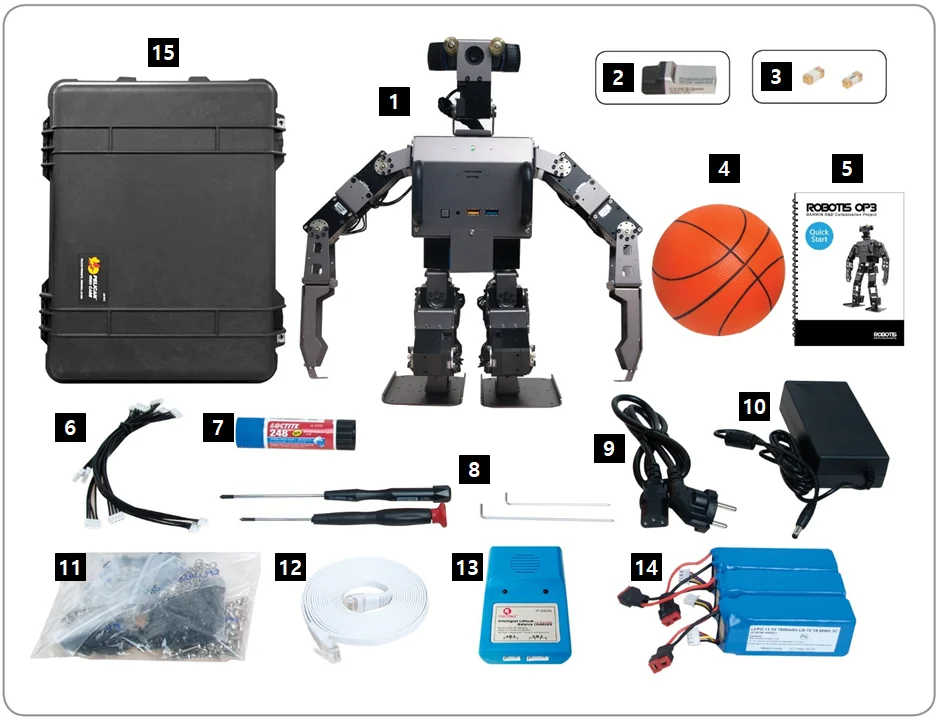
Check your ROBOTIS OP3 package for the following items.
| No | Item | Quantity |
|---|---|---|
| 1 | Fully-assembled ROBOTIS OP3 robot | 1 |
| 2 | USB Thumb Drive (with recovery software) | 1 |
| 3 | Fuse | 2 |
| 4 | Ball | 1 |
| 5 | Quick Start Manual | 1 |
| 6 | Spare Cables | 1 pack |
| 7 | Loctite | 1 |
| 8 | Wrench & Screw Driver | 1 set |
| 9 | Power Cable | 1 |
| 10 | DC Power Supply | 1 |
| 11 | Spare Bolts and Nuts | 1 pack |
| 12 | Ethernet Cable | 1 |
| 13 | Battery Charger | 1 |
| 14 | Battery Pack | 3 |
| 15 | Hard Case | 1 |
Layout
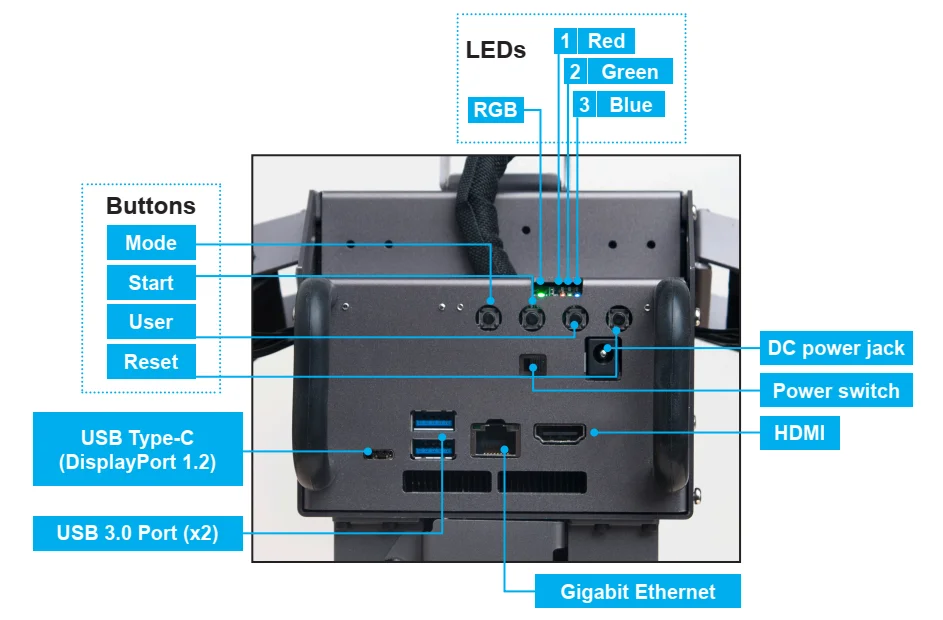
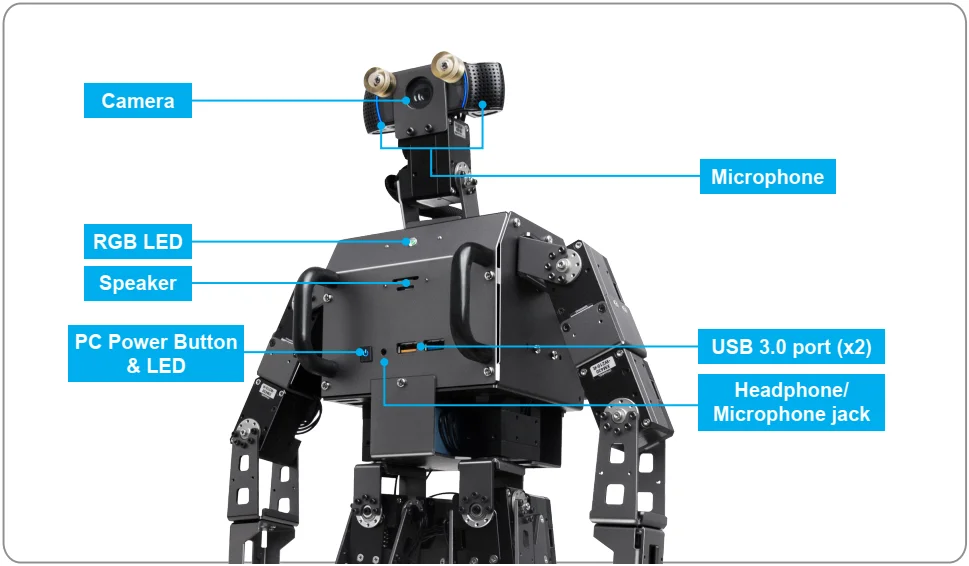
CAUTION : Layout of the front and back panel is subject to change depends on the selected built-in PC.
Charging Battery
This section describes how to charge a battery using the provided charger.
Use either of instructions depending on a provided charger.
Using LBC-010
The following video provides instructions on how to charge a battery using the LBC-010.
Using IMAX B6MINI CHARGER
Follow the next instruction and learn how to charge a battery using IMAX B6MINI CHARGER.
Battery Hot Swap
The battery of ROBOTIS-OP3 can be replaced without shutting down the robot.
To replace battery during operation, please follow the below procedure.