Cyclo Manager
Cyclo Manager is a web-based operation and maintenance tool for OMY. It runs on the robot computer and provides a browser UI for common robot-side tasks such as bringup, container management, version updates, and noVNC access.
Instead of entering the robot container and running several commands by hand, you can open Cyclo Manager from a browser and use each operation feature directly. This is useful during setup, daily operation, and software updates.
Cyclo Manager is installed on the OMY robot PC and is accessed from a PC, tablet, or phone on the same network. The web UI runs on port 3000, and the API server runs on port 8081.
What You Can Do
Use Cyclo Manager to:
- Bring up the OMY robot stack and related services from the browser.
- Start, stop, restart, and inspect Docker containers running on the robot.
- Monitor robot status, Docker status, storage usage, and version status.
- Open a browser-based terminal into Docker containers.
- Use noVNC to run GUI tools such as Dynamixel Wizard 2.0 without connecting a monitor.
How It Runs
Cyclo Manager is composed of a Python CLI, a web UI, an API server, and small agents that run inside managed containers.
- The
cyclo-managerPython package provides thecyclo_managerCLI. - The CLI creates the Docker Compose stack and registers the host-side agent.
- The Web UI provides browser pages for operation and monitoring.
- The API Server receives UI requests, controls Docker, communicates with container agents, and exposes log streams.
- The s6 agent inside each robot container starts and stops ROS 2 services and reports service status.
- The host agent handles host-level operations such as repository update workflows.
Software Architecture
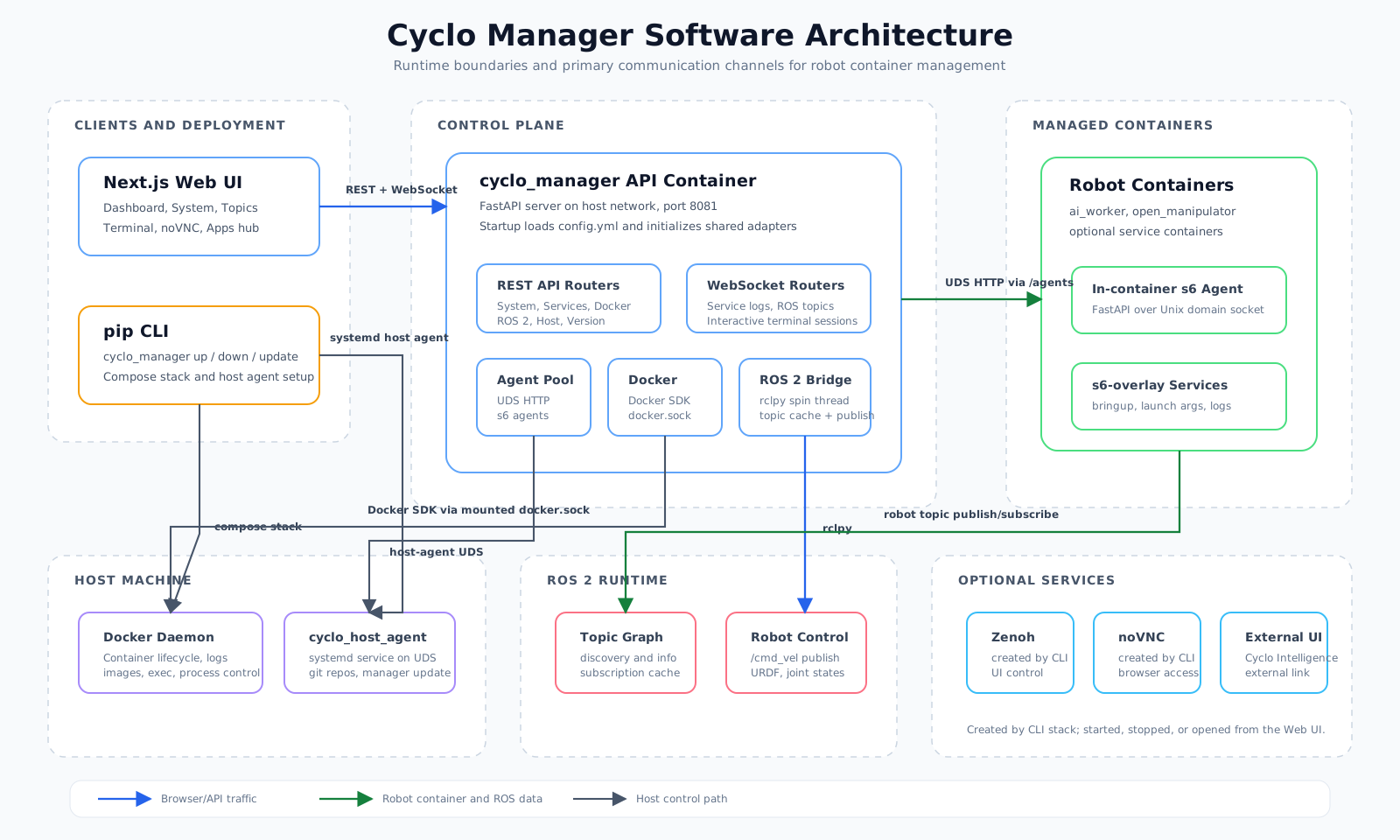
At a high level, Cyclo Manager separates user-facing controls from the robot runtime:
- User layer: A browser is used to operate the robot and CLI is used to install the Cyclo Manager stack.
- Manager layer: The Web UI and API Server provide the control surface.
- Robot container layer: Robot bringup services run inside containers managed by s6.
- Host layer: Docker, storage, serial devices, and git repositories remain on the robot host.
Feature Guides
- Install: Install the CLI, start the Cyclo Manager stack, and open the web UI.
- Bringup: Bring up the Zenoh daemon, robot stack, and related services.
- Manage Container: Start, stop, configure, inspect, and access containers.
- Version Update: Update robot software packages and container images.
- noVNC: Run graphical tools such as Dynamixel Wizard 2.0 from the browser.