Cyclo Manager
Cyclo Manager is a web-based operation and maintenance tool for OMX. For OMX, the robot software stack runs on the user's PC, so Cyclo Manager is installed and run on the user's PC. It provides a browser UI for common robot-side tasks such as bringup, container management, version updates, and noVNC access.
Instead of entering the robot container and running several commands by hand, you can open Cyclo Manager from a browser and use each operation feature directly. This is useful during setup, daily operation, and software updates.
For OMX, install Cyclo Manager on the user PC that runs the OMX Docker containers. The web UI runs on port 3000, and the API server runs on port 8081.
What You Can Do
Use Cyclo Manager to:
- Bring up the OMX robot stack and related services from the browser.
- Start, stop, restart, and inspect Docker containers running on the robot.
- Monitor robot status, Docker status, storage usage, and version status.
- Open a browser-based terminal into Docker containers.
- Use noVNC to run GUI tools such as Dynamixel Wizard 2.0 without connecting a monitor.
How It Runs
Cyclo Manager is composed of a Python CLI, a web UI, an API server, and small agents that run inside managed containers.
- The
cyclo-managerPython package provides thecyclo_managerCLI. - The CLI creates the Docker Compose stack and registers the host-side agent.
- The Web UI provides browser pages for operation and monitoring.
- The API Server receives UI requests, controls Docker, communicates with container agents, and exposes log streams.
- The s6 agent inside each robot container starts and stops ROS 2 services and reports service status.
- The host agent handles host-level operations such as repository update workflows.
Software Architecture
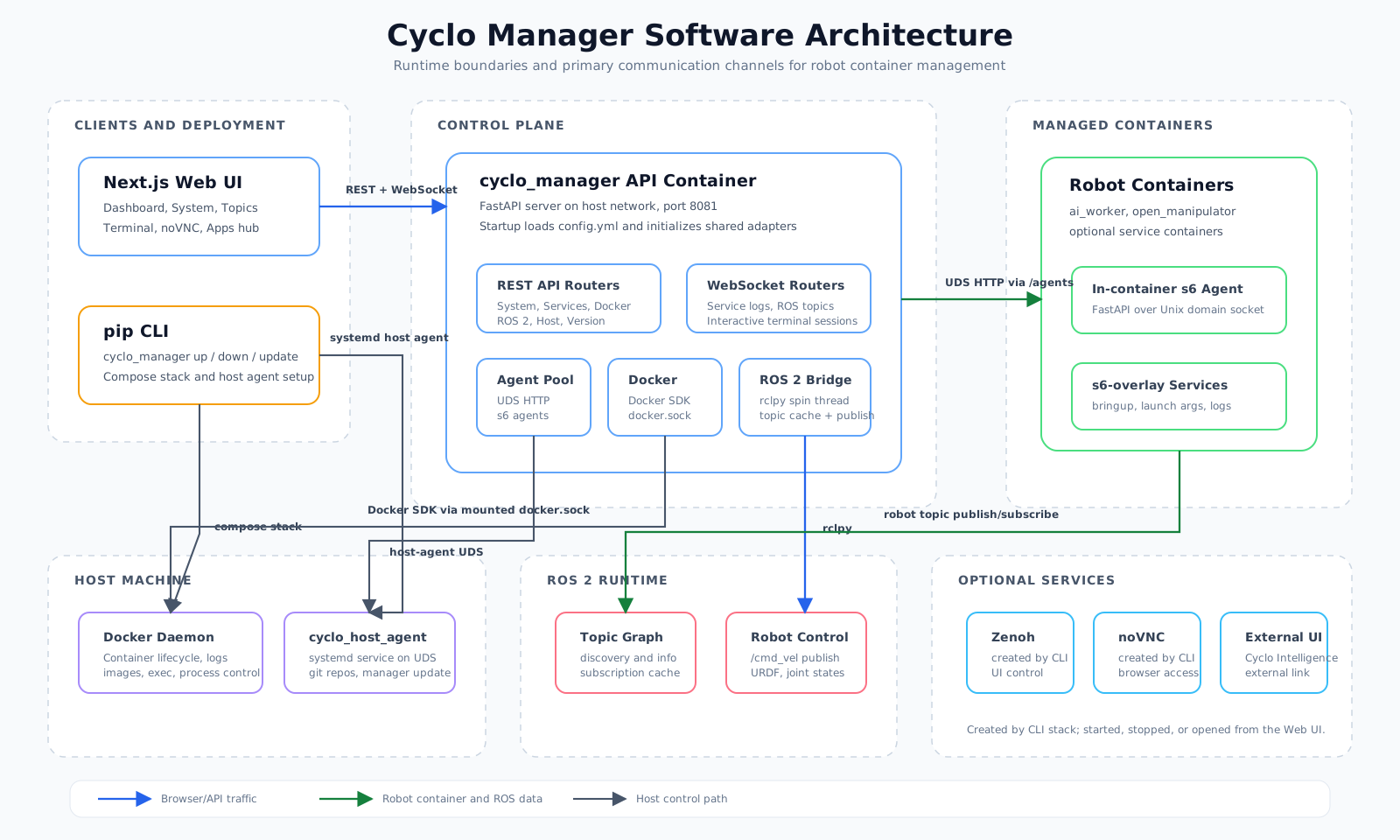
At a high level, Cyclo Manager separates user-facing controls from the robot runtime:
- User layer: A browser is used to operate the robot and CLI is used to install the Cyclo Manager stack.
- Manager layer: The Web UI and API Server provide the control surface.
- Robot container layer: Robot bringup services run inside containers managed by s6.
- Host layer: Docker, storage, serial devices, and git repositories remain on the user PC that runs the OMX containers.
Feature Guides
- Install: Install the CLI, start the Cyclo Manager stack, and open the web UI.
- Bringup: Bring up the Zenoh daemon, robot stack, and related services.
- Manage Container: Start, stop, configure, inspect, and access containers.
- Version Update: Update robot software packages and container images.
- noVNC: Run graphical tools such as Dynamixel Wizard 2.0 from the browser.