Robot PC Access
This guide explains how to connect to the robot's onboard AGX Orin via SSH and access its source code.
Accessing the Robot PC via SSH
Before connecting, make sure your PC and the robot are on the same network. See Network Connection.
-
Find the serial number printed on the sticker on the back of the robot body.
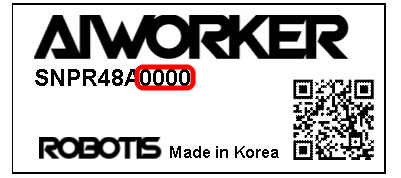
The letter identifies the robot model, followed by its individual number.
For example:- SG2/BG2:
A0000 - W2:
C0000 - W1:
D0000
- SG2/BG2:
-
On your user PC, open a terminal and connect using the robot's full serial number:
ssh robotis@ffw-<serial-number>.localFor example, if the serial number is
SNPR48A0000, run:ssh robotis@ffw-SNPR48A0000.local -
When prompted, enter the system password
root.
AI Worker supports mDNS, so you can connect using the hostname without manually checking the IP address.
If the hostname is not available
Connect a monitor to the robot PC via HDMI, log in locally, and check its IP address. Then connect from your user PC:
ssh robotis@<robot-ip-address>
The system password is initially configured by ROBOTIS. Change it if required by your security policy.