SOMA-X
SOMA-X is NVIDIA's open-source framework for using different parametric human body models through one canonical body topology and rig. SOMA-X does not replace an identity model such as SMPL, SMPL-X, or MHR. It maps each model's rest shape and rig information to the shared SOMA representation.
This shared representation separates three parts:
| Component | Role |
|---|---|
| Identity model | Defines body shape and model-specific parameters. |
| SOMA topology and rig | Provides the common skeleton and animation representation. |
| Pose data | Drives the common SOMA rig independently of the original identity-model format. |
The result is one animation interface that can work across supported body-model families. The pipeline is end-to-end differentiable and GPU-accelerated with NVIDIA Warp.
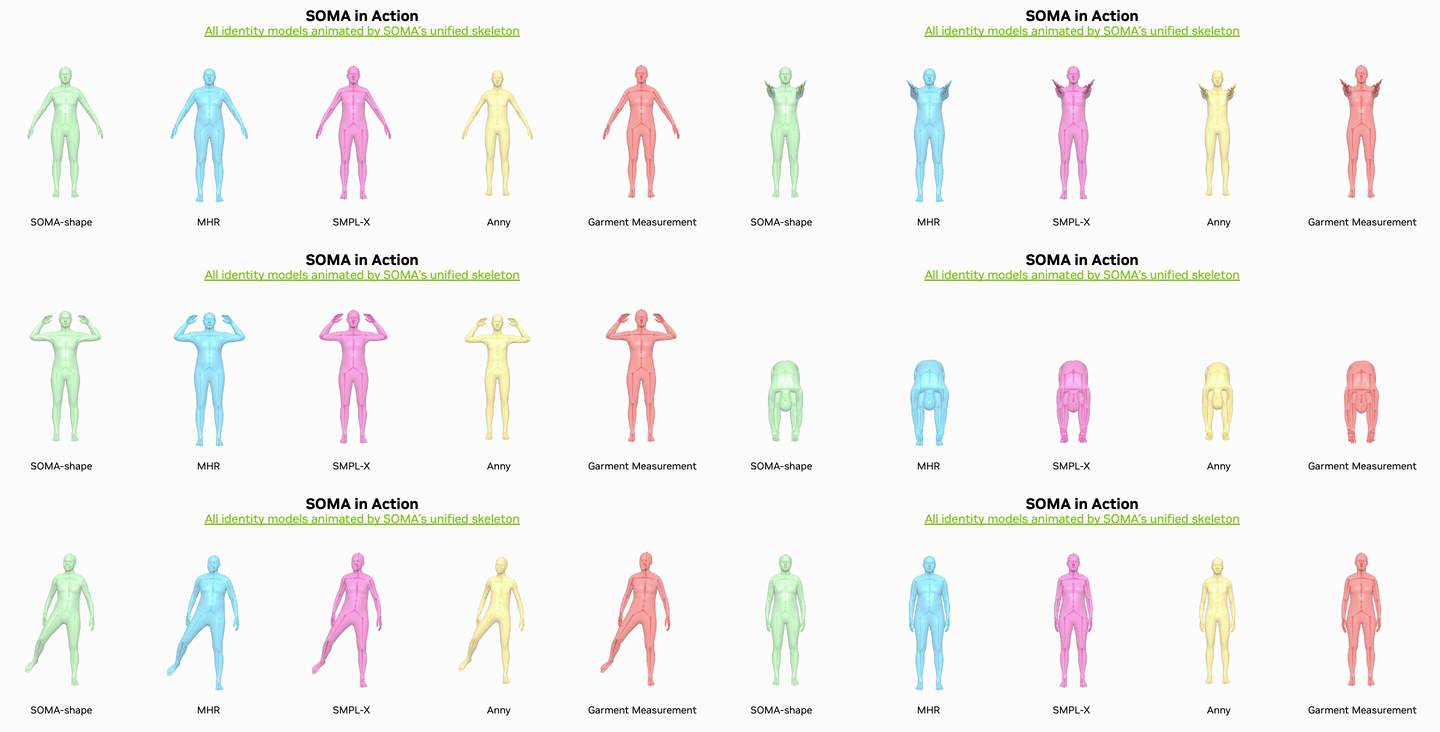
SOMA-X output is still human motion. It provides the standardized input representation required by Soma-retargeter, but Soma-retargeter performs the separate step that produces robot joint motion.
Why SOMA-X Is Needed
Human motion data and robot learning data use different representations. Human motion describes movement through a human body model, while robot training requires trajectories expressed through the target robot's joints, root pose, proportions, and joint limits. Human motion therefore cannot be used directly for robot learning; it must first be retargeted to the robot.
Parametric body models are not directly interchangeable:
| Difference | Result without SOMA-X |
|---|---|
| Mesh topology | Vertex indices and surface correspondence do not match. |
| Joint hierarchy | Skeleton structure and parent-child relationships differ. |
| Model parameters | Shape, scale, pose, and corrective parameters use different definitions. |
Without a common representation, each human-model family would need a separate conversion and robot-retargeting path. A target-robot mapping prepared for one human skeleton could not be reused reliably with another model's joint hierarchy.
SOMA-X uses SOMA as a universal pivot. This makes it possible to:
- convert motion from different supported human body models to one canonical topology and rig,
- keep identity and pose representation separate so motion can be used independently of the original model format,
- reuse one Soma-retargeter input contract and target-robot mapping instead of implementing a separate path for every source model,
- combine identity from one model family with pose data from another at inference time.
From Human Motion to Robot Training
- Human motion starts as parameters from a supported body model such as SMPL, SMPL-X, MHR, or Anny.
- SOMA-X converts the model-specific shape, skeleton, and pose representation into canonical SOMA motion.
- Soma-retargeter accepts the SOMA motion and maps it to the selected robot's joints and root pose.
- A downstream validation workflow must check the robot-specific result against joint limits, contacts, balance, task requirements, and hardware safety constraints.
- Only trajectories that pass those downstream checks should be used for training, evaluation, or robot execution.
SOMA-X does not perform robot validation, and Soma-retargeter output is not a certification of contact feasibility, balance, task success, or hardware safety.
Motion that is already in SOMA format does not require SOMA-X. Soma-retargeter accepts SOMA BVH directly and converts SOMA-compatible NPZ to SOMA BVH before solving. Raw SMPL-family input in the integrated GUI or headless command follows two stages internally: SOMA-X creates SOMA motion first, then Soma-retargeter performs robot retargeting.
Supported Identity Models
| Model family | Upstream role |
|---|---|
| MHR | Default SOMA identity model with high-fidelity body shape representation. |
| Anny | Extends identity coverage to younger body shapes. |
| SMPL family | Supports established SMPL and SMPL-X body-model workflows. |
| SOMA-shape | SOMA's PCA identity model with 128 identity coefficients. |
| GarmentMeasurements | PCA identity model intended for measurement and garment-related use cases. |
Unified Pose-dependent Mesh Correctives
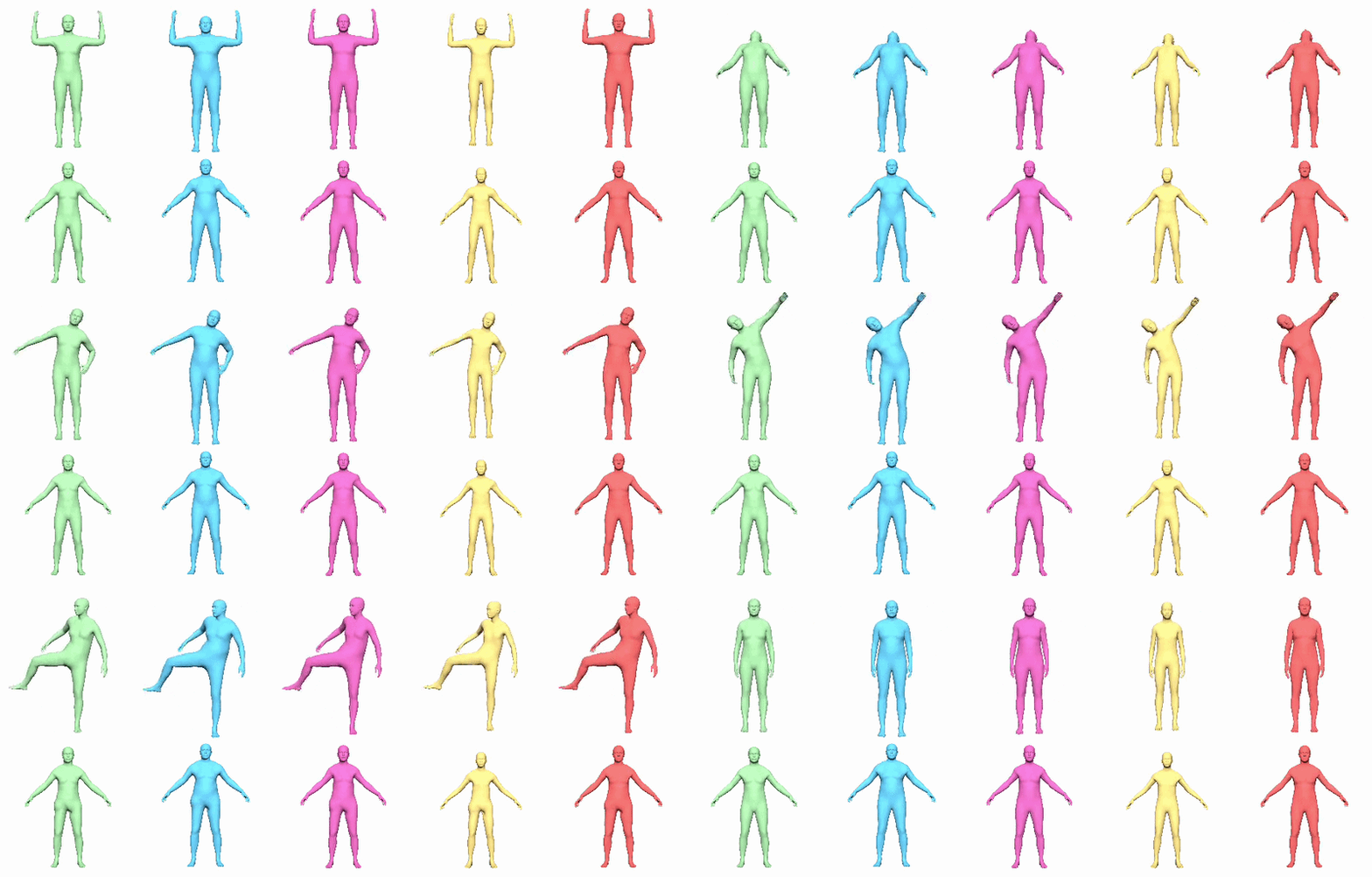
SOMA-X includes unified pose-dependent corrective deformation as a separate beta feature. It reduces visible mesh-deformation artifacts caused by linear blend skinning, including for supported identity models that do not provide their own corrective model. This feature corrects the rendered human mesh around articulated joints; it is not robot joint-pose correction and is not part of Soma-retargeter's robot IK constraints.
Install SOMA-X
Install the base package from PyPI:
python -m pip install py-soma-x
Install the SMPL extra when using SMPL or SMPL-X:
python -m pip install "py-soma-x[smpl]"
python -m pip install --no-build-isolation chumpy
Install the Anny extra when using Anny:
python -m pip install "py-soma-x[anny]"
SOMA assets are downloaded from Hugging Face on first use and cached under ~/.cache/huggingface/hub/.
SOMA-X integration involves separate license layers:
- The SOMA-X codebase is Apache-2.0 licensed.
- The
smplxPython dependency uses its own license for non-commercial scientific research and related permitted non-commercial uses. Review its terms and commercial-license contact before use. - SMPL, SMPL-H, and SMPL-X model files are separately licensed assets obtained from the official SMPL or SMPL-X provider. They are not included and must not be redistributed with SOMA-X or Soma-retargeter.
Installing SOMA-X or its optional extras does not replace or expand the rights granted by dependency and model-file licenses. Other optional identity models and third-party assets may also have their own terms.
Clone and Install from Source
Use Git LFS when cloning the repository because the repository stores large assets through LFS:
git lfs install
git clone https://github.com/NVlabs/SOMA-X.git
cd SOMA-X
git lfs pull
If Git LFS content is missing, asset files remain pointer files and model loading fails.
Create the developer environment and install the source checkout:
python -m pip install uv
uv venv .venv
source .venv/bin/activate
# Install a PyTorch build that matches the system's GPU and CUDA environment.
uv pip install torch --index-url https://download.pytorch.org/whl/cu124
uv pip install ".[dev]"
Select the appropriate PyTorch index for the installed driver and CUDA environment rather than assuming cu124 is correct for every system.
Use SOMA-X
Create a Full-Body Layer
Create a SOMALayer for the selected identity-model family and call it with pose and identity parameters:
from soma import SOMALayer

soma = SOMALayer(
    identity_model_type="mhr",
    device="cuda",
)

output = soma(poses, identity, scale_params=scale_params)
vertices = output["vertices"]
Expected inputs are:
| Input | Shape or role |
|---|---|
poses | Axis-angle joint poses with shape (B, num_joints, 3). |
identity | Identity coefficients with shape (B, num_coeffs). |
scale_params | Optional model-dependent scale parameters. Some model types require them. |
identity_model_type accepts the model identifiers documented by the upstream package:
mhr, soma, smpl, smplx, anny, garment
To use assets from a local checkout instead of the automatic cache, provide data_root:
soma = SOMALayer(
    data_root="./assets",
    identity_model_type="mhr",
    device="cuda",
)
For a licensed SMPL model, pass its path explicitly:
soma = SOMALayer(
    identity_model_type="smpl",
    identity_model_kwargs={"model_path": "/path/to/SMPL_NEUTRAL.pkl"},
    device="cuda",
)
Convert Existing Pose Parameters to SOMA
The upstream conversion tools use PoseInversion.fit() to recover SOMA pose parameters from another body model. Two solver paths are available:
The python -m tools.smpl2soma, tools.mhr2soma, and tools.convert_amass_to_soma commands below run repository scripts from a cloned SOMA-X source checkout. pip install py-soma-x installs the soma Python package, but it does not install these top-level tools.* command modules. Clone SOMA-X with Git LFS and run the commands from the SOMA-X repository root.
| Solver | Behavior |
|---|---|
| Analytical | Default iterative inverse-LBS path optimized for throughput. |
| Autograd FK | Optimizes 6D rotations through forward kinematics and linear blend skinning. It is slower but allows additional objective weighting. |
The analytical result can also initialize an Autograd FK refinement pass.
SMPL to SOMA
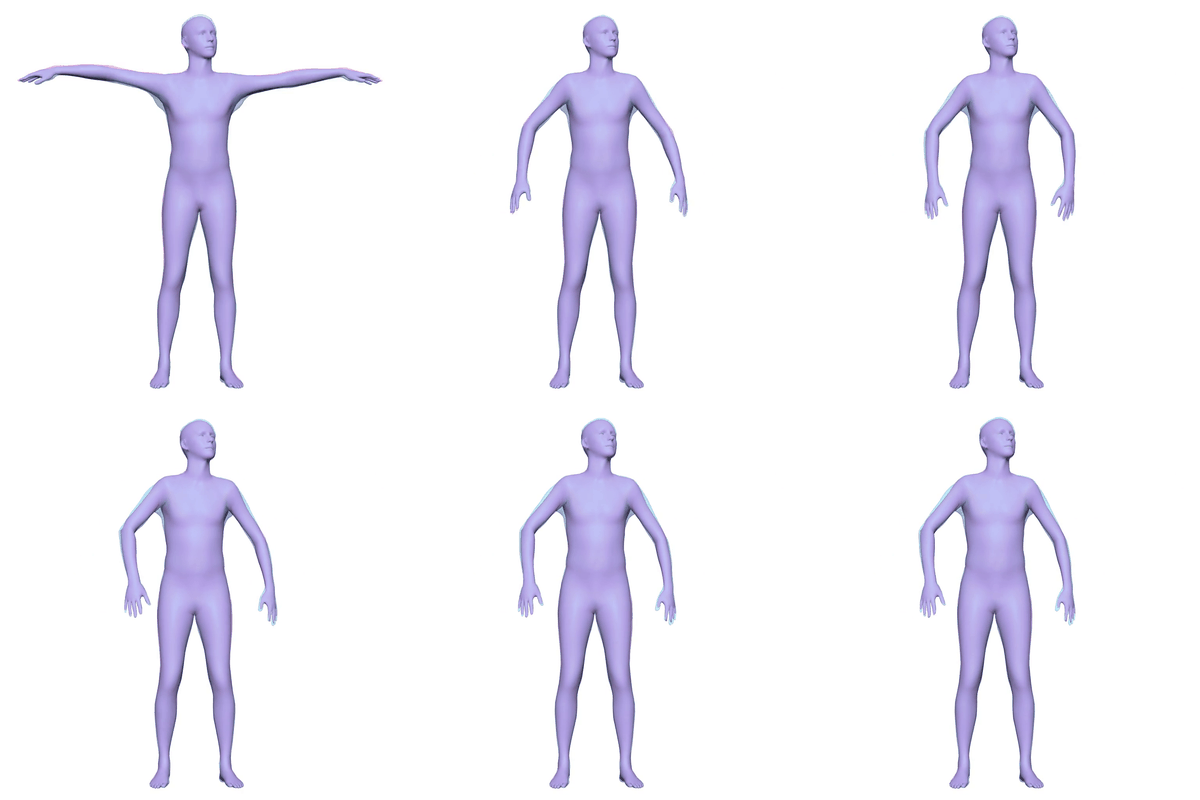
python -m tools.smpl2soma
# Export the converted SOMA pose parameters instead of only rendering the comparison.
python -m tools.smpl2soma --output-npz out/smpl_soma.npz
MHR to SOMA
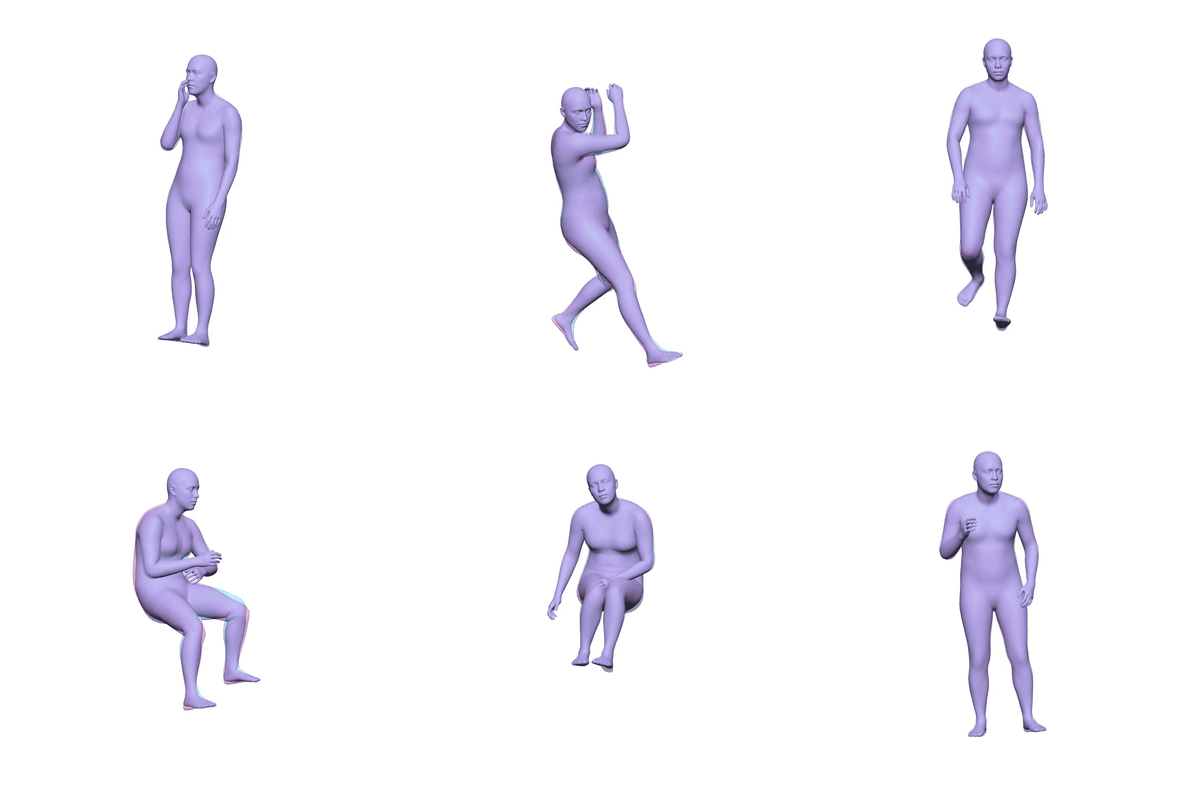
python -m tools.mhr2soma \
  --input path/to/parquet_dir \
  --output-npz out/mhr_soma.npz
AMASS SMPL Motion to SOMA
python -m tools.convert_amass_to_soma \
  --input path/to/amass_sequence.npz \
  --output-npz out/soma.npz \
  --no-render
For a complete AMASS directory:
python -m tools.convert_amass_to_soma \
  --input-dir /data/amass \
  --output-dir out/amass_soma
The exported SOMA NPZ contains joint pose rotation vectors, root translation, SOMA joint names, reconstruction error, and identity or scale parameters used during conversion.
Run the Official Demo
From a source checkout, install the demo dependencies and render the included examples:
uv pip install ".[demo]"
python tools/demo_soma_vis.py \
  --data-root ./assets \
  --output-dir ./out
Use --identity-model-type to select one or more identity models, --motion-file for custom motion, and --device to select the compute device.
Official Resources
- NVIDIA SOMA-X repository
- NVIDIA SOMA-X README
- SOMA-X documentation
- PyPI package
- Soma-retargeter integration guide
The SOMA-X codebase is distributed under Apache-2.0. The smplx dependency, licensed human-model files, optional identity models, and other third-party dependencies retain their own license terms as described in the installation section.